Stock Movement Log
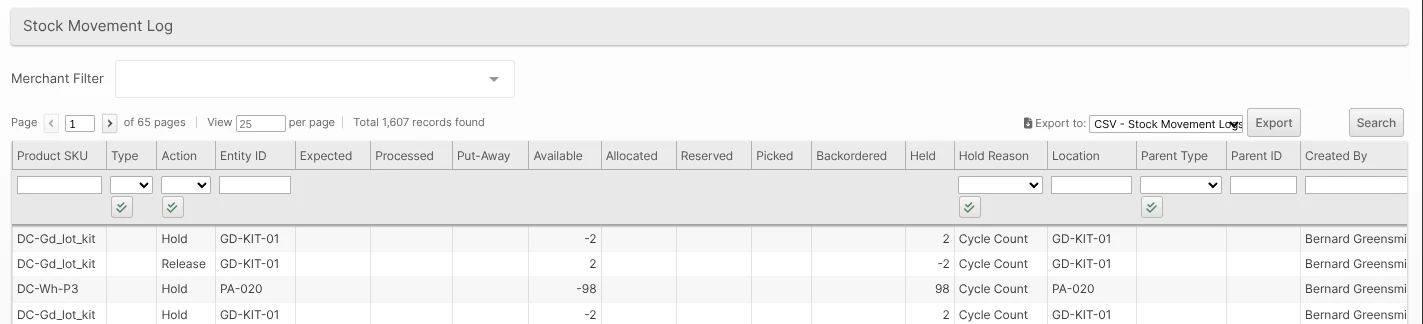
Navigating to Operations > Stock Movement Log will take the user to a Grid View showing data related to physical movement of products in their allocated location and the date the item was moved.
The numbers in the Expected, Processed, Put-Away, Available, Allocated, Reserved, Picked, Packed, Shipped, and Backordered columns are quantities of the Product that have changed. Held quantity changes appear under your configured Hold Display Groups. Inventory Holds reduce Available inventory when available shelf stock is held, and releasing the Hold restores it. Hold movements also show the Hold Reason, so you can filter the log by reason — for example, to audit every cycle-count or recall Hold placed in the last week.
Packing and Shipping Movements
Packing and shipping are recorded as separate movements, so you can tell inventory that is still in your Warehouse from inventory that has left it.
| Action | Quantity changes | Location |
|---|---|---|
| Packed | Moves quantity from Picked to Packed. On Hand stays the same. | Packing Station |
| Shipped | Moves quantity from Packed to Shipped. On Hand decreases. | Manifest Load Location |
| Unshipped | Returns quantity from Shipped to Packed. On Hand increases. | Manifest Load Location |
| Unpacked | Returns quantity from Packed to Picked. On Hand stays the same. | Packing Station |
A Shipment with multiple Packages stays Packed until every Package has shipped. Cancelling or reverting a packed Shipment moves its Packed quantity to Processed so it can be put away.
Holds and Adjustments
Movements from inventory adjustments (cycle counts, manual corrections, and API-driven changes) are tagged with the structured Adjustment Reason chosen when the adjustment was made — Cycle Count Variance, Found / Located, Damaged, Shrinkage, and so on. Like the Hold Reason column, the Adjustment Reason column is filterable, so you can review every adjustment of a given type. Movements that are not adjustments, and historical adjustments recorded before this feature, leave the column blank.