

EasyPost
EasyPost is a flexible, modern API designed to simplify technical and logistical requirements for shipping. ShipStream leverages EasyPost as an integration provider for the following carriers:
- USPS
- DHL eCommerce
- DHL Express
- SpeeDee
- LSO
- LaserShip
- GLS
EasyPost offers the following features, fully supported by ShipStream for a seamless integration:
- USPS Commercial Plus pricing with no volume requirements
- Automatically generated customs documents for international orders
- Automatic printing of SCAN forms for end of day pickups
- Package insurance
- Address verification
- Tracking information
If there is a carrier supported by EasyPost that you'd like to use in ShipStream, just put in a request and we'll make it happen!
How to Set Up EasyPost
Users must first sign up with EasyPost to be able to use their account with ShipStream. The steps from a high level are:
- Obtain an EasyPost API Key and save it in the ShipStream configuration
- Choose EasyPost as the Integration Provider for each carrier you wish to use (if multiple providers are supported)
- Add a Shipping Account in ShipStream for each EasyPost carrier account you wish to use
Step 1 - EasyPost API Key
- Log In to EasyPost account dashboard, click your user name below the logo, and click API Keys.
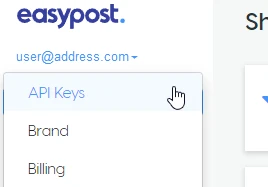
Choose an API Key and click copy to the right of the input field.
You may use either Production API Keys or Test API Keys, the difference being that the latter cannot be used to ship real packages as the test labels will be clearly marked as VOID to avoid accidental shipping.- In ShipStream, navigate to System > Configuration and click the Shipping Methods tab on the left side menu.
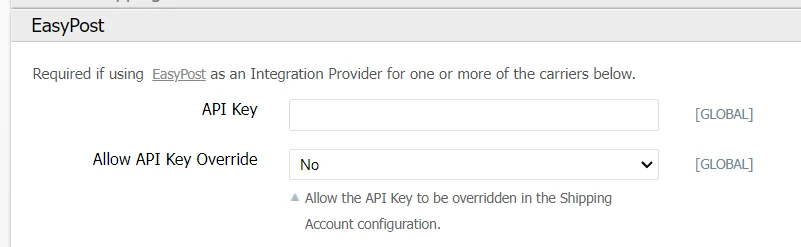
- Expand the EasyPost pane and paste the API Key from your EasyPost account and click Save Config.
Step 2 - Integration Providers
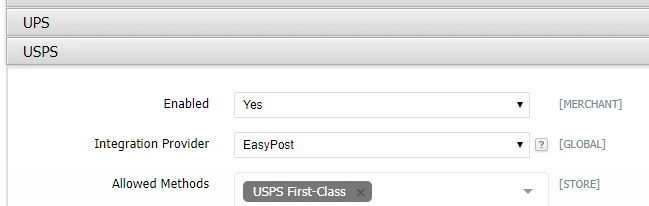
For some carriers, such as USPS and DHL Express, ShipStream supports multiple integration providers. Make sure "EasyPost" is chosen as the Integration Provider in the carrier's pane (e.g. Shipping Methods > USPS) and click Save Config.
Step 3 - Shipping Accounts
See Shipping Accounts for more information on managing Shipping Accounts.
Obtain the Carrier Account ID
- Login to your EasyPost account dashboard and go to the Carrier Accounts page.
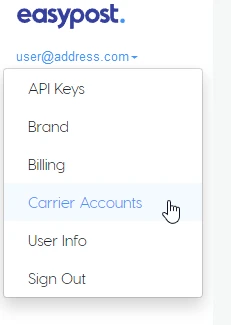
Locate the appropriate carrier account and copy the "Account ID" to your clipboard. The Account ID will always start with "ca_".
If you don't have a Carrier Account ID yet, you can add one by selecting the carrier you wish to use from the list that appears to the right of the page (this may require additional information from the carrier).With the Carrier Account ID in the clipboard, return to ShipStream and
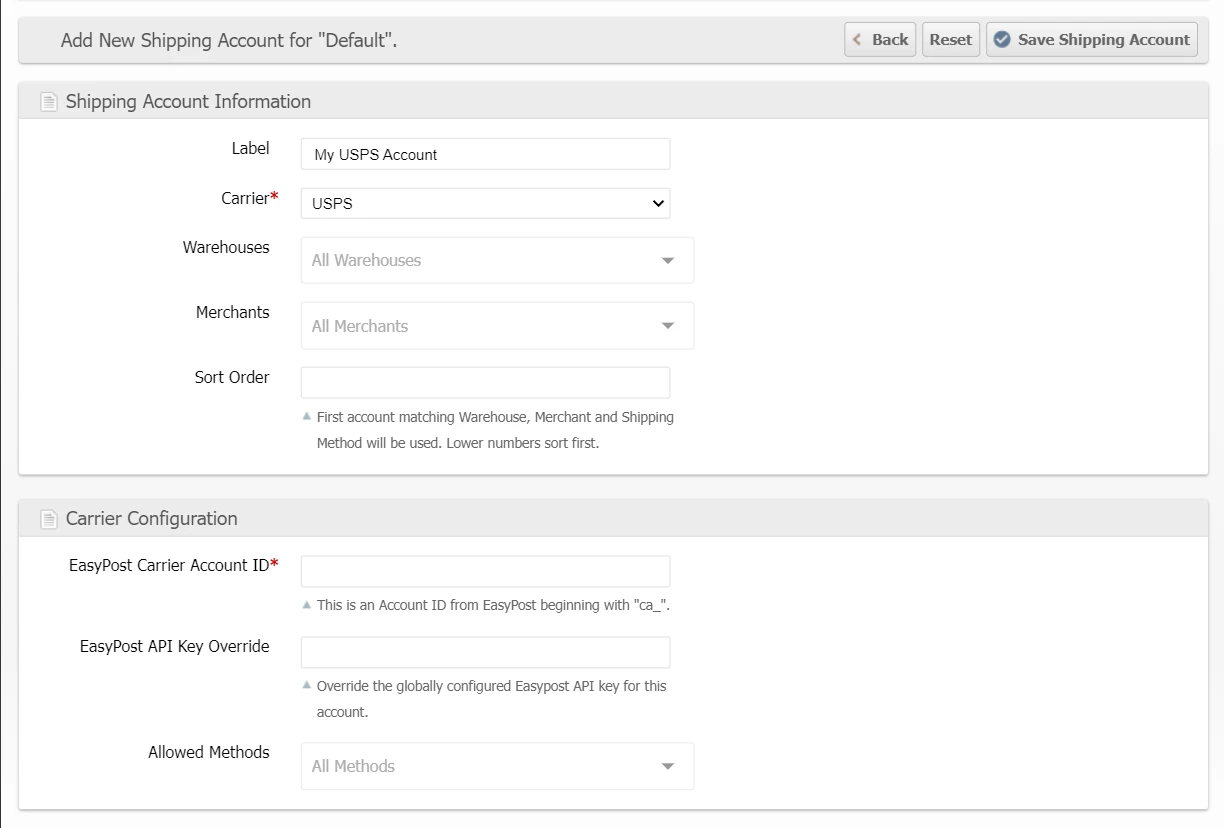
- Navigate to System > Shipping > Shipping Accounts
- Choose or create a Shipping Account Group as appropriate (use "Default" unless you have a special need for a different Shipping Account Group)
- Click a Shipping Account to edit or click Add New Shipping Account to add a new one
- Select the Carrier corresponding to the account you wish to add
- In the last pane titled "Carrier Configuration," paste the Account ID from EasyPost into the EasyPost Carrier Account ID input and click Save Shipping Account.
EasyPost Options
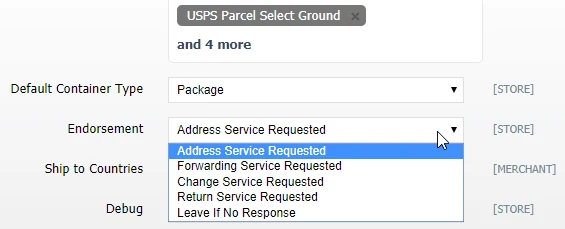
Endorsement
Users can select which endorsement service to request upon a failed delivery. Options include:
- Address Service Requested - Provides forwarding and address correction services when possible. If the mail is undeliverable and not forwardable, it is returned to the sender with the reason identified on the mailpiece.
- Forwarding Service Requested - New address notification is provided with returns.
- Change Service Requested - Provides address correction services without forwarding or return. If undeliverable, either the new address or the reason it is undeliverable is provided to the sender.
- Return Service Requested - Povides address correction services and always returns the piece.
- Leave If No Response
To set the Endorsement options navigate to System > Configuration and click the Shipping Methods tab in the left side menu. Scroll to the USPS pane and expand it. Choose the Endorsement method in the selection menu.
USPS Package Weight
When purchasing a USPS label through EasyPost that requires customs documents, ShipStream compares the package weight from the scale to the total weight of the products in the package. If the product total is a little higher — within one ounce — ShipStream raises the weight submitted to USPS to the next tenth of a pound so the carrier accepts the label. The scale reading remains the package's recorded actual weight.
If the product total exceeds the scale weight by more than one ounce, label purchase stops with:
The total item weight is more than one ounce greater than the reported actual weight. Please double-check your scales and product weights for accuracy.
This check runs only where customs documents are required, because that is where the per-item weights are transmitted alongside the package weight and the two must agree. Domestic EasyPost USPS labels keep the existing weight validation and are neither corrected nor given the one-ounce tolerance. Native Stamps.com USPS and other carriers are unaffected. Keeping product weights accurate remains important — see Products.
DHL Express
DHL Express international express shipping is available through EasyPost using the same setup flow as the other EasyPost carriers described above:
- Navigate to System > Configuration, click the Shipping Methods tab, and expand the DHL Express pane.
- Set Enabled to "Yes" and choose "EasyPost" as the Integration Provider, then choose the services you wish to offer in the Allowed Methods field and click Save Config.
- Add a DHL Express carrier account in your EasyPost dashboard and attach it to a Shipping Account in ShipStream as described in Step 3 above.
Two services are available:
- DHL Express Worldwide - Documents - for shipments containing only documents, limited to 4 lb (2 kg) billable weight.
- DHL Express Worldwide - Non Documents - for merchandise and other dutiable goods.
Before a label is purchased, ShipStream validates each package against DHL Express's published limits so an oversize or over-weight package is rejected up front with a clear error message rather than a cryptic carrier error:
- The longest side may not exceed 48 inches and the other sides may not exceed 32 inches (120 cm and 80 cm for shipments not originating in the US).
- The billable weight — the greater of the actual weight and the dimensional weight — may not exceed 150 lb (70 kg).
- Documents shipments may not exceed 4 lb (2 kg) billable weight; heavier document shipments must ship as Non Documents.
Customs declarations are handled automatically based on the service. Non Documents shipments submit your full commercial customs data from the Products' customs attributes, while Documents shipments are declared as documents built from the actual package contents, so no Product customs data is required. Sender Tax IDs (VAT, IOSS, VOEC) are passed to DHL Express as well.
By default DHL Express bills duties and taxes to the recipient (DAP). To bill them to your own account instead (DDP), navigate to System > Configuration, click the Shipping Methods tab, expand the DHL Express pane, and set Default Duties and Taxes Payor to "Sender". You can set this globally or per Merchant, and an individual Order's Duties and Taxes Payor field always takes precedence over it. Duties and taxes do not apply to the Documents service, so this setting affects Non Documents shipments only.
Section II lithium-ion batteries packed with equipment (PI966) or contained in equipment (PI967) are declared automatically based on the Products' Lithium Battery settings. Other regulated goods — standalone lithium-ion batteries, lithium metal batteries, ORM-D, and Limited Quantity goods — are not supported for DHL Express and will be rejected.