

Advanced Grid Filtering
ShipStream grids contain form fields in the header row which allow you to filter the results. Enter or select your filters and then click "Search" to apply the filters.
For grid columns that contain a single text input field you can enter a search query that will be matched against that column field. By default the search will be matched using a prefix search. For example, a search for "ABC" will match "ABCD" but not "XABC".
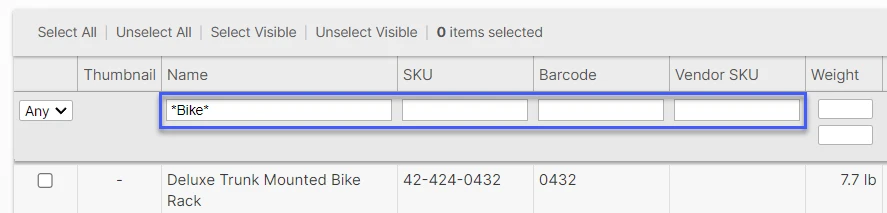
If you want more control over your search there are many features at your disposal which use special keywords which are described in detail below.
- Prefix match (default)
- (wildcards)
- (empty values)
- (not-empty values)
- OR
- EQ
- NOT EQ
- LIKE
- NOT LIKE
- REGEXP
- NOT REGEXP
- IN
- NOT IN
- EMPTY
- NOT EMPTY
The examples given below assume your are searching a grid column where the full data set includes the following values:
- Red
- Red-b
- Red-c
- Rose
- Yellow
- Yellow-b
Prefix Match (default)
When no special characters or keywords are used the default search behavior is a "prefix match" meaning that any value matching your search term at the beginning will match.
| Example Search Term | Matches | Ignores |
|---|---|---|
| Red | Red, Red-b, Red-c | Yellow, Yellow-b, Rose |
| R | Red, Red-b, Red-c, Rose | Yellow, Yellow-b |
| low | (none) | Red, Red-b, Red-c, Yellow, Yellow-b, Rose |
Wildcard Search (*)
Specify an asterisk (*) anywhere you would like to use a wildcard (matches zero or more characters). For example to search anywhere surround the search term with a wildcard on both sides (*query*).
| Example Search Term | Matches | Ignores |
|---|---|---|
| *low | Yellow | Red, Red-b, Red-c, Rose, Yellow-b |
| low | Yellow, Yellow-b | Red, Red-b, Red-c, Rose |
| R*-b | Red-b | Red, Red-c, Rose, Yellow, Yellow-b |
Empty (-) or Not Empty (+)
Sometimes you may need to find specifically values that are empty (tehcnically NULL or zero characters) or not empty (1 or more characters).
| Example Search Term | Matches | Ignores |
|---|---|---|
| - | (empty values) | (non-empty values) |
| + | (non-empty values) | (empty values) |
Multiple Searches (OR)
You can specify multiple of any of the above searches by combining them with boolean OR logic so that if any of the queries match then the value will be considered a match.
| Example Search Query | Matches | Ignores |
|---|---|---|
| Red OR Yellow | Red, Red-b, Red-c, Yellow, Yellow-b | Rose |
| *-c OR EQ Yellow-b | Red-c, Yellow-b | Red, Red-b, Rose, Yellow |
| IN Red,Rose OR *-b | Red, Red-b, Yellow-b, Rose | Red-c, Yellow |
Exact Match (EQ)
| Example Search Term | Matches | Ignores |
|---|---|---|
| EQ Red | Red | Red-b, Red-c Yellow, Yellow-b, Rose |
Negative Match (NOT EQ)
You can specify the exact values that you would like to not match using NOT EQ ("not equals") or NEQ for short.
| Example Search Term | Matches | Ignores |
|---|---|---|
| NOT EQ Red | Red-b, Red-c Yellow, Yellow-b, Rose | Red |
Advanced Wildcards (LIKE)
This keyword is similar to the wildcard match but uses LIKE as a keyword and supports * as a wildcard that matches zero-or-more characters as well as ? as a wildcard that matches only a single character.
| Example Search Term | Matches | Ignores |
|---|---|---|
| LIKE *low | Yellow | Red, Red-b, Red-c, Rose, Yellow-b |
| LIKE R??-* | Red-b, Red-c | Red, Rose, Yellow, Yellow-b |
Negative Advanced Wildcards (NOT LIKE)
Negate any LIKE search using NOT LIKE.
| Example Search Term | Matches | Ignores |
|---|---|---|
| NOT LIKE *low | Red, Red-b, Red-c, Rose, Yellow-b | Yellow |
| NOT LIKE R??-* | Red, Rose, Yellow, Yellow-b | Red-b, Red-c |
Regular Expressions (REGEXP)
Regular expressions are an advanced language that is very powerful. See the MySQL documentation for complete information as it pertains to the grid searches.
| Example Search Term | Matches | Ignores |
|---|---|---|
| REGEXP ^A-Ze.+ | Red, Red-b, Red-c, Yellow, Yellow-b | Rose |
The above example says to match any value that begins with an uppercase letter in the range from "A" to "Z" followed by a lower-case "e" followed by any character one or more times.
Negated Regular Expressions (NOT REGEXP)
Like above but to match everything that doesn't match the regular expression use NOT REGEXP.
| Example Search Term | Matches | Ignores |
|---|---|---|
| NOT REGEXP ^A-Ze.+ | Rose | Red, Red-b, Red-c, Yellow, Yellow-b |
The above example says to match any value that begins with an uppercase letter in the range from "A" to "Z" followed by a lower-case "e" followed by any character one or more times.
List of Values (IN)
If you want to match a list of exact values you can separate the values with a comma and use the IN keyword.
| Example Search Term | Matches | Ignores |
|---|---|---|
| IN Red,Yellow,Rose | Red, Yellow, Rose | Red-b, Red-c, Yellow-b |
Negated List of Values (NOT IN)
If you want to match everything except a list of exact values you can separate the values with a comma and use the NOT IN keyword.
| Example Search Term | Matches | Ignores |
|---|---|---|
| NOT IN Red,Yellow,Rose | Red-b, Red-c, Yellow-b | Red, Yellow, Rose |