

Version 2026.6
Slot Type DOI Schedules
A small shelf and a full pallet face should not carry the same number of days of stock. Replenishment Policies can now size their trigger and target by the kind of pick face a SKU lives in. Give a Slot Type optional Trigger DOI and Target DOI defaults, then set a Policy's DOI Basis to By Slot Type. For each SKU, ShipStream looks at its highest-priority Location in the Policy's Location Profile and uses, in order, a Policy override for that Slot Type, the Slot Type's default, or the Policy's fallback band. Coverage is still measured across all stock in the Location Profile.
While editing a Policy, the Effective DOI Schedule Preview shows, for each Slot Type in the Location Profile, which band applies, how many SKUs the Policy currently governs there, and how many would not fit at the current Target DOI. The Replenishment Report records each SKU's resolved Slot Type and a Sizing Source that tells you where the band came from. Existing Policies keep Policy (single DOI), so nothing changes until you opt in.

Explore how much stock to carry with an interactive comparison of equal-space, equal-time, and tailored DOI targets against the same pick-face capacities.
Replenishment Lanes and Inventory Position
Replenishment now understands the shape of your warehouse. A Replenishment Lane describes one flow of stock, such as Reserve into Case Pick or Case Pick into Each Pick, with a destination Location Profile, an optional source Profile, and an optional upstream Lane for cascades. Each Replenishment Policy attaches to one Lane instead of naming a Location Profile directly, so the Lane owns where stock goes and the Policy owns the thresholds. A SKU that matches Policies in several Lanes produces a need in one Lane only, and the Replenishment Report shows where else it matched under Suppressed In, so the same demand is never worked twice.
Needs are now measured against Inventory Position rather than the raw quantity on the shelf. Inventory Position counts unreserved stock at the destination and stock that can still be picked, less demand that is already spoken for, so a face full of stock reserved for a wave shows as a real need instead of looking healthy. The report updates as inventory moves, usually within a minute, and a Trigger column explains each row: Min Threshold when the position falls below the trigger level, or Top-off when a Policy's new Top-Off option finds the position below a percentage of target inside a scheduled window. Rows with no recorded demand that a fixed quantity keeps relevant carry a Zero demand advisory instead of disappearing.
Policies also gain Product Overrides for SKUs that deserve their own numbers: a days-of-inventory pair or a fixed minimum and maximum, plus an optional case or pack UOM Product from which ShipStream derives the move multiple. Overrides can be locked, every change asks for a reason, and a full audit history is kept beneath the Policy.

Slotting Density
The best forward-pick space should go to the Products that earn it. ShipStream now scores every Product on how much picking activity it generates for the space it occupies, and ranks it against the other Products in the same Warehouse, Lane, and Merchant on a 0 to 1000 Slotting Density Rank (SDR). A higher rank means more activity per unit of space. Products without reliable dimensions or activity receive a neutral rank so they neither win nor lose contested slots.
Each Warehouse chooses the Rank Formula that fits how it works: Slotting Density (pick visits per committed forward-pick space, the default), Burn Efficiency (units picked per unit of Product volume), or Pick Density (pick visits per unit of Product volume). The new Slotting Density report at Operations -> Slotting Density shows each calculation with its observation window, forward-pick space, how much of it is committed to Products, and the activity behind the numbers, and lets you drill into each Product's rank and any reason it was excluded. Results refresh nightly and are kept so you can compare over time.
Configure Observation Window Days, Neutral SDR, Rank Formula, and Unit Cube Guard per Warehouse at System -> Configuration -> Warehouse -> Stock -> Slotting Density.
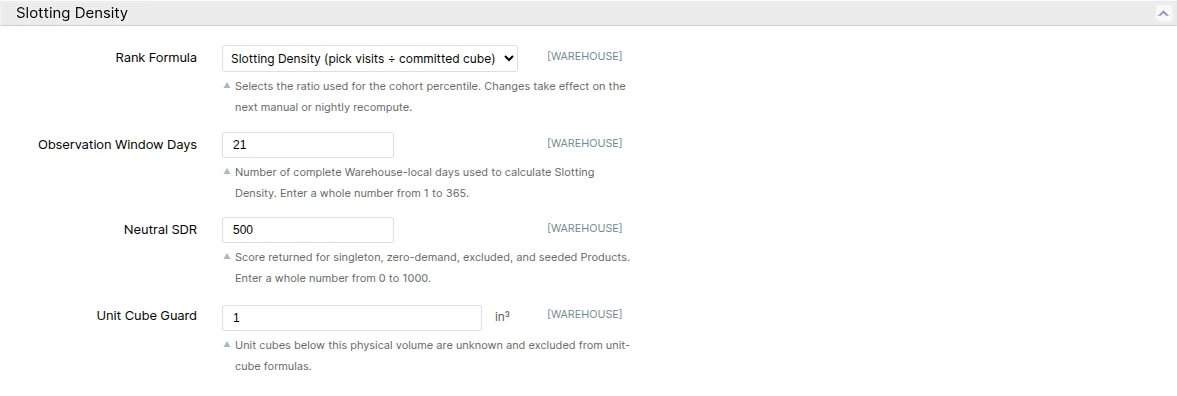
Explore who gets first choice of a preferred Location: switch among all three Rank Formulas in the interactive example to see how Product scores and placement priority change.
Directed Put-Away Workflow
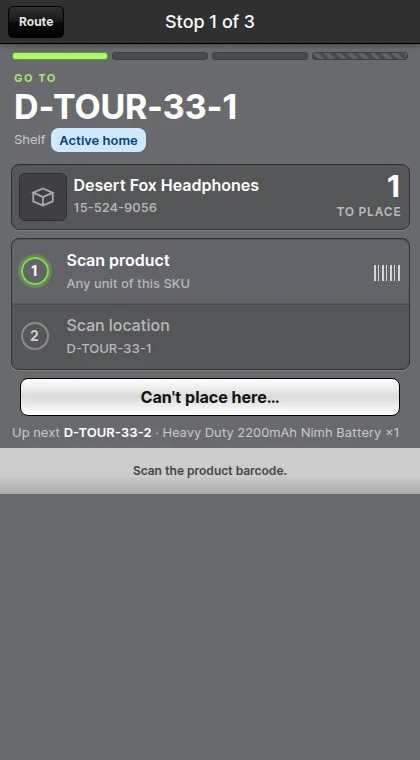
Put-away has always relied on the operator to choose a good Location. Directed put-away moves that decision to ShipStream: each Put-Away can be planned into a Directed Tour, a list of stops in travel order that names the destination Location, the Product, the quantity, and the reason that Location was chosen, such as Open pick-face need or Best available slot. Planned destinations are limited to Locations a manual put-away would accept, so Slotting Rules, Slot Capacity, lot segregation, and Inventory Holds still apply.
This release ships the workflow controls and the guided tour. Each Warehouse chooses a Default Put-Away Workflow of Manual or Directed, and users with the new Override Directed Put-Away Workflow permission can switch an individual Put-Away from the Scanner's Start screen. When a Put-Away is Directed, Start Tour walks the operator through the route one stop at a time: each stop leads with its destination, the Product, and the planned quantity, a checklist closes as the Product and the Location are scanned, and the counter opens on the planned quantity before the tour advances. A Route view shows what has been placed, what is next, and what is left for manual put-away, and the completion summary lists where everything went. If a destination cannot be used, Can't place here… records a reason and takes the next saved destination or skips the stop for later. When a plan cannot be built, the Put-Away simply proceeds as a manual session. Room that a plan reserves at a destination is held for the tour and released automatically when the session ends or stops refreshing, so two Put-Aways are never sent to the same empty space. Planning follows a fixed order: a pick face that needs stock first, then the best slot by Slotting Density Rank and pick convenience, with Soft Tiebreakers, candidate limits, and the number of alternatives kept per destination configurable per Warehouse under Warehouse -> Stock. See Put-Aways for details.
Sweep Batches
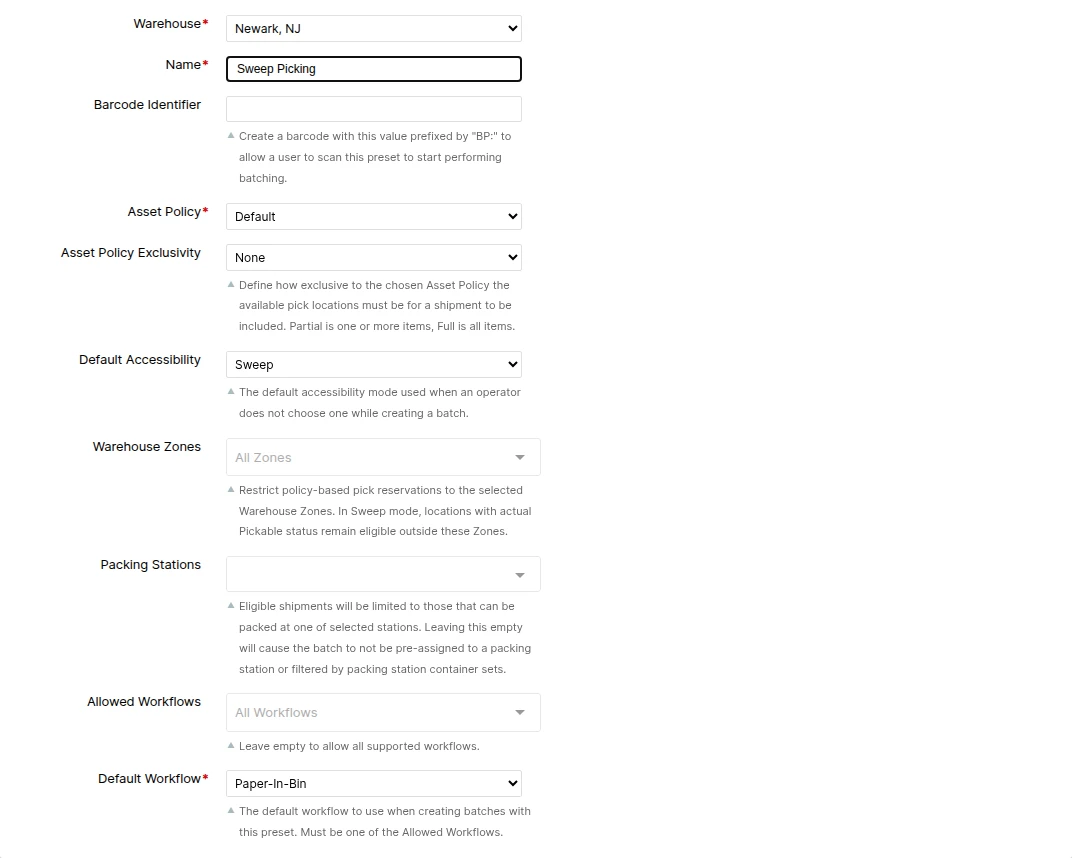
Floor and lift teams can now divide batch work without racing each other. Sweep replaces Resolve Burn Order Conflicts in the Accessibility choices and selects only Shipments that genuinely require at least one non-pickable Location. Within those Shipments, ShipStream follows Lot burn order, allocates from actual Pickable Locations first, and uses Asset Policy Locations only for the remaining quantity. This includes quantity shortfalls and burn-order exceptions that could previously fall between floor and air workflows.
Batch Presets now have a Default Accessibility setting. An untouched Admin UI dialog and Scanner Next Up, BP: barcode, and Quick Batch flows inherit that default, while an explicit dialog choice still wins for the current run. The Picking Batches grid and batch details also show the effective Accessibility and Asset Policy for later review.
Asset Policy Exclusivity now ignores inventory in Locations that no batch-picking Asset Policy can reach. A reachable non-preferred alternative still prevents exclusivity. None is required when you want the full Sweep population; Partial and Full deliberately narrow it further.
Inventory Holds Webhooks
Your integrations can now receive notifications when Inventory Holds are placed or released, making it easier to track held inventory alongside your existing inventory updates. Notifications identify the affected Products, Lots where applicable, hold reasons, and individual Holds, without exposing shelf-level Location details.
The new notifications complement existing inventory webhooks rather than replacing them: hold notifications describe the hold lifecycle, while quantity changes continue to arrive through the existing inventory quantity notifications.
Scan Each Unit
For picking workflows where accuracy matters more than speed, you can now require a Product barcode scan for every unit instead of confirming an entire pick line with one scan. A visual countdown shows progress, and cart-location or packing-slip confirmation is accepted only after the required unit scans are complete.
Enable specific workflows with Workflows Requiring Scan of Each Unit at System -> Configuration -> Warehouse -> Scanner -> Picking. A separate Require Scan of Each Unit (Work Order Picking) setting provides the same control for Work Orders. Partial Pick opens with the quantity already scanned, and the Confirm Product shortcut is hidden while per-unit scanning applies.
Client Bill of Lading
Merchants can now retrieve a Shipment's Bill of Lading directly from the Client UI without asking warehouse staff to send it. Print Bill of Lading is available on both the Order and Shipment pages once packing is complete and a saved Bill of Lading is available.
The button sends the existing document to the paired laser printer. If no laser printer is paired, it downloads the document as a PDF.
DHL Express Duties
You can now choose who pays duties and taxes by default for DHL Express Shipments, rather than setting the payor on each Order. The new Default Duties and Taxes Payor setting is available globally or per Merchant under System -> Configuration -> Shipping Methods -> DHL Express.
Choose Sender to bill duties and taxes to the shipper's account. An Order's own Duties and Taxes Payor selection still takes precedence. The setting applies to DHL Express Worldwide - Non Documents; the Documents service is unaffected.
Packing by Type
Freight pallets no longer need to use weight-check tolerances designed for parcels. Separate Packing (Parcel) and Packing (Freight) sections at System -> Configuration -> Warehouse -> Scanner let you tune weight checks, Blind Count, packaging scans, and other packing controls independently.
Freight's new weight-check defaults allow a 10% difference, bounded by a 4 lb minimum and 25 lb maximum tolerance, compared with Parcel's existing 4% / 0.1 lb / 2 lb. Freight also uses a 35 lb Minimum Packaging Weight to better account for pallet weight.
The Packing Start Script can now distinguish Parcel from Freight for more specific rules, and the Admin UI's 3D Packing Solution viewer is always available.
Other Improvements
- Added optional Storage Dimensions to the Product page for Products that take up different space on the shelf than in a shipping carton. Enter Length, Width, and Height in the global base length unit; a complete set replaces the general Dimensions for Slot Capacity calculations, the Slotting Density report, and cubic inventory reporting, while a partial set is ignored. The fields can also be set through the Update Attributes mass action and the
storage_length,storage_width, andstorage_heightproduct import columns. See Products.
- Added background capture of daily demand and pick-face availability history for each Product and Warehouse. There is no new screen; the data is recorded automatically. After the update, ShipStream backfills the last few weeks of history in the background.
- Moved the Scanner's View Container List button onto the Batch Setup screen, beneath Begin Picking, so a picker can see which containers a batch needs while assigning cart locations rather than only after picking has started. Batches that skip setup, such as single-shipment batches, keep the button on the batch start screen.
- Updated the Locations grid at Operations -> Warehouse -> Locations, and the Locations list on a Rack, to open the Location View page instead of the edit form. You now land on inventory, Holds, stock takes, and movements; use Edit Location for settings.
Bug Fixes
- Fixed USPS labels via EasyPost failing for oversized packages with "Package was marked as machinable, but is nonstandard", which left affected orders with no way to label until they were moved to another carrier or service. ShipStream now tells USPS whether each package can go through its automated sorting equipment, based on the dimensions and weight submitted with the label, instead of leaving USPS to assume that every package can. Packages shipped in a USPS-supplied container, such as a Flat Rate box or envelope, are unchanged.
- Fixed Product Profiles and Handling Classes misreading Yes/No product attributes such as Requires Packaging and Ship Separate. A product set to No could be evaluated as though it were set to Yes, so products were matched into profiles they did not belong in and — far more often — left out of profiles they did. Classifications are recalculated automatically after the update, so expect a number of products to change profiles. Because Product Profiles select the products that Slotting Rules and Replenishment Policies act on, this can also change where those products are directed in the warehouse.
- Fixed the Copy button in the Global API access-token popup so it copies the generated token.
- Fixed photo upload on Orders and Shipments in the Admin panel turning everyone away with "You do not have permission to upload photos." unless they held full access, even though the same users could add photos from the Scanner. The Admin panel was checking a permission that does not exist in the role tree, so no checkbox could ever grant it. Order and Shipment photo upload and delete now follow Shipping -> Orders -> Actions -> Process, which roles that already hold it gain after the update. Deliveries were never affected.
- Fixed the Back button on a Location page always returning to the Cycle Count grid. It now returns to the page that sent you, and if you opened Edit Location from the View page it steps back there first.
- Fixed the Last Location link on a Serial's page doing nothing when clicked. It now opens that Location's view page.
- Fixed receiving and overage approval failing when a container's overage was split across multiple Put-Aways and one was then counted down to zero. Also fixed overage approval failing after the expected quantity for an unexpected item was increased during receiving.
- Fixed signing out of ShipStream after Google or Microsoft Social Login leaving that provider session in the browser, so the next person on a shared device could be signed in as the previous user. Both sign-in buttons now ask which account to use instead of signing in silently, and User Roles used on shared devices can set End Social Login Session on Sign Out to also end the Microsoft session when the user signs out and to have later Microsoft sign-ins on that browser ask for credentials instead of listing remembered accounts.
- Fixed the Slot Data import rejecting every row with "No slot type found." when the Slot Type column held
0in an Excel file.0means Auto-Assignment. Excel and CSV files now read the column the same way.
- Fixed Qty Held on the Inventory Holds grid, its exports, the Location and Lot Holds tabs, Product Active Holds, and the Client Portal showing a stale quantity. It now shows the quantity currently held at the Location, and released holds show a blank quantity.
- Fixed EasyPost labels failing to purchase when Declared Value Service was requested for a Shipment with no declared value. The label is now purchased without insurance, as with USPS, OnTrac, and FedEx.
Global API Updates
The slotting and replenishment configuration layer is now reachable over the Global API, so an integration can provision and maintain a Warehouse's setup as code instead of someone working through the Admin panel.
- Added
/v1/inventory/location-tagsand/v1/inventory/slot-typeswith full create, read, update, and delete support. Location Tag deletion is a soft delete matching the Admin panel: Locations already carrying the tag keep showing it, the tag stops being assignable, andPUT {"is_deleted": false}restores it under its original name. Slot Types exposesort_order,patterns,is_fixed_capacity,slot_dimensions, andweight_capacityunderfields=all— the existingfields=slot_typeembed on Locations is unchanged — and refuse deletion with aused_bydetail while still assigned. Locations gained a readable and writabletagsfield plusPOST /v1/inventory/warehouses/{id}/locations/tags, which mirrors the grid's mass actions withadd,remove, andreplaceoperations over up to 1,000 Locations per request.
- Added
/v1/inventory/product-profilesCRUD, lookup bycode, acondition-fieldsdiscovery endpoint, andGET /v1/inventory/product-profiles/{id}/productsfor member Products. Conditions use ShipStream's validated condition format, and responses carry the readable expression, the matched Product count, and the classification status, so a client can poll until a Profile has finished indexing. Re-submitting equivalent conditions does not trigger a rebuild, and deleting a Profile still used by a Slotting Rule or Replenishment Policy returns 422 with dependency counts.
- Added
/v1/inventory/handling-classesCRUD and lookup bycode, covering Warehouse assignments, sort order, shared Product conditions, and Product Profile membership conditions, with the current classification status on every response.GET /v1/inventory/products/{type}/{id}/classificationsreturns a Product's assigned Product Profiles and its Handling Class for each indexed Warehouse.
- Added create, update, delete, rebuild, and member-Location endpoints for
/v1/inventory/warehouses/{id}/location-profiles, completing a surface that was previously read-only. A Profile'smatchis an ordered list of AND-ed clauses over the same seven fields the Admin form offers, reads back in a form that can be submitted again unchanged, and is also published compiled to a single expression asmatch_readable. Writes answer202 Acceptedwhile membership is rebuilt and200when nothing changed; poll untilstatusisreadybefore pointing a Slotting Rule or Replenishment Policy at the Profile. The previously published revision keeps serving throughout, so a rebuild never interrupts slotting.matchis required on create, and a Profile still referenced by a Slotting Rule or Replenishment Policy cannot be deleted.
- Added
/v1/inventory/warehouses/{id}/slotting-rule-setsand their nested/ruleswith full CRUD,POST /v1/inventory/warehouses/{id}/slotting-rule-sets/{rule_set_id}/duplicateto copy a Rule Set within a Warehouse or into another one, andGET /v1/inventory/warehouses/{id}/slotting-conflictsfor the Warehouse's current conflicting Rules, conflict-check status, and Rule Set and Rule counts. Duplicates always arrive inactive and report warnings where a Warehouse-specific selector could not be carried across; script criteria are copied unchanged for review.
- Added
/v1/inventory/warehouses/{id}/replenishment-policiesCRUD plus anoptionsdiscovery endpoint. Policies list in their real evaluation order, writes are validated with the same rules as the Admin panel, and responses expose Policy subjects, qualification state, the Location Profile reference, and result counters without presenting unpublished values as calculated results. Policies with published Replenishment results are protected from deletion.
- Added
GET /v1/inventory/warehouses/{id}/replenishment-index/statusandPOST /v1/inventory/warehouses/{id}/replenishment-index/rebuild, so an integration can tell whether a Warehouse's Replenishment results are current and ask for a rebuild rather than waiting for the next scheduled one. Rebuild answers202withrequested_revision(requested_generationbefore version2026-08) and coalesces repeated requests, so retrying is safe; it is not available to client Bearer tokens. The Replenishment Report also gainedsku,merchant_id,doi_days, andshortfall_qtyfilters and askusort.
- Added Global API version
2026-08. The Replenishment Report gainslane_id,lane_code,lane_name,inventory_position_qty,available_now_qty,serviceable_pick_qty, the stored inventory components,condition_triggers,eligible_triggers,dominant_trigger,desired_level_qty,target_gap_qty,next_evaluation_at,advisories,fixed_min_qty,fixed_max_qty,doi_source, and replenishment UOM fields, with matching filters such aslane_id,dominant_trigger, andadvisory. Rows are now identified by Warehouse, Product, and Lane, andshortfall_qty/is_flaggeddescribe the retained physical-coverage figures. Replenishment Policies addqualification_reasonvaluelane_inactive, and the index status reportsfresh,catching_up,building, orfailedwith revision and pending-change counts. Version2025-07keeps the previous shape; new filters are rejected on it.
- Added opt-in Slot Type fields
trigger_doi_daysandtarget_doi_days; the default Replenishment Policy fielddoi_basis; opt-in Policy fieldsslot_type_doi_overridesandresults_rebuild_status; and opt-in Replenishment Report fieldsslot_type_idanddoi_source. Policy responses now includedoi_basisby default. After recovery is requested for a failed build,results_rebuild_statusreadspendinguntil the successor build starts.
- Added cursor paging for every supported sort order on collection endpoints. Sorting by anything other than
idpreviously limited results to a single page; sorted pages now return opaque cursors in thenextandpreviouslinks and inmeta.cursor_start/meta.cursor_end, resuming the walk exactly where it left off with ties broken byid. A plain recordidis also accepted as a cursor for sorted collections and resumes from that record's position. Total inventory levels (/v1/inventory/levels/total) also gained theidsort. See paging parameters for details.
- Updated
meta.cursor_start/meta.cursor_endto opaque strings whenever results are sorted by a non-idfield — including the default order of the inventory levels and rack-types endpoints. Pass the values back verbatim or follow thenext/previouslinks; integer cursors are unchanged forid-sorted collections.
- Removed the
labelsort option from the deliveries endpoints. It referenced a field that does not exist and always failed with a server error;sort=labelnow returns a clear 400Unsupported sort fieldresponse.
Merchant API Updates
- Added the
inventory:advertised_changedwebhook topic so integrations can synchronize advertised inventory directly instead of reconstructing it from Order, Delivery, Inventory Hold, and adjustment events. Each committed inventory update reports Merchant- and Warehouse-level before/after quantities, collapses intermediate changes, and includes up to 500 Products per event with best-effort hold context.