

eHub

With eHub, you can optimize shipping with lower rates and improved package visibility.
ShipStream leverages eHub as an integration provider for the following carriers:
- USPS
eHub offers the following features, fully supported by ShipStream for a seamless integration:
- USPS shipping labels
- Automatically generated customs documents for international orders
- Automatic printing of SCAN forms for end of day pickups
- Package insurance
- Address verification
- Tracking information
If there is a carrier supported by eHub that you'd like to use in ShipStream, just put in a request and we'll make it happen!
How to Set Up eHub
Getting started with eHub is easy, the steps from a high level are:
- Obtain an eHub API Key and save it in the ShipStream configuration
- Choose eHub as the Integration Provider for each carrier you wish to use (if multiple providers are supported)
- Add a Shipping Account in ShipStream for each EasyPost carrier account you wish to use
Step 1 - eHub API Key
- Sign up with eHub and as part of the onboarding process you will obtain the Partner API Key. You can also find the API Key in the eHub Portal.
- Sign into ShipStream and navigate to the System > Configuration > Shipping > Shipping > Methods > eHub section. Paste the API Key into the API Key field and click Save Config.
Step 2 - Integration Provider
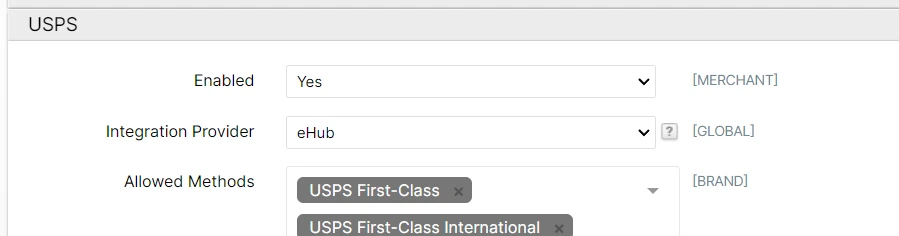
For USPS, ShipStream supports multiple integration providers. Make sure "eHub" is chosen in Shipping Methods > USPS and click Save Config.
Step 3 - Shipping Account
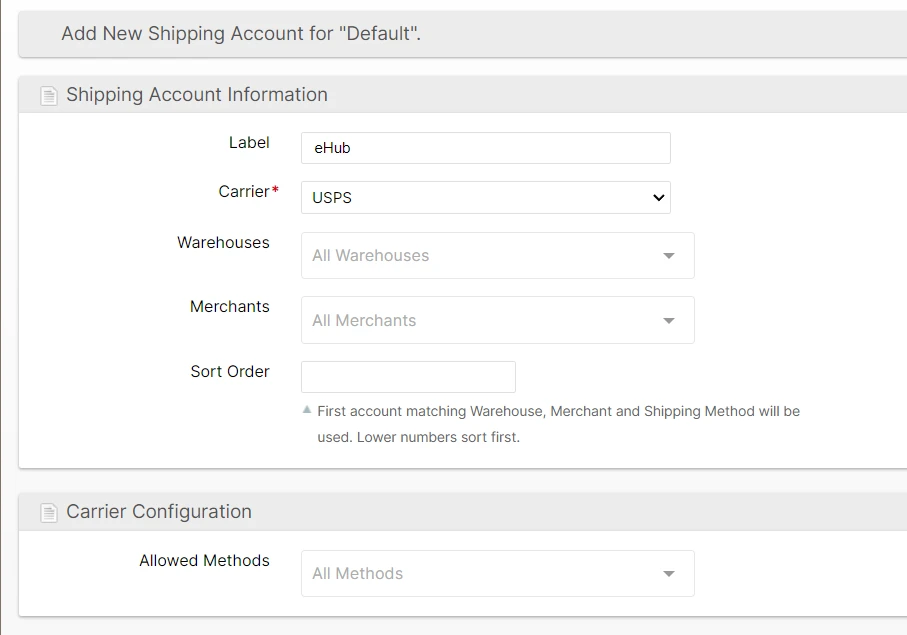
- Navigate to System > Shipping > Shipping Accounts
Choose or create a Shipping Account Group as appropriate (use "Default" unless you have a special need for a different Shipping Account Group)
See Shipping Accounts for more information on managing Shipping Accounts with groups.- Click Add New Shipping Account to add a new account to the chosen group or click an existing account.
- Select the Carrier corresponding to the account you wish to add (e.g. USPS)
- Click Save Shipping Account
USPS Package Weight
When purchasing a USPS label through eHub, ShipStream compares the package weight from the scale to the total weight of the products in the package. If the product total is a little higher — within one ounce — ShipStream raises the weight submitted to USPS to the next tenth of a pound so the carrier accepts the label. The scale reading remains the package's recorded actual weight.
If the product total exceeds the scale weight by more than one ounce, label purchase stops with:
The total item weight is more than one ounce greater than the reported actual weight. Please double-check your scales and product weights for accuracy.
This applies to outbound and return USPS labels through eHub. Other carriers are unaffected. Keeping product weights accurate remains important — see Products.