

Version 2026.5
Slot Capacities
Answering "how full is my warehouse, really?" requires knowing not just what is on each shelf, but how much could be. This release lays that foundation: ShipStream now computes how many units of each product fit in each kind of slot, automatically, from the dimensions you already maintain.
- Stock Location Types are now Slot Types. The clearer name reflects what they describe — the physical slot on the rack. The rename carries through the admin menus, grids, the Stock Locations import, and the Global API, and your existing role permissions are updated automatically.
- Slot Types can declare their physical capacity. Enable Fixed Capacity on a Slot Type to record its interior Width, Height, and Depth, plus an optional Weight Capacity.
- Capacities are computed for you. For every product and fixed-capacity Slot Type, ShipStream determines how many units fit using the product's dimensions, weight, and Can Tip setting — a volumetric estimate governed by a configurable Volumetric Efficiency (default 90%); a same-angle fallback that staggers units along touching long sides while keeping their outer corners on shared planes; an optional ShipStream Packer axis-aligned grid refinement; and an optional Paccurate refinement. Products and slots that share the same physical profile share one result, and capacities recompute automatically when dimensions change.
- Capacities can be overridden per product. A new Slot Capacities tab on the Product edit page lists every fixed-capacity Slot Type and lets you set its source to Computed, Reported (with a specific unit count), Prohibited, or Unlimited; a Set Slot Capacity mass action applies the same change to multiple products at once from the Products and Packaging Features grids. Both require the new Warehouse -> Stock -> Slot Capacities permission — without it, the tab is shown read-only and the mass action is unavailable.
- Capacities can be imported in bulk. A separate Slot Capacities upload on the Import Slot Information page sets per-product capacities from a spreadsheet — one column per fixed-capacity Slot Type, accepting a unit count or a capacity source keyword.
- The Locations grid shows how full each slot is. A new Utilization column compares each Location's contents against its capacity, with a color-graded chip that can be sorted, filtered, and exported.
- The Scanner shows capacity during Put-Away and Relocation. Destination lists and counters display a capacity chip — Fits, Tight, Over by N, or Prohibited — so operators can pick a sensible slot at a glance. Guidance is advisory by default; new Enforce Capacity settings under Warehouse -> Scanner -> Put-Away and -> Relocation turn it into a hard stop. See Put-Aways and Relocations.
Computation methods are configured at System -> Configuration -> Warehouse -> Stock -> Slot Capacity. Together these give you the first clear picture of how full the warehouse really is, and set the stage for directed put-away guidance built on top of them.
Replenishment Policies and Location Profiles
Keeping pick faces stocked has always depended on someone noticing they're running low. ShipStream can now watch for you: define Replenishment Policies with a Trigger DOI and Target DOI (days of inventory), and ShipStream flags every SKU whose coverage in a chosen set of locations has fallen below the trigger — including SKUs that are selling but were never slotted there in the first place.
- Location Profiles (System -> Operations -> Location Profiles) are named, reusable sets of Locations defined by match criteria such as Zone, Rack, or Location Tags. Slotting Rules and Replenishment Policies share them, so one "Forward Pick" definition can serve both, and the grid shows live counts of the rules and policies using each profile.
- Replenishment Policies (System -> Operations -> Replenishment Policies) select SKUs by Merchant, Product Profile, or Handling Class and pair them with one Location Profile and a days-of-inventory band: when a SKU's coverage — its on-hand in the profile divided by its recent daily pick rate over a configurable Demand Period — drops below Trigger DOI, it is flagged with the quantity needed to restore Target DOI. Each policy's Demand Basis decides which picks count toward that rate: Pickable counts only picks made from pickable locations, while Overall counts every pick and so also surfaces SKUs selling entirely out of reserve that were never slotted. Policies are evaluated in your chosen order, and the first matching policy governs each SKU.
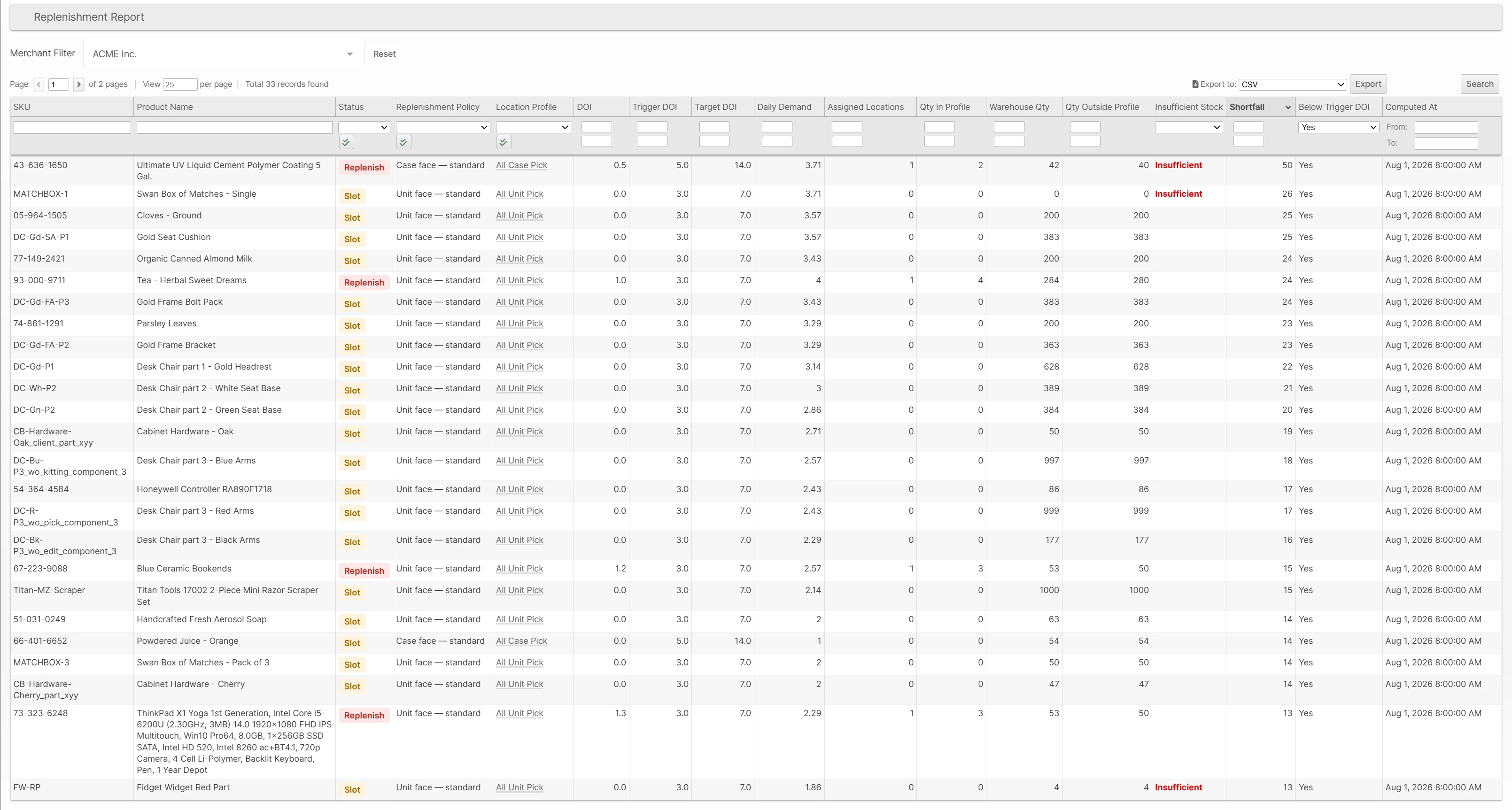
- The Replenishment report shows each flagged SKU with a Replenish status (stocked in the profile but below trigger) or Slot status (selling, but not yet assigned a location in the profile), along with its current days of inventory, the suggested move quantity, and how much stock is available elsewhere in the warehouse to cover it.
SKUs that Slotting Rules forbid everywhere in the profile are excluded automatically, so every flag is one your team can act on. Together with Slot Capacities, this lays the groundwork for directed put-away guidance.
Improved Inventory Holds
An Inventory Hold is now an attribute of the Location itself rather than a quantity captured at the moment the hold was placed. Previously a hold froze only the units counted at placement time, so inventory arriving at the held Location afterwards — a Delivery commit, a return, a Work Order output — landed pickable, quietly defeating the point of the hold. Now a hold covers the entire Location, Put-Away, Unreserved, and Reserved units alike, and anything that arrives while the hold is active is held the moment it lands.
- Partial holds are removed. A Location is either fully held or not held, and carries at most one active hold. The Place Hold dialog shows the quantity on the shelf instead of asking for a quantity, and a hold releases itself automatically once its Location fully drains.
- Relocating held inventory is more flexible. Partial pulls from a held Location are now allowed — the hold travels with the moved units, the source stays held on the remainder, and each side releases automatically when emptied. The destination rules that keep held and available stock from mixing are enforced with clear messages and greyed-out Locations. See Relocating Held Inventory.
- Picking is hold-aware. When a hold is placed after a Shipment or Batch was already assigned its pick Locations, the Scanner now warns the operator, badges the affected item with its Hold Reason, and blocks confirming the pick until the hold is released or the Shipment is removed from the Batch.
- Every movement shows its hold. Stock Movement grids across the Admin UI gain a Hold Reason column and per-Display-Group held quantities, attributed to all movements governed by a hold — not just the hold and release events themselves.
Smarter Packing Weight Checks
The packing weight check now uses a tolerance band instead of a single flat percentage, so it can be sensitive enough to catch a missing item in a small package without flagging normal variance on a heavy one. The allowed difference is a percentage of the expected weight, kept between a new Weight Check Difference Minimum and Maximum, and widened to your scale's precision so a coarse scale's rounding never causes a failure on its own. When a check does fail, the packer now sees the measured weight and the exact accepted range instead of a percentage, making it much easier to spot what went wrong.
Configure the band per merchant at System -> Configuration -> Warehouse -> Scanner -> Packing (defaults: 4%, 0.1 lb Minimum, 2 lb Maximum) and set each warehouse's Scale Precision under Scanner -> General to match its scales. The Minimum, Percentage, and Maximum can also be tuned for individual Shipments from a Packing Start Script. See Packing Weight Check for the full details.
DHL Express via EasyPost
DHL Express is now available as an EasyPost-backed carrier, bringing international express shipping — DHL Express Worldwide - Documents and DHL Express Worldwide - Non Documents — into the same setup flow you already use for other EasyPost carriers: enable the carrier, choose EasyPost as the Integration Provider, attach a DHL Express carrier account from your EasyPost dashboard to a Shipping Account, and select the allowed methods. Labels, customs documents, tracking, and refunds all flow through EasyPost, and both services are available as methods on merchant rate plans.
Customs paperwork is handled automatically per service: Non Documents shipments send your full commercial customs data, while Documents shipments are declared as documents built from the actual package contents — no product customs data required. Sender Tax IDs (VAT, IOSS, VOEC) are passed along as well.
Shipments are validated against DHL's current published limits before a label is attempted, so an oversize package or an over-weight Documents shipment (the Documents service is limited to 4 lb / 2 kg billable weight) is rejected up front with a clear message instead of a cryptic carrier error. Section II lithium-ion battery shipments — packed with equipment (PI966) or contained in equipment (PI967) — are declared automatically based on the products' hazmat settings; other hazmat classes are rejected before a label is attempted.
Automated Order Cancellations via EDI (SPS Commerce)
When a trading partner cancels a purchase order over EDI, the cancellation no longer sits in an error queue waiting for someone to notice — with the risk that the canceled order ships in the meantime. The SPS Commerce integration now processes inbound Orders documents with TsetPurposeCode 01 (Cancellation) automatically, matching them to the Order created from the original EDI document and acting according to a new per-subscription Order Cancellation Policy:
- Immediate Only - The Order is canceled outright; if it cannot be (for example, fulfillment is already underway), the document is flagged for manual handling.
- Immediate with Cancellation Request fallback - Orders already being fulfilled receive a Cancellation Request instead, so warehouse staff decide whether to stop the shipment or let it go.
A cancellation that arrives for an already-canceled Order is treated as success, and one that arrives before the original order document has finished processing is retried automatically.
With the companion Send Cancellation Ack option enabled, an 855/OrderAck reports the outcome back to the trading partner — sent only once the outcome is final: the Order is canceled, or the cancellation request is rejected because the Order shipped anyway.
Merchant-Scoped Allowed Countries
The Allow Countries setting can now be set per Merchant, so a 3PL serving clients with different international footprints no longer has to settle on one global list. Set a Merchant-specific list at System -> Configuration -> General -> Countries Options by switching the configuration scope to that Merchant; Merchants without an override continue to inherit the global list.
The Merchant's own list is honored everywhere destination countries matter: the country selectors on Admin and Client UI order creation, order validation through the APIs, and the destination check at shipment time — so an order accepted for one Merchant is never blocked later by another Merchant's settings.
Harmonized System Code Terminology and Export Disclaimers
The product Export tab now uses standard customs terminology so the fields match what you'll find in classification databases and carrier paperwork. The field previously labeled HTS Base Code is now Harmonized System Code — the 6-digit internationally standardized HS code in the format ####.## (e.g. 8471.30) — and HTS Country Code is now HS Code Extensions, the country-specific extensions to the 6-digit code (for imports into the United States, the last 4 digits of the 10-digit HTS code). Updated notes under each field explain the expected format, and product imports accept the new column names hs_base_code and hs_country_extension while the legacy column names continue to work.
The rename goes all the way down: the product attribute codes themselves are now hs_base_code and hs_country_extension, matching the field names already used by the Global API. The legacy hts_* names remain accepted at every external boundary — Merchant API input, product import columns, and plugin rate/shipment payloads — so existing integrations, saved import templates, and scripts keep working.
The Export tab (in both the Admin and Client UI), the export and customs configuration sections, and the Regulations screens now also display disclaimers clarifying that you are responsible for the accuracy of export classification data and for compliance with shipping regulations.
attributes selector should switch from hts_base_code/hts_country_code to hs_base_code/hs_country_extension; the standard product.info response includes both key sets.EU Customs Product Identifiers
Shipments originating outside the EU and destined for an EU country now fail early at label creation when a Product is missing the identifiers needed for customs clearance. This helps prevent non-compliant parcels from reaching the carrier and being held at origin.
Set the Manufacturer Part Number on the Product's General tab. ShipStream finds a valid GTIN from the Product's existing Barcode values, supporting GTIN-8, UPC-A, EAN-13, and GTIN-14 alongside any other barcodes you use. If your products do not have a distinct manufacturer part number, optional Vendor SKU and SKU fallbacks are available at System -> Configuration -> Catalog -> General; both are disabled by default.
Other Improvements
- Added an
hs_base_codefield to the External Shipping Method API rate and shipment request payloads alongside the legacyhts_base_codefield, which remains supported as a deprecated alias.
- Updated Retailers to a single global catalog shared by all Merchants, so each trading partner is set up once rather than recreated per client. See also Retailers in 2026.4.
- Added a Retailer column to Shipping -> Shipments, including the Parcel and Freight views, so operators can see and filter Shipments by Retailer just as they already can on Orders. The filter matches Retailer Name, Code, or EDI Identifier, and the column is included in CSV and Excel exports.
Bug Fixes
- Fixed the SPS Commerce 947 Inventory Adjustment Advice failing on every adjustment event in Real-Time mode. Real-Time documents now also report each Adjustment Reason on its own reason-coded line, matching Hourly mode, and an unmapped hold or release Reason now falls back to the General hold Reason's mapping (AJ, Quarantined, by default) instead of AH (Inspection Required).
- Fixed Delivery processing on the Scanner counting against the wrong line when a Delivery listed both the case SKU and the singles SKU of the same Quantity-type product. Scanning a singles barcode opened the case line and counted a fraction of a case, leaving an overage on one line and a shortage on the other. Each barcode now counts against its own line, and the counter still accepts either barcode when only one of the two SKUs is on the Delivery.
- Fixed FedEx Shipping Accounts using the REST API asking for a Meter Number — the meter fields now appear only for legacy SOAP authentication — and manifest close now follows the account's effective authorization type, so accounts migrated from SOAP to REST close manifests correctly.
- Fixed the Scanner Allow Partial Batches toggle not flagging a Preset + Asset Type selection as unfillable when the cart is limited by weight or volume (for example a Steel Picking Cart). With Allow Partial Batches off, those selections now grey out Quick Batch / Next Up and show "Not enough shipments to create a full batch" as soon as the entire matching queue cannot reach the cart's weight or volume cap — not only when the shipment count is short of the cart capacity.
- Fixed USPS labels via EasyPost and eHub failing when a light package's scale weight fell just under the catalog item total. Within one ounce, ShipStream raises the weight submitted to the carrier to the next tenth of a pound from the greater of the two; larger gaps stop the label with a clear message to recheck product weights and scales. Return labels get the same treatment. The scale reading is still stored as the package's actual weight.
- Fixed FedEx label generation for U.S. Minor Outlying Islands destinations that FedEx classifies as domestic. ShipStream no longer requests Electronic Trade Documents for these shipments.
- Fixed the once-per-day grouping of repeated integration errors rolling over at midnight UTC rather than midnight in your configured Global timezone, which made a single recurring problem appear to span two days. The boundary now follows the Global timezone — see Timezones.
- Fixed Scanner packing leaving serial numbers attached to a package after a serialized item was recounted down or its serial capture was cancelled mid-scan. That mismatch blocked final submit with a generic "Serial Number quantity does not match the package items quantity" error that named neither the package nor the product, and package review could not clear the leftovers. Recounting or cancelling now clears the serials correctly, and if a mismatch still occurs the error names the package, product, SKU, and the serial-vs-quantity counts.
- Fixed Ready to Ship Time scripts not receiving the order's Batch Tag, so scripts that branch on batch tag can now use it.
- Fixed Packing Start Scripts that request a packing-progress reset not actually clearing packing progress.
- Fixed automatic Lot expiration processing for deactivated Merchants.
- Fixed the Products Ordered report hanging when opened without a date range. It now prompts you to choose one, and says so when a date is invalid.
Global API Updates
- Updated the Location resource: the
location_typereference is renamedslot_type, and its resource typeLocationTypeis renamedSlotType. This applies to responses, create/update requests, andinclude/fields/sort/filter parameters on the warehouse locations endpoints. Requests using the old names are rejected, so update integrations alongside this release.
- Added
manufacturer_part_numberto the Inventory Product resource for read and create/update requests. The field is nullable.
- Updated the location holds endpoint for whole-location holds:
qtyon hold creation is now optional and nullable — omit it to hold the Location's entire on-shelf quantity, and when supplied it must equal that quantity or the request is rejected. A hold'sqtyin responses is now the Location's live held quantity while the hold is active and0once released, rather than a fixed snapshot from placement time. - Fixed
POST /api/global/v1/shipping/shipments/{id}/pickfailing when no pick locations or reservation refs are specified. The documented pick-all mode now picks every reservation for the Shipment.
Merchant API Updates
- Added
hs_base_codeandhs_country_extensionfields to product info responses alongside the legacyhts_base_codeandhts_country_codefields. Product create and update accept either naming (when both are supplied, thehs_*value wins), and the legacyhts_*field names remain supported.
- Added a
containersproperty to thedelivery:committedanddelivery:completewebhook payloads so integrations can capture container-level contents and lot quantities at commit/complete time without a follow-updelivery.searchcall. Each container matches the existingdelivery.searchcontainer shape (contentswith per-lotqty_countedandqty_shortage); lot-tracked content also includes the commit quantitiesqty_processed,qty_putaway, andqty_committed, which are webhook-only and are not added todelivery.search. The array is always present and may be empty.
- Added an optional
detailsarray on each SKU row instock_adjustmentsfor theinventory:adjusted,delivery:committed, anddelivery:completewebhook payloads (and any other topics that includestock_adjustments). Each detail breaks the adjustment down bylot_idand eitheradjustment_reason_codeorhold_reason_code; hold/release details also includeqty_held. SKU-levelqty_adjustis unchanged and equals the sum of its details.detailsis omitted when there is no lot or reason breakdown.
- Added structured
lotandreasonobjects to each row returned byinventory.holdSearch, so clients can read full lot and hold-reason details without a follow-up lookup. Thelotobject includeslot_id,lot_number,expiration_date,origination_date,group_value,is_active,is_expired, andcreated_at(ornullwhen the hold is not lot-specific);reasonis{ code, label, display_group }matchinginventory.holdReasons. The scalarlot_number,reason_code, andreason_labelfields remain for compatibility but are deprecated.
- Added
manufacturer_part_numberto Product responses and search filters so integrations can read and find Products by manufacturer part number.
- Updated
inventory.holdSearchfor whole-location holds:qtynow reports the Location's live held quantity for an active hold and0for a released hold, rather than the quantity captured when the hold was placed.
- Added a nested
holdobject on eachstock_movement.listrow for movements attributed to a hold, withscope_type,lot_id,parent_hold_id, andreason({ code, label, display_group }matchinginventory.holdSearch). The top-levelhold_reason_coderemains the rolled-up parent/system reason code for compatibility; non-hold movements returnhold: null. Added ahold_reason_codefilter (standard operators, filter-only — not sortable) so clients can query hold/release history by rolled-up reason without a follow-up lookup.
- Added Lot lifecycle quantities and hold detail to
inventory.lots: nestedhold_reason({ code, label, display_group }),qty_held_by_reason,qty_unreserved(canonical;qty_availableremains as a deprecated alias with the same value),qty_processed,qty_picked, derivedqty_on_hand, and per-warehousedetailed[]. SKU-levelqty_heldand reason breakdowns ininventory.list,inventory.detailed, andinventory.detailed_packagingnow include quarantined off-shelf quantity as well.