

Version 2026.7
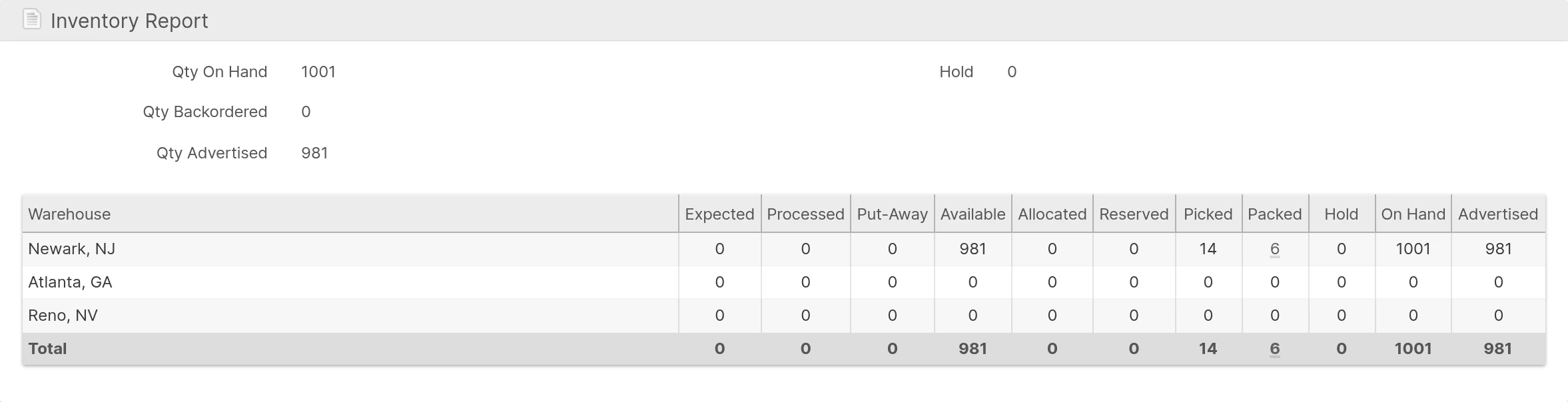
Packed and Shipped Inventory
Inventory now leaves On Hand when a Shipment ships instead of when it is packed, so On Hand includes goods that are packed but still on your dock. Packing moves inventory from Picked to a new Packed quantity. Product Inventory shows the Packed quantity in the Admin UI and Client UI, and clicking it lists the Packed Shipments holding it. The Stock Movement Log records packing and shipping as separate movements, showing the packing station on pack rows and the Manifest load Location on ship rows.
Orders have a new Packed status between Processing and Complete. An Order becomes Packed once everything has been packed, and Complete when its last Shipment ships; its completion time and the order:completed webhook now follow shipping. Shipments are marked Shipped by Manifest Loading, carrier tracking, carriers that mark Packages Shipped automatically, or a user or API action. As a backstop, a daily safety net marks Shipments Shipped that are still Packed after 30 days, configurable per Warehouse with Automatically Mark Shipped After (Days) under System -> Configuration -> Shipping -> Shipping Settings -> Shipments. Existing Shipments and historical movements are updated in the background after the release; see the migration guide for details.
A Shipment with part of its quantity already canceled can no longer be shipped by a user; void its label and revert it instead. See Shipments With a Pending or Partial Cancellation.
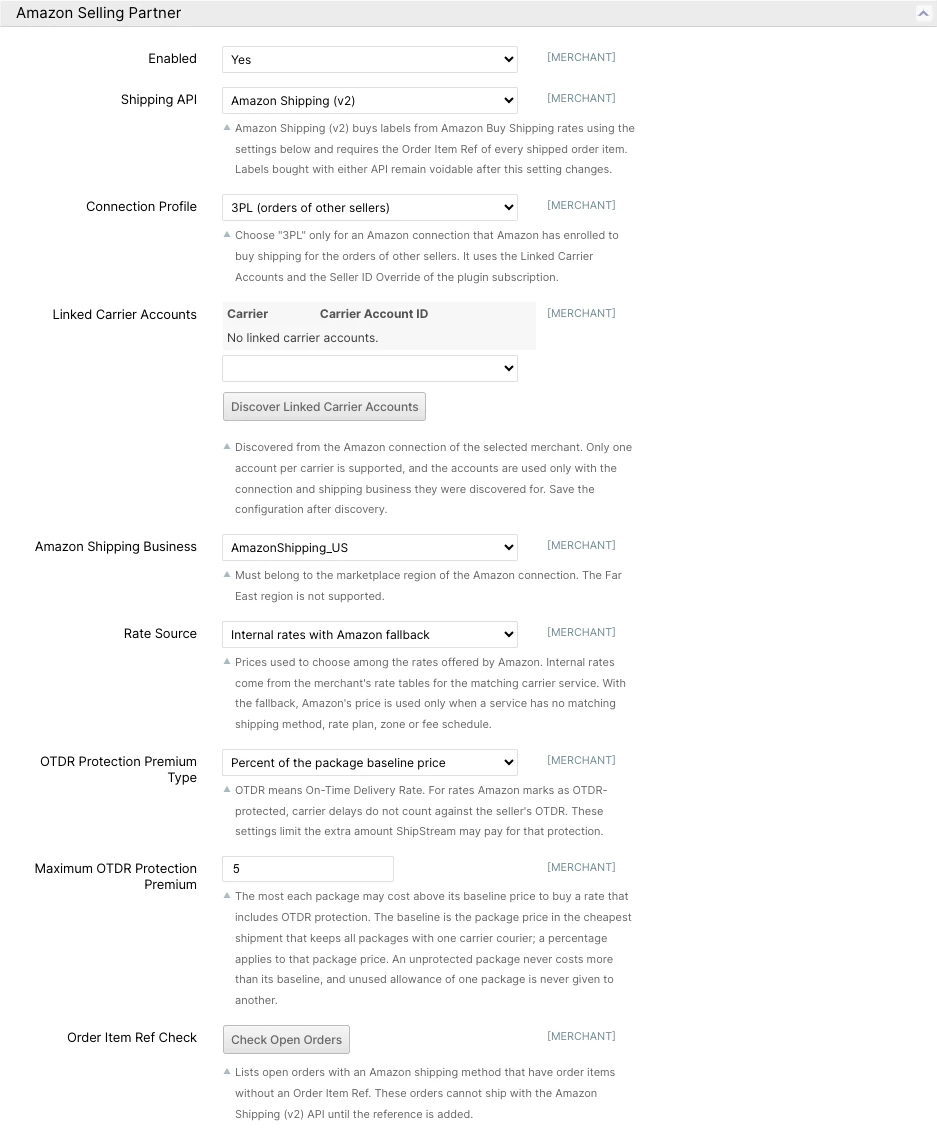
Amazon Shipping (v2) and 3PL Buy Shipping
Sellers and Amazon-enrolled 3PLs can now buy Amazon labels through Amazon Shipping (v2). ShipStream looks at the rates Amazon offers for the whole Shipment and chooses among them using your own prices, so label costs follow your Rate Tables rather than whatever Amazon lists first. A 3PL can buy shipping for the Orders of the sellers it fulfills for, using the carrier accounts linked to its Amazon connection.
On-time delivery (OTDR) protection is bought only when it fits the premium you allow for each package, as a fixed amount or a percentage of the package's baseline price, so protection never quietly inflates a label. Every Shipment's comments explain the prices considered and why a rate was chosen. Each label keeps the account that bought it, so voiding and tracking keep working after you change settings, and a purchased label whose document could not be retrieved or saved can be recovered without buying it again.
Configure it at System -> Configuration -> Shipping Methods -> Amazon Selling Partner. See Amazon Selling Partner for setup, pricing rules, and 3PL requirements.
Mark-For Stores
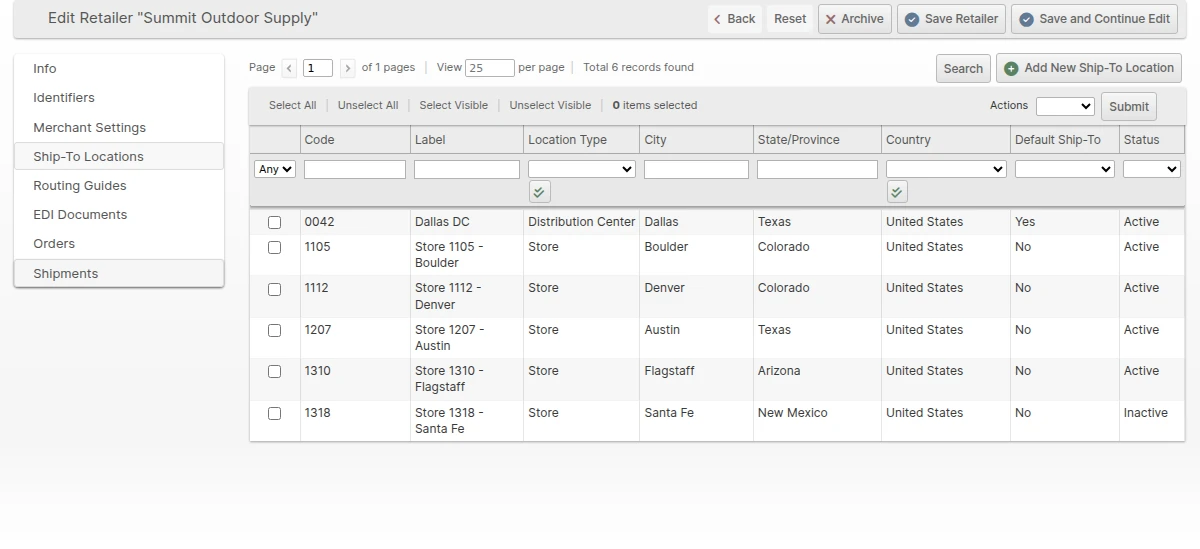
Retail consolidation programs ship cartons to a distribution center but need each carton labeled for the final store. An Order can now carry a Mark For store alongside its ship-to Location, chosen from the same Retailer Locations catalog, so the store stays attached to the Order through picking, packing, labeling, and EDI instead of being retyped or lost along the way.
Choose a Mark-For Location in the Retailer popup when creating an Order, or supply it in an Order import or through the API. It appears as Mark For on Order and Shipment pages in the Admin UI and Client UI and on the Scanner packing screen, so packers can confirm carton labels at a glance. The optional Display Mark-For Store packing slip setting prints the store's name, number, and address below the shipping address.
For Orders received from SPS Commerce, the 850's Mark-For party is saved with the Order, GS1-128 SSCC labels fill their Mark-For zone from it, and the outbound 856 ASN includes the Mark-For party that retailers require on consolidation Orders.
Replenishment Tasks
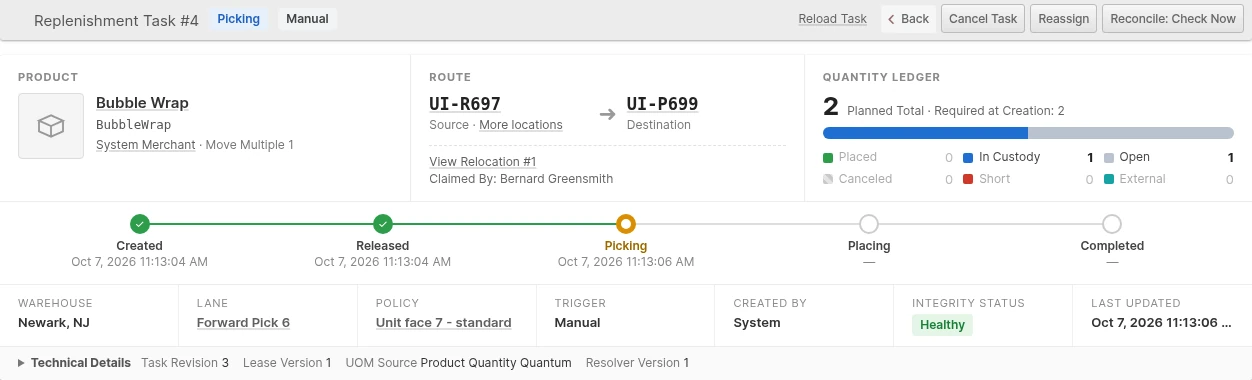
Replenishment now closes the loop from "this pick face needs stock" to "the stock is there". The Replenishment Report finds the need; a Replenishment Task now carries out the move. Tasks are created automatically from Emergency, Min Threshold, and Top-off needs, in that priority order and within open-task limits you set per Warehouse and Lane, or manually at Operations -> Replenishment Tasks. An Emergency is raised when a picker reports a source shortage, which places a hold and requests a count on that Location.
Operators work tasks from the new Replenishment Scanner menu: claim a task, scan the source, confirm the Product, then scan and place at the destination. Every check a relocation makes applies, including Location Profiles, Lots, Holds, move quantities, and destination capacity, and Order reservations always take priority over replenishment. Open tasks count toward Inventory Position, so the same need is never worked twice. The task page shows a quantity ledger of what was planned, picked, placed, and canceled, with full history. Canceling a task never strands stock: anything already picked stays in custody until it is placed, returned to its source, or resolved by a supervisor. A delivery received straight into the destination can satisfy an open task.
Demand Context for Replenishment
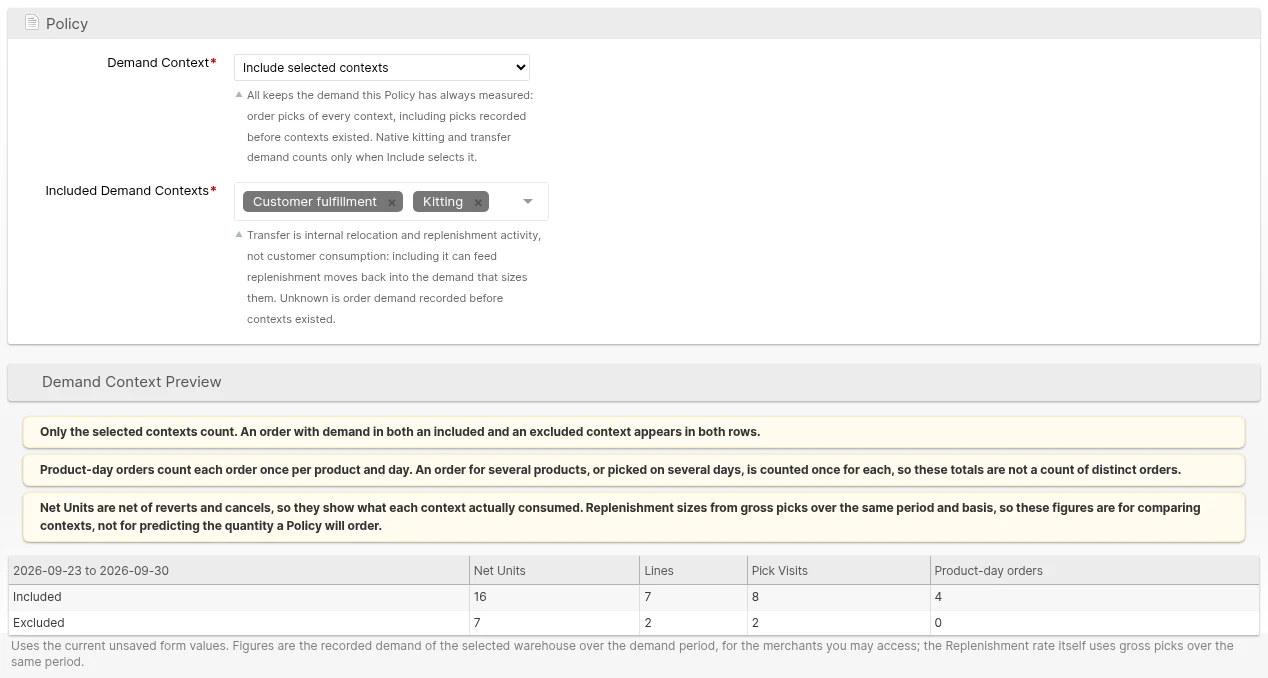
Not every pick is customer demand. Bulk fulfillment of a promotion, kitting, and internal transfers all draw down a pick face, and sizing replenishment on them can stock a face for a spike that will not repeat. ShipStream now records why each pick happened, as one of Customer fulfillment, Bulk fulfillment, External freight, Kitting, Transfer, Other, or Unknown, at the moment it happens. Corrections and reversals keep the original context, and history that cannot be classified stays Unknown rather than being guessed.
A Replenishment Policy's new Demand Context setting keeps All, the existing behavior, or counts only the contexts you select, with a live preview of the demand your unsaved selection would measure. Slotting Density ranks each Product using the same selection as its Policy. Product Velocity refreshes now run in the background in steps, resume after an interruption, and publish each Warehouse's results at once.
Complete-Day Product Velocity
Product Velocity windows are now whole days in each Warehouse's own time zone. A 7-day figure covers the 7 complete days before today, midnight to midnight local time, so units, burn rates, and days of inventory hold steady through the day instead of creeping up until a UTC rollover. Today's picks appear at the first update after local midnight.
Whether a pick counts as pickable demand now follows the Location's pickability at the time of the pick, so renaming, deleting, or re-flagging a Location no longer rewrites past demand. On a Product's Velocity tab, the (Automatic) pickable tier now uses pickable velocity, and the Set Tier mass action processes large selections in batches and reports errors it previously ignored.
Directed Put-Away Tour Controls
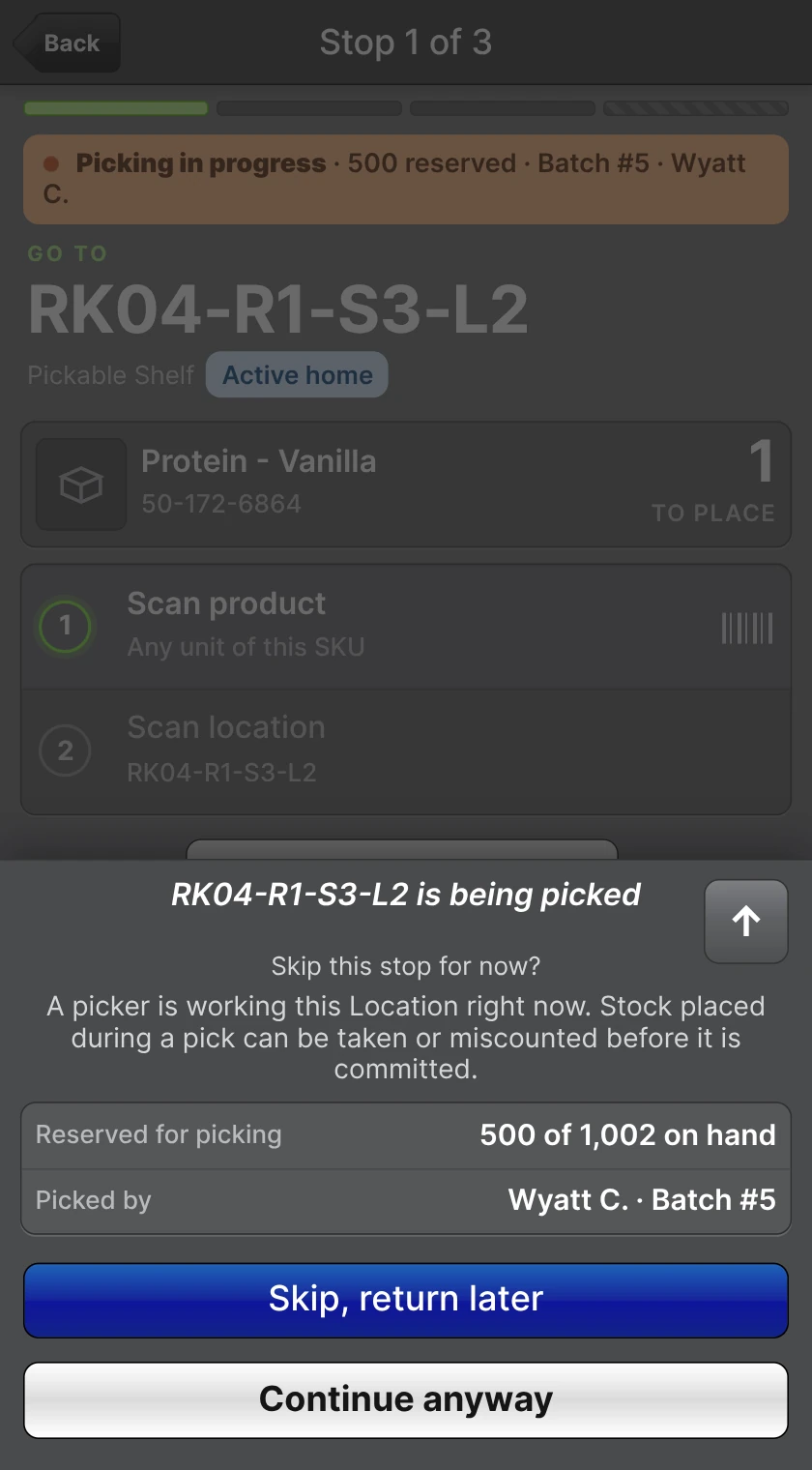
Directed Put-Away tours now handle the realities of a busy floor. When a stop's destination is being picked right now, by a Batch, Bulk Fulfill Order, or Work Order in progress, the stop shows a Picking in progress banner and offers to skip it, so stock is not placed where a picker could take or count it before it is committed. The prompt is advisory: Continue anyway is always available.
Leads with the new Override Directed Put-Away Destination permission can choose Choose location... from the Can't place here… sheet and send one stop to a Location of their choice. The Location is checked exactly as a manual put-away would be, room is reserved there, and every other stop keeps its planned destination.
Each stop can also show which Asset Types can reach its destination in an Access with row, read from Asset Policies with the new Other operation, so operators know which equipment a stop needs before they walk to it.
Directed Put-Away Follows Location Priority
Directed Put-Away now chooses destinations the way Shipment Reservation chooses Locations, so received stock lands where you reserve from first. Each candidate is ranked by its Location Priority: the Priority of a Location that holds the Product, or the Default Priority of any other Location, including an empty one still assigned to the Product. A lower number ranks first, and a Location with no Default Priority ranks after all the others. Among Locations with the same number, a Location assigned to the Product comes first, then an unassigned one, then one assigned to another Product, so a Product's emptied slot is refilled before another Product's slot is reused.
The Pick Route no longer decides which Locations are chosen. It sets the order in which a tour visits its stops and breaks ties between Locations that rank equally, so a route that starts at the far end of the Warehouse no longer pulls your fastest movers to the far end. See How Directed Destinations Are Chosen.
Bulk Fulfill Pick Plans
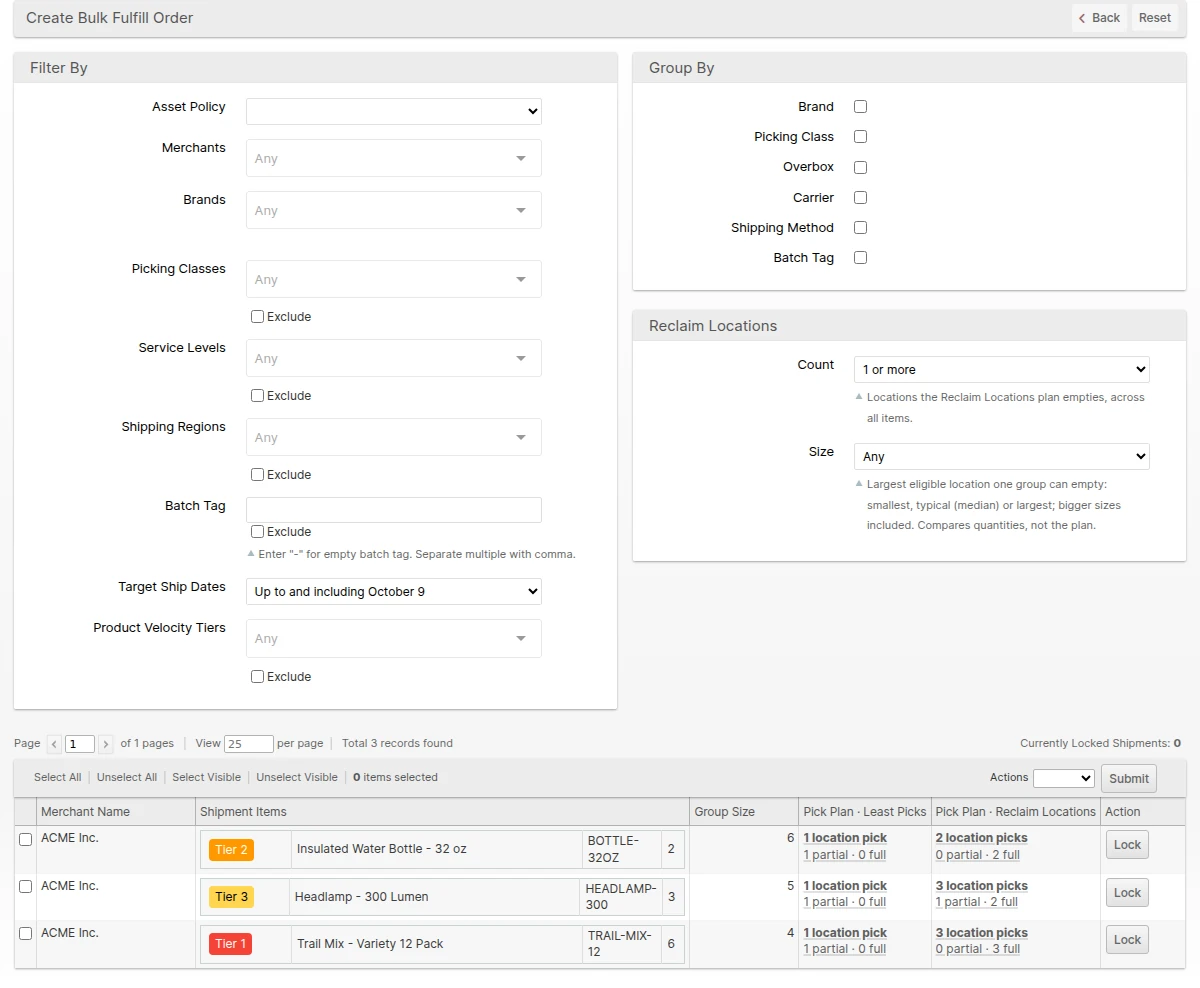
Bulk Fulfill Orders can now be planned to free up space, not just to minimize picks. Each group offers two pick plans: Least Picks, the existing automatic fill, and Reclaim Locations, which takes whole Locations first so as many as possible are picked empty and ready for new stock. Both plans draw first from Locations that match the Asset Policy, and still follow lot burn order and your allocation method.
The Create Bulk Fulfill Order grid shows both plans for every group, with location picks and how many Locations each leaves partial or empty, and the Count and Size filters under Reclaim Locations find groups whose plan empties at least a given number of Locations. Click a plan to open Choose Locations with it filled in, or choose a Pick Plan in the Create mass action. Choose Locations compares the plans side by side, shows what stays on each Location after picking, and, when a group would leave a Location partly picked, offers Recommended group sizes to avoid partial picks: smaller groups whose Reclaim Locations plan empties every Location it touches.
A new Product Velocity Tiers filter finds groups containing a Product in the selected tiers, or with Exclude checked, groups with none, and the Shipment Items and Choose Locations tables show each Product's tier.
Shipment Documents in Packing Instructions
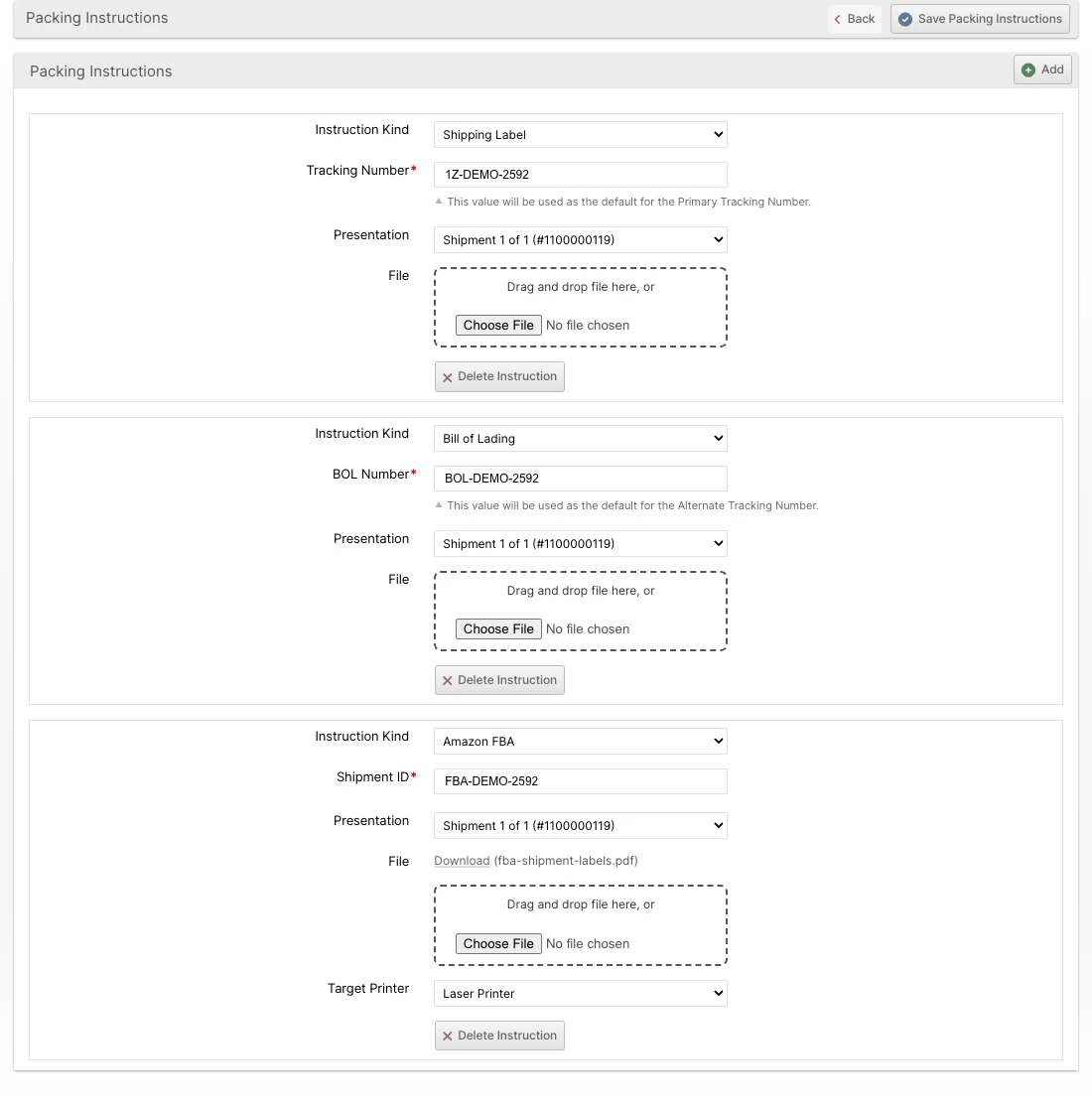
Shipping documents that arrive after an Order is placed, such as Amazon FBA pallet labels or a Bill of Lading from the customer's carrier, can now be attached to the exact Shipment they belong to instead of being emailed to the floor. Packing Instructions have a document type, Shipping Label, Bill of Lading, Amazon FBA, Commercial Invoice, Certificate of Origin, or NAFTA/USMCA, with a matching reference field, and can target the first Shipment, every Shipment, every Package, or one specific Shipment. Shipping Label and Bill of Lading references fill in the tracking numbers during packing.
Documents can be added to an unshipped Shipment even after packing is complete, and the Shipments grid's Unconfirmed Instructions filter gives the floor a queue of documents still to print. A document whose Shipment was voided or removed warns and blocks packing until it is reassigned. Commercial Invoices and other customs documents can instead be uploaded to FedEx with the label.
Lot Recall Quarantine
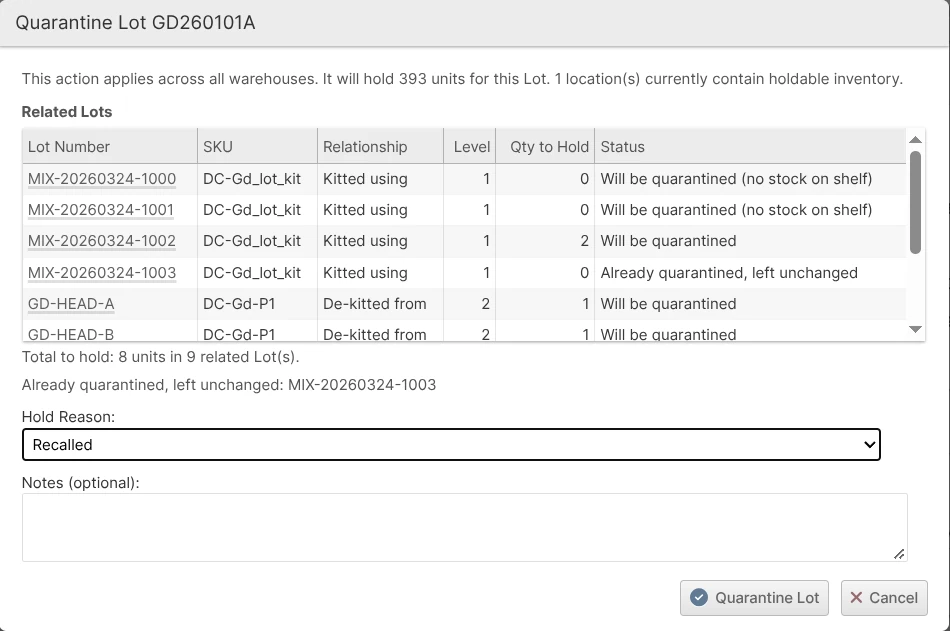
Quarantining a recalled component now quarantines what was made from it. Quarantine Lot in the Admin UI also holds every Lot made from the selected Lot: kits assembled with it and components de-kitted from it, level by level, in every Warehouse. The Lots it was made from are not held. Before you submit, the popup lists each related Lot and the quantity that will be held, and stock of these Lots put away later is held too.
A related Lot that was already on hold for another reason joins the recall, so it stays quarantined when its own hold ends. Release Quarantine can release the whole group at once, and the release popup lists every reason a Lot is held so you choose exactly what to release. When the Lot was released on its own, Release Related Lots on its Lot page releases the related Lots still quarantined with it in one step (see Releasing the Related Lots Later). The nightly expiry check now releases only the holds it placed itself, so a manual Expired or Near Expiry quarantine is no longer released overnight. A de-kit Work Order that picked boxes from more than one kit Lot can no longer count components while any of those kit Lots is on hold, because the count cannot tell which box the components came from.
cascade_bom=true should review the response changes listed under Global API Updates. In the Admin UI, Quarantine Lot now also holds related Lots, so brief staff who handle recalls.Shopify Admin API 2026-07
The Shopify plugin now uses Shopify Admin API 2026-07, ahead of Shopify retiring the version it used on October 16, 2026, and is ready for Shopify's 2027 fulfillment changes. Only Shopify fulfillment orders that are being shipped are imported; store pickup, local delivery, and orders marked as needing no delivery are rejected with the reason shown in Shopify. The shipping method now comes from the shipping line of the fulfillment order's own items, so an order that mixes shipping and pickup, or is split into several shipments, maps each part correctly.
The update also fixes several long-standing issues: an order whose cancellation was rejected because it had already been picked is now fulfilled in Shopify with tracking, a stock level that reaches zero is sent to Shopify right away, retried stock updates are no longer applied twice, and Import Unsubmitted Fulfillment Orders tags orders and records import errors as documented.
ShipStream Packer Thorough and Angled Placement
ShipStream Packer now packs with a Thorough search by default, comparing many candidate packings and keeping the best one instead of taking the first that fits. On a postage model over 6,877 real parcel orders, Thorough with angled placement came out about 4% cheaper than the previous Fast search. It also never leaves an item resting on less than half of its base, and falls back to Fast for any set of items it cannot pack.
Angled placement lets an item slightly too long for a carton lie diagonally across it instead of forcing a larger carton. The 3D viewers in the Admin UI, Client UI, and Scanner UI packing screen draw angled items at their angle with a label such as 31.6°, so packers can place them the same way. The new Enable Shipment Cost Model setting, on by default, also makes ShipStream prefer the cheapest of several solutions, while a Preferred solution and solution priority still come first. See Packing Solutions for the settings.
box_packer source should also accept the new thorough source.Other Improvements
- Added a Number of Copies choice to Print Bill of Lading on Order and Shipment pages in the Admin UI and Client UI: one copy, one per package, or any number up to 100, sent as a single print job or a single PDF.
- Improved the Retailer popup on Create New Order and Edit Order to sort Retailers by name and Ship-To and Mark-For Locations by code and label, with numbers sorted as numbers. A Retailer's default Location is listed first.
- Added a Location Profile column to the Locations grid at Operations -> Warehouse -> Locations, listing every Location Profile each Location belongs to. Filter by one or more Profiles to see exactly which Locations a Slotting Rule or Replenishment Lane will act on.
Bug Fixes
- Fixed a weight typed into the Scanner's Actual Wt. field during packing being cleared after a failed weight check or while a weight override was pending, which forced the packer to re-enter it. Typed weights are now also read in the displayed weight unit.
- Fixed packing weight checks ignoring a Merchant-level Minimum Packaging Weight and always using the global value.
- Fixed Rack Location auto-assignment in a Warehouse stalling indefinitely after an interrupted run, and Scanner activity in that Warehouse timing out while Locations were being re-matched after a Rack save or import. The Auto-Assign Locations mass action now reports that assignment has been queued rather than claiming it already finished.
- Fixed photo uploads that reported "Photos uploaded successfully." when nothing was saved. The Admin UI, Client UI, and Scanner now show why a photo was rejected, and a rejected photo is removed from the upload list instead of looking uploaded. JPEG photos saved with a
.jfif,.jpe,.jif, or.pjpextension, which some browsers and devices produce, are now accepted.
- Fixed the Utilization column on the Locations grid and the Capacity indicator on the Location page staying out of date after a Product's weight changed, for Locations that have a Max Total Weight. Editing a Product, using the Update Attributes mass action, or importing Products now refreshes the affected Locations within about a minute.
- Fixed the replenishment move size inferred from a Product's quantity Bill of Materials being shown on the Product Override form but not used. When no override is saved, the case or pack size now sets the move size in effect, and Slotting Density ranks Products without their own dimensions using that case or pack's size instead of excluding them.
- Fixed Change Shipping Method on an Order's Shipments tab listing the system-wide shipping methods instead of the Merchant's. It now offers the same methods as the Order's Shipping & Handling edit form, limited to the Retailer's Allowed Shipping Methods when set, and rejects a method the Retailer does not allow.
- Fixed placing an Order on hold and releasing it not resetting the Target Ship Date when the Order was already not ready to ship, and a shipping method change during a hold setting a Target Ship Date that survived the release. Shipments in both cases were reported as shipped late.
Global API Updates
- Added an opt-in
mark_for_locationfield on Orders and Shipments (/v1/shipping/orders,/v1/shipping/shipments) referencing the Retailer location the cartons are marked for, with the same nested field expansion asretailer_ship_to_location.
- Fixed paging on endpoints that scope their results before paging, such as
GET /v1/inventory/warehouses/{id}/replenishment-report, when a plain recordidcursor is combined with a non-idsort. The page boundary is now resolved only from records within the request's scope, so rows are no longer skipped or repeated at a page boundary. A plainidcursor that refers to a record outside the requested scope, such as a Product not stocked in the requested Warehouse, now returns a 400 "record referenced by the cursor no longer exists" response.
- Fixed Product weights and dimensions reporting values in a different unit from the unit named in the response, so each value now matches its unit label.
- Added
qty_packedto inventory levels (/v1/inventory/levels/warehouse,/v1/inventory/levels/total), and thepackedOrder status.
- Added
/v1/inventory/warehouses/{id}/replenishment-tasksto list and create Replenishment Tasks,/replenishment-tasks/{task_id}and/replenishment-tasks/{task_id}/cancelto read and cancel one, and/replenishment-tasks/healthfor a Warehouse's task health. Replenishment Policies gainemergency_floor_qty, and the Replenishment Report produces theemergencytrigger and acount_lockedadvisory.
- Added
demand_context_mode(allorinclude) anddemand_contextsto Replenishment Policies.includewith an empty or unknown context is rejected.
- Added optional
effective_move_multiple_qtyandeffective_move_multiple_sourcefields toGET /v1/inventory/warehouses/{id}/replenishment-report(API version2026-08, requested throughfields), reporting the move size in effect and whether it comes from anoverride, isinferred, or isunstorable,none, ornot_evaluated. They are advisory:desired_level_qtyandtarget_gap_qtyare not rounded to this multiple.
- Updated
POST /v1/inventory/holds/lotwithcascade_bom=trueto hold only the Lots made from the Lot, in every Warehouse. Thecascaderesponse dropsrelease_mode,root_hold_ids,skipped_lots_no_origin_in_stock, andskipped_locations_no_origin_in_stock, and addsdetached_lot_ids. Releasing withrelease_cascaded=truenow works, returnsrequarantined_lot_ids, and returns 422 asking to retry when the Lot changed during the request. On a Lot that was released on its own,release_cascaded=truereleases the related Lots still quarantined with it. Holds written through the Global API record the API token as the requester, and the newBackgroundJobrequester type identifies the nightly Lot expiry check. - Added
reason_hold_idstoPOST /v1/inventory/holds/lot/{lot_id}/releaseto release only some of the reasons that hold a Lot, as the Admin Release Quarantine popup does, andleft_origin_lot_idsto its response. An id that is no longer a reason of the Lot returns 422 and nothing is released. - Added
GET /v1/inventory/holds/lot/{lot_id}, which returns the reasons that hold a Lot (with theirhold_idforreason_hold_ids), the Lot it was quarantined with, the related Lots that a release withrelease_cascaded=truereleases, inleaving_related_lot_idsthe related Lots that such a release takes out of the quarantine while they keep another hold, and instill_quarantined_lot_idsthe related Lots still quarantined with a Lot that was released on its own. - Added
POST /v1/inventory/holds/lot/{lot_id}/release-related-lots, which releases the related Lots still quarantined with a Lot that was released on its own and leaves the Lot's own holds unchanged, as the Admin Release Related Lots button does.
- Added
kind,kind_label,identifier,shipment_id, andis_shipmentto Order instructions, theshipmentpresentation, and theuploadprint target.noteis kept as an alias ofidentifier.
Merchant API Updates
- Updated
stock_movement.listto distinguishpackandunpackfrom actualshipandunship, withqty_packed,qty_shipped,parent_type, andparent_idfields. Inventory methods returnqty_packed, Orderstatuscan now bepacked,order:completedis sent when the last Shipment ships, andtrack:createdis no longer sent when a tracking number is removed. See the migration guide.
- Added the document type, reference, and Shipment association to Order packing instructions, keeping the existing
notefields and method signatures so current integrations are unaffected.
- Added a
packagesarray to each entry in therate.quoteratesresponse, so an integration can compare rates using the expected size and weight of each package. Every physical package has its own entry, including packages with identical measurements, and the count matchespackage_count. Each entry containswarehouse_id,length,width,height,dimension_unit,weight, andweight_unit, whereweightis the estimated packed weight including packaging. Unknown measurements are returned asnulland never as zero. Existing response fields and rate calculations are unchanged.
- Added a
mark_for_locationoption onorder.createthat matches an existing Retailer location byqualifierandcode. For Wholesale Retailers, a code that matches no location is rejected unless location auto-creation is enabled, in which case the store is created from the address fields supplied.order.infoandshipment.inforeturn amark_for_locationblock including the store's address, andorder.searchandshipment.searchreturn it when requested throughfields.