

Version 2026.0.1
Other Improvements
- Fixed a failure to recover from a specific intermittent FedEx API error when fetching tracking info
- Fixed a failure to report error messages back to Shopify due to the message being too long
- Fixed an intermittent error when merging a group of PDF files
- Improved handling of invalid FedEx tracking responses (non-XML response)
Global API
- Added support for "Other" delivery type (in addition to existing ASN and RMA types)
- Return
tracking_numbersinline for deliveries as array of strings, removedtracking_number(not backwards-compatible) - Renamed
DeliveryItempropertyqtytoquantity(not backwards-compatible) - Removed the ability to expand
merchant.brandsandmerchant.default_brandfor deliveries endpoints (not backwards-compatible) - New field parameters for delivery endpoints allow selecting specific nested relationship fields:
fields:items- DeliveryItem fieldsfields:items.exceptions- DeliveryException fieldsfields:items.lots- DeliveryItemLot fieldsfields:items.locations- DeliveryItemLocation fieldsfields:containers- DeliveryContainer fields
- Fixed an error when requesting orders with status history
Cycle Count Grid
Planning your inventory cycle counts just got a dedicated home. We've added a new Cycle Count grid under Operations → Warehouse → Cycle Count that provides a purpose-built view for planning and prioritizing your counting operations, so you no longer need to mentally juggle between the Locations grid and the Velocities grid. The grid is built on the same foundation as the Locations grid but adds a critical new dimension: the Tier column, which displays each product's velocity tier as a color-coded badge. This enables ABC-style cycle count frequency planning — your high-velocity "A" tier items are immediately visible, making it easy to ensure they're counted more frequently than slower-moving stock.
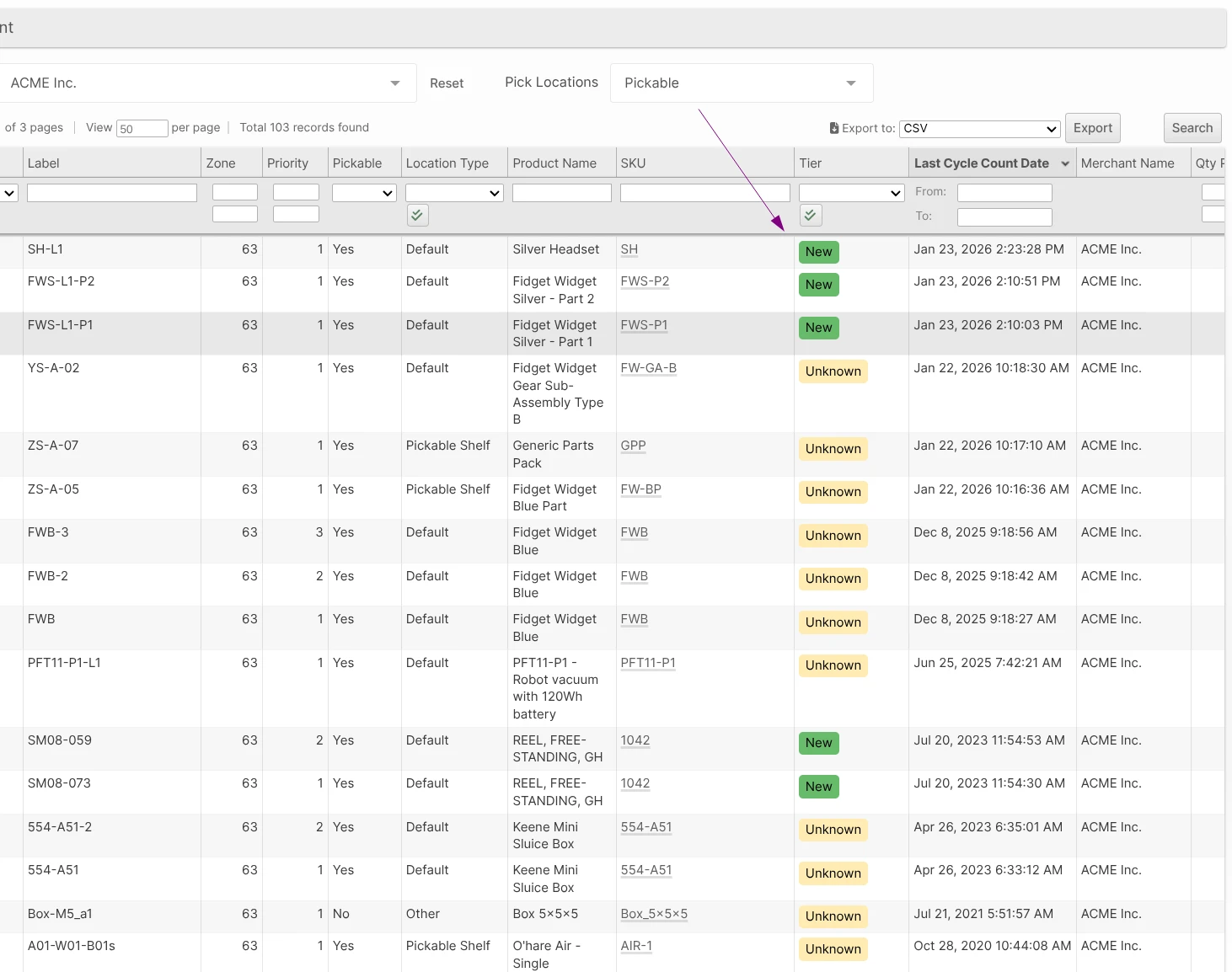
By default, the grid hides empty locations and sorts by Last Cycle Count Date in descending order, so locations that haven't been counted recently naturally rise to the top of the list. Key columns include Label, Zone, SKU (with a clickable link to the product), Tier, Last Cycle Count Date, and inventory quantities (Put-Away, Unreserved, Reserved). Clicking any row navigates to the Location edit page, and CSV/Excel export is available for offline planning.
Other Improvements
- Implemented USPS dimensional weight cap rule: when dimensional weight exceeds 70 pounds for qualifying USPS services (zones 1-9, domestic, volume > 1 cubic foot), the billable weight is capped at 70 pounds. *
- Fixed a 500 error when fetching additional pages of the inventory levels endpoints (using
cursor_start). * - Added "Use Separate Manifest Code for UPS 2nd Day Air" option to System -> Configuration -> Shipping -> Shippin g Methods -> UPS to allow 2nd Day Air and 2nd Day Air A.M. service levels to be manifested with the UPS Next Day Air manifest courier.