

Version 2026.0.2
Cycle Count Grid
Planning your inventory cycle counts just got a dedicated home. We've added a new Cycle Count grid under Operations → Warehouse → Cycle Count that provides a purpose-built view for planning and prioritizing your counting operations, so you no longer need to mentally juggle between the Locations grid and the Velocities grid. The grid is built on the same foundation as the Locations grid but adds a critical new dimension: the Tier column, which displays each product's velocity tier as a color-coded badge. This enables ABC-style cycle count frequency planning — your high-velocity "A" tier items are immediately visible, making it easy to ensure they're counted more frequently than slower-moving stock.
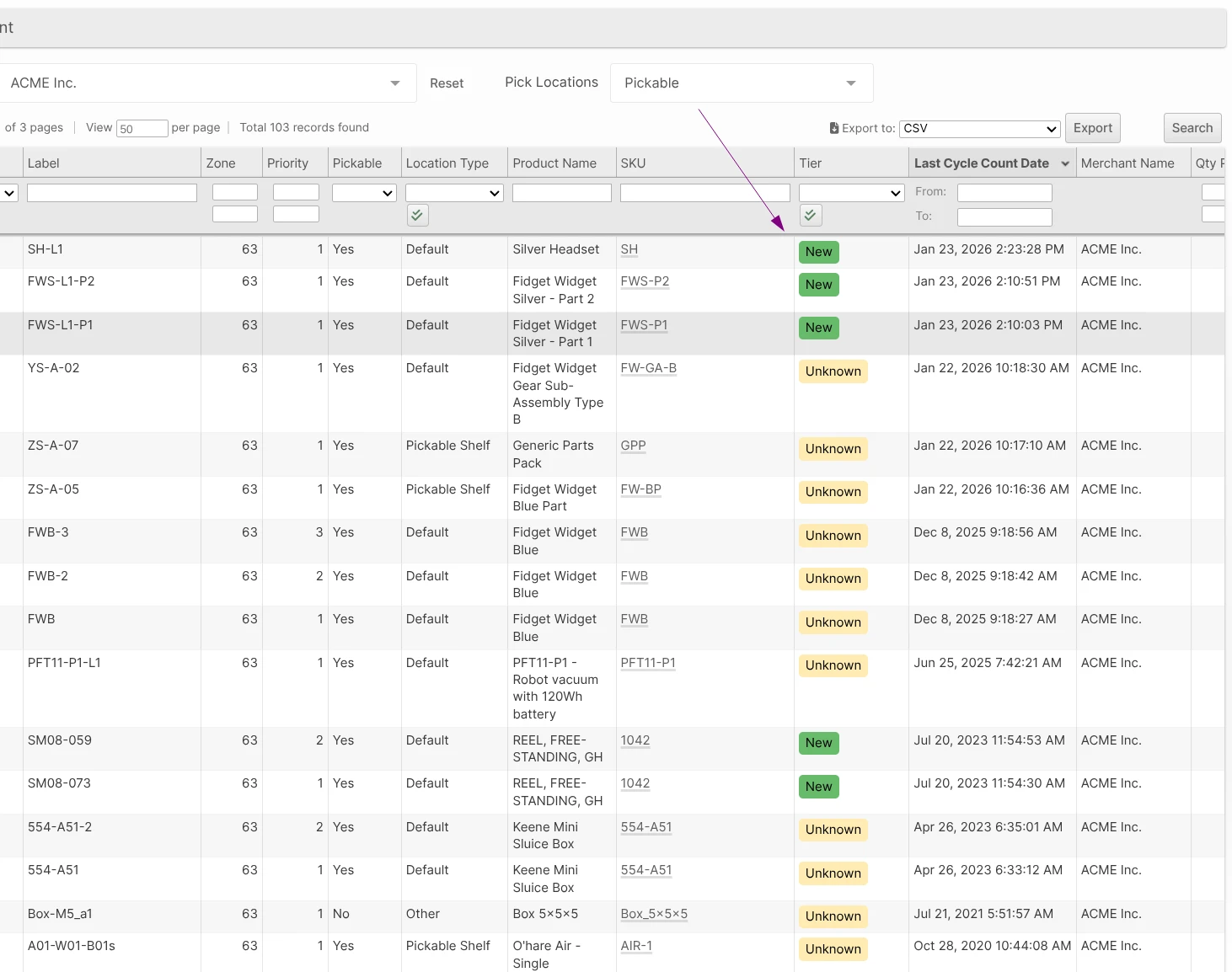
By default, the grid hides empty locations and sorts by Last Cycle Count Date in descending order, so locations that haven't been counted recently naturally rise to the top of the list. Key columns include Label, Zone, SKU (with a clickable link to the product), Tier, Last Cycle Count Date, and inventory quantities (Put-Away, Unreserved, Reserved). Clicking any row navigates to the Location edit page, and CSV/Excel export is available for offline planning.
First Receipt Exception
A new First Receipt Exception option is available for ASN deliveries, giving warehouse managers visibility and control when a product is received at a warehouse for the first time. When enabled, a delivery exception is automatically created the first time any SKU is counted in, flagging the item for review before it is put away.
This is useful for workflows where new products require a quality check, weight/dimension capture, or other onboarding steps before entering the normal receiving flow. The exception behaves the same as the existing Required Attributes exception — it can be resolved or rejected — and includes an optional configurable comment to prompt receivers with instructions.
Enable the feature per delivery type at System → Configuration → Receiving → {Type} → Processing → First Receipt Exception, and optionally set a default comment at First Receipt Comment.
Location Weight Limits
You can now define weight restrictions on individual locations to prevent unsafe conditions and direct put-away to the right areas of your warehouse.
Three new optional fields are available on every location:
- Min Item Weight: Items lighter than this limit should not be put away in this location (e.g., to keep heavy-duty pick zones free of light items).
- Max Item Weight: Items heavier than this limit should not be put away here (e.g., to protect shelving rated for lighter loads).
- Max Total Weight: The cumulative weight of all inventory on the shelf must not exceed this value.
All limits are expressed in your warehouse's default weight units and default to unrestricted. Configure them per location via the new Location Restrictions fieldset on the location edit form, or import them in bulk via the Locations CSV import using the column headers Min Item Weight, Max Item Weight, and Max Total Weight. The Location grid also gains four new columns — Min Item Weight, Max Item Weight, Max Total Weight, and Current Weight (computed as units on shelf × SKU weight) — so you can monitor headroom across all locations at a glance.
Scanner Enforcement
A new Enforce Location Restrictions Yes/No setting is available under System → Configuration → Warehouse → Scanner → Put-Away and System → Configuration → Warehouse → Scanner → Relocation:
- No (default): When a restriction would be violated, the scanner displays a clear warning and asks the operator to confirm before proceeding. They can cancel or continue.
- Yes: Violations produce a hard error — the put-away or relocation is blocked until a compliant location is chosen.
The scanner also displays the location's weight limits and current on-shelf weight in the Put-Away and Relocation screens, giving operators the context they need before committing to a location.
Other Improvements
- Work Order Kitting Instructions and Internal Notes can now be edited after picking has begun. The Additional Information fieldset remains editable on the Work Order edit page for WOs in the Reserved, Picking, Picked, Assembling, and Disassembling statuses.
- Added a Currently Locked Shipments counter to the Create BFO screen showing the total number of shipments held by active locked configurations. The counter updates automatically when locking or unlocking combos.
- Added On Hand and On Hand Weight columns to the Locations grid. On Hand is the total quantity at a location (Put-Away + Unreserved + Reserved); On Hand Weight is that quantity multiplied by the product's unit weight, displayed in your configured weight unit. Both columns are sortable and filterable and are also shown as read-only fields on the Location edit form.
- Fixed incorrect shipped dates caused by carriers reusing tracking numbers. Tracking events predating the shipping label's creation are now ignored, preventing historical data from a previous shipment from affecting the current shipment's status or timestamps.
- Fixed pressing Enter in a grid filter field on the Product Edit page causing the product to be saved and the user redirected to the Catalog Grid. Pressing Enter in any grid filter field now only applies the filter.
- Improved the Shopify integration's handling of missing API permissions. When the
read_locationsaccess scope is not granted, the integration now detects this, surfaces a clear message in the connection diagnostics ("The 'read_locations' access is required. Please re-activate to update permissions."), and stops retrying — preventing repeated errors until the permission is restored by re-activating the plugin. - Optimized the warehouse statistics query to reduce lock contention on large inventories.
- Optimized the Stock Movement grid query to avoid slow filter lookups when a text filter contains only whitespace.
- Implemented USPS dimensional weight cap rule: when dimensional weight exceeds 70 pounds for qualifying USPS services (zones 1-9, domestic, volume > 1 cubic foot), the billable weight is capped at 70 pounds.
- Fixed a 500 error when fetching additional pages of the inventory levels endpoints (using
cursor_start). - Added "Use Separate Manifest Code for UPS 2nd Day Air" option to System -> Configuration -> Shipping -> Shippin g Methods -> UPS to allow 2nd Day Air and 2nd Day Air A.M. service levels to be manifested with the UPS Next Day Air manifest courier.
- Fixed an internal server error that occurred when viewing the inventory tab of a product associated with a delivery whose quantity exceeded the maximum supported value for a BOM item on a delivery (999,999). *
- Fixed issue where shipments between certain regions within GB country code require a commercial invoice.
- Fixed order scripts that explicitly set
send_emailto custom recipients being silently blocked after the 2025.7 release. - Fixed edge case internal error when rating a virtual shipping method shipment without a valid classification after the rate source was changed while shipment was in progress.