Create a Shopify Publicly Listed App
TODO - updates:
Add link to setup Private app as an alternative https://help.shipstream.io/article/52asr88vy1-shopify-public-and-private-apps#private_app_setup_not_using_o_auth
Use "acme-3pl.shipstream.app" as the base url for screenshots (shipstream.io is no longer used)
Reference the ShipStream config location for the App urls only (so user's don't copy/paste from the docs)
Add section on how to make the app "Unlisted"
Add section on how to handle GDPR requests (Pipedream)
Add section with pointers on how to submit app for review (need privacy policy, instructions for testing, etc)
ShipStream supports custom Shopify apps for 3PLs. This article will explain how to create a white label Shopify app that integrates with ShipStream.
Requirements:
- Shopify Partners account
- ShipStream with permission to access Plugins
Setting up a Shopify App
- Log in to your Shopify Partners account.
- Navigate to the Apps page.
- Click the Create App button in the top right.
- Choose Public App (listing in the Shopify App Store is optional)
- Enter your App's name, and the URL for accessing the ShipStream instance.
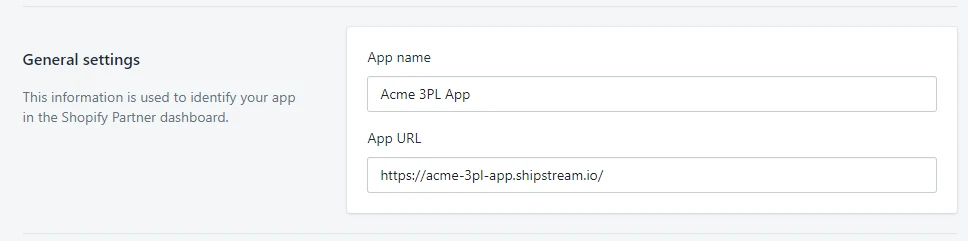
Include the following redirect URLs:
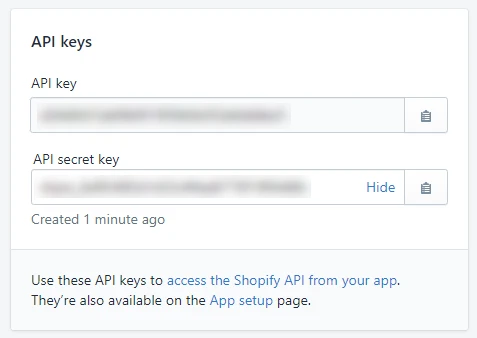
https://{account-id}.shipstream.io/index.php/admin/plugin_oauth/index/action/redirect/ https://{account-id}.shipstream.io/index.php/client/plugin_oauth/index/action/redirect/- Click Create App in the top Right. You will be redirected to the app's dashboard where you will need to use the information provided under API Keys.
You can either continue editing and configuring your app listing on Shopify by clicking Manage Listing and clicking English Listing, or continue setting up the integration on ShipStream as shown in the next steps.
Integrate the App with ShipStream
- Open your ShipStream instance and navigate to System > Configuration.
- Select Plugins/Webhooks from the left menu under "General".
- Scroll to the "Shopify Plugin" panel at the bottom of the page.
- Copy and paste the API Key from your Shopify App dashboard to the "OAuth API Key" field.
- In your Shopify App dashboard, click "Show" next to the API secret key, copy that value, then paste it into ShipStream in the "OAuth Secret" field.
- Enter the name of your fulfillment service in the ShipStream configurations.
- Click Save Config in the top right of the window.
ShipStream - Shopify Plugin configurations:

Shopify - API Keys: