

Version 2026.8
Whole-Unit Replenishment Tasks
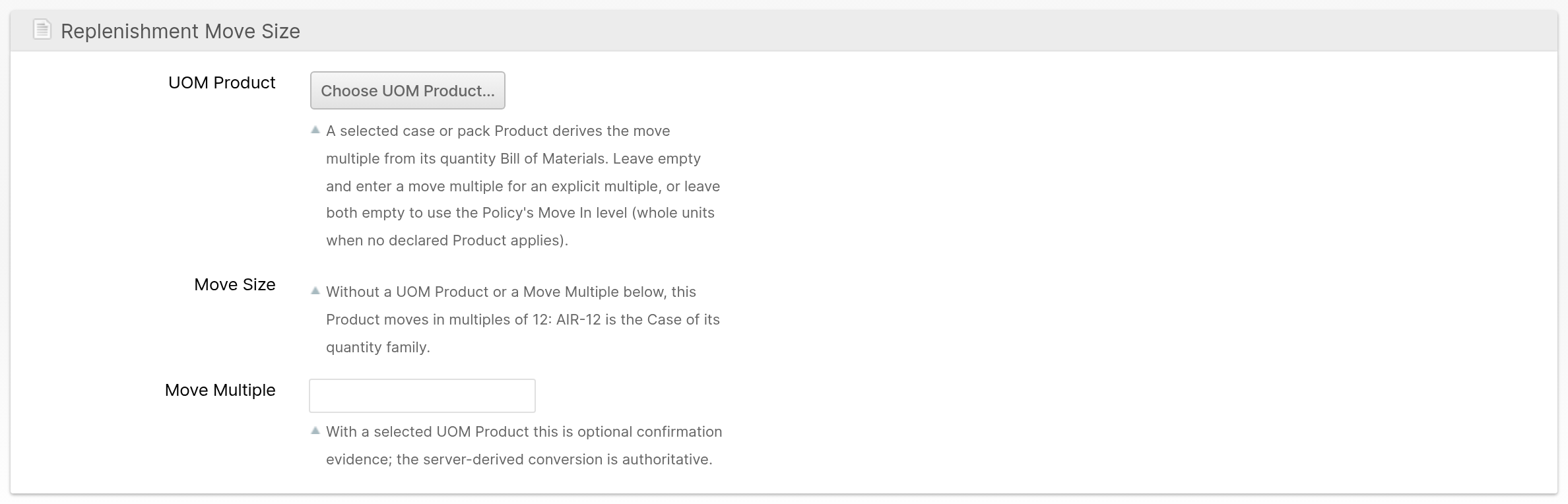
Replenishment Tasks move in whole move units: the case or pack size set on the Product's replenishment override, the case or pack declared at the Policy's Move In level (see Unit Levels and Replenishment Move In), or one whole unit of the Product when neither applies. A case Product that picking splits into eaches is replenished in whole cases, so reserve stock is never opened to carry part of a case to the pick face unless you choose to move it in inner packs. See Move Unit.
Unit Levels and Replenishment Move In
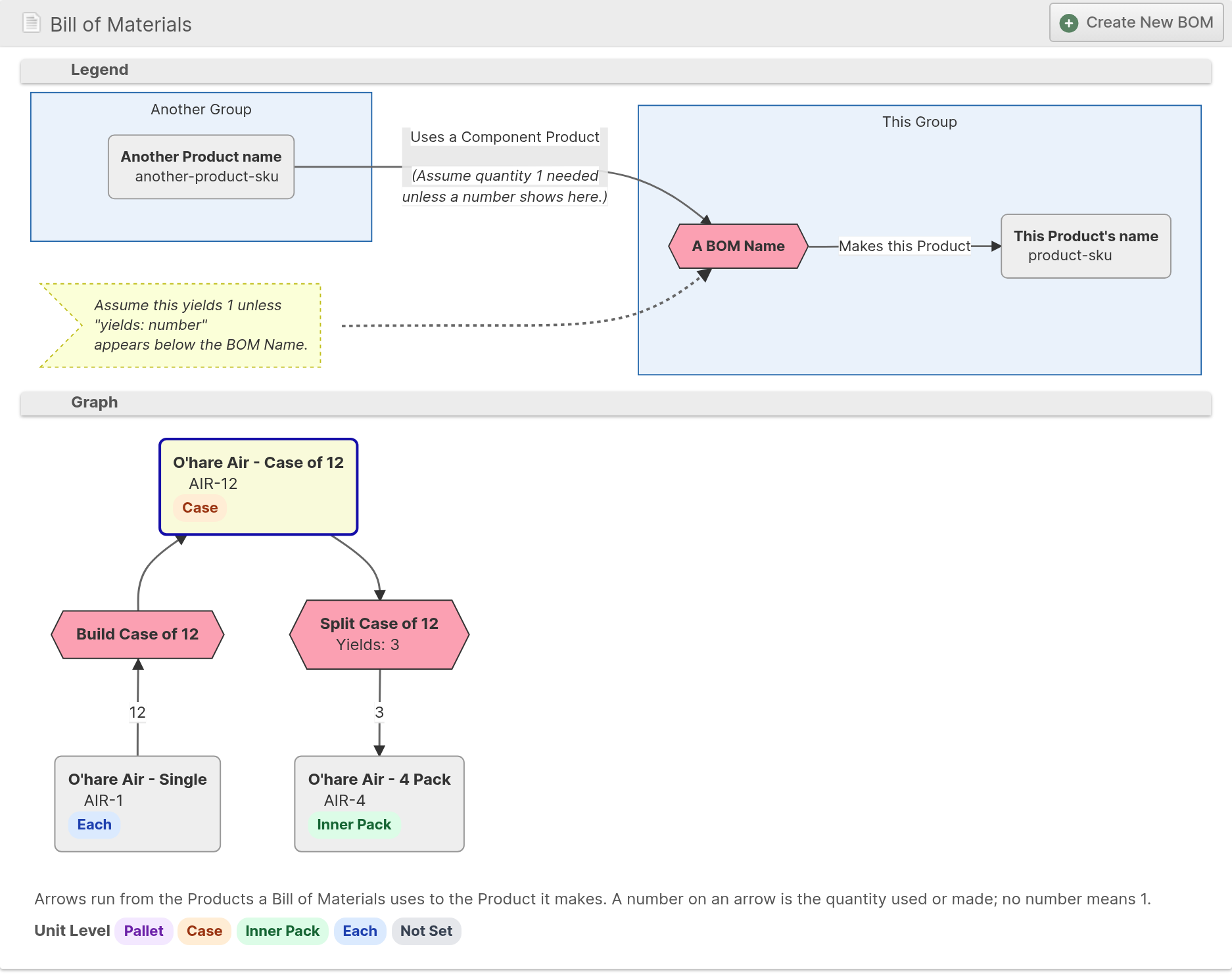
Replenishing pick faces in sealed cases or inner packs no longer needs a Product Override for every SKU. Declare each Product's packaging once with the new Unit Level, Each, Inner Pack, Case, or Pallet, on the Product page in the Admin UI and Client UI, with Update Attributes, or through Import Products. Each Replenishment Policy then says which level it moves in with the new Move In setting, Cases by default.
When the Product Override sets no move size, a Replenishment Task moves in the one Product declared at the Policy's Move In level among the Products related to the SKU by quantity Bills of Materials, converted into the SKU's units. A SKU stocked in eaches moves in its declared case of 12, and a case-stocked SKU under a Policy that moves in Inner Packs moves a third of a case at a time. When no Product, or more than one, is declared at that level, Tasks move whole units, and a move size stored on the override still wins. ShipStream never guesses which related Product is the case. See Replenishment Move Size.
For an existing catalog, a new suggestion script prints a CSV of likely Each, Inner Pack, and Case levels for one Merchant, read from its quantity Bills of Materials, and changes nothing; review the file and import it with Handle Duplicates set to Update. ShipStream refuses a Product or Bill of Materials save, import, or API call that leaves declared levels contradicting their sizes, such as an Inner Pack holding more than a Case, and names both Products. The Bill of Materials graph shows each Product's level as a colored badge, ordered from Pallet down to Each.
Put-Away Tours
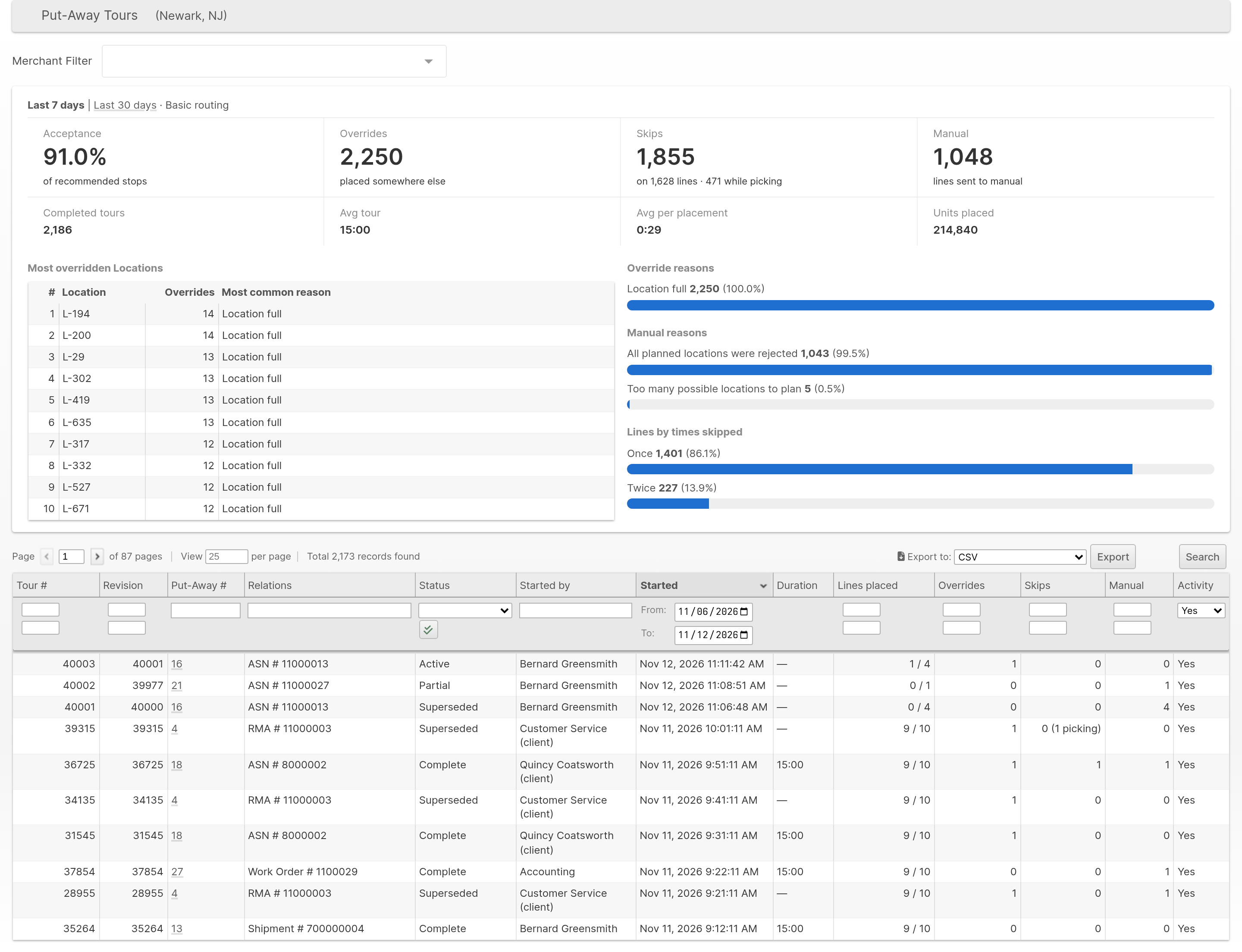
Supervisors can now see whether Directed Put-Away is working on their floor, which Locations operators keep turning down, and who may need coaching. The new Operations -> Put-Aways -> Put-Away Tours screen lists every tour with who started it, how long it took, how many lines were placed, and its overrides, skips (with the skips made because a Location was being picked) and manual lines. Filter by operator, exact Put-Away number, Relations (ASN, Work Order or Shipment number), status, or date, and export to CSV or Excel.
Above the grid, a summary of the last 7 or 30 days for one Warehouse shows the share of stops placed where recommended, average tour and placement times, why stops were overridden or sent to manual put-away, and the 10 most-overridden Locations with their most common reason, so a Location that is always full gets a visit instead of another override. Click any tour to see each stop's path of recommended Locations joined by arrows, where it was actually put, the reason for the original recommendation, and the most recent turn-down reason. The Why popup's Next best table shows which alternatives were turned down, are the current destination, or were used for placement, including operator choices. Every tour of a Put-Away is also listed on the new Tours tab of its page. See Reviewing Put-Away Tours.
Inventory Health on Deliveries
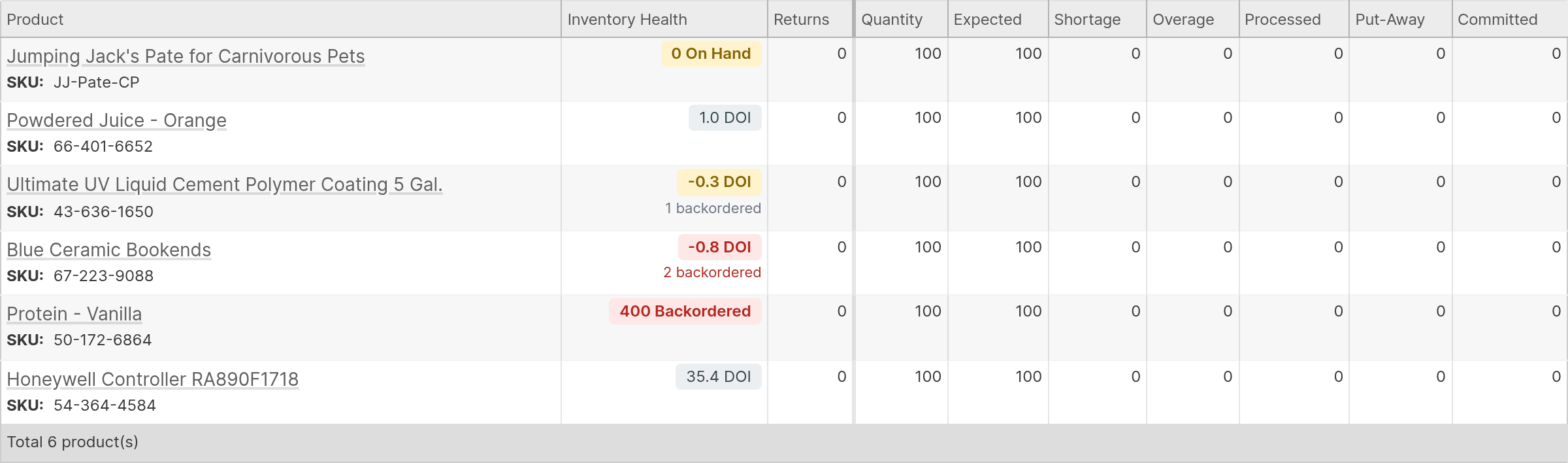
Receivers can now see which SKUs on an ASN, RMA, or Other Delivery are needed most urgently and put them away first. On the delivery page, the Items table's Inventory Health column replaces Backorders. It shows each SKU's days of inventory in the delivery's warehouse, net of backorders, as a badge such as 38.7 DOI, with any backordered quantity listed below it. A badge turns red at -0.5 days or lower, meaning orders are waiting for at least half a day of demand. A yellow badge indicates above -0.5 through 0.5 DOI. Without recent picks, a SKU with zero on-hand stock in the delivery's warehouse shows 0 On Hand in yellow. A SKU with orders waiting but no recent picks shows its backordered quantity instead, such as 400 Backordered, with red taking priority. Rest the pointer on a badge to see the stock, backorders, and daily demand behind it.
Put-Away Capacity Corrections
A wrong slot capacity no longer stops a put-away until someone edits the Product in the Admin UI. The Scanner's Manual and Directed Put-Away counter has a new Correct capacity button: the operator sets how many units really fit, either at This Location only (a lower beam, a sprinkler head) or for the Product in every Location of the Slot Type, picks a reason, reviews the effect, and confirms. Manual Put-Away saves the correction and the placement together; a Directed tour is planned again from the corrected Location. Every change records who made it, when, why, and the capacity before and after.
In the Admin UI, the Location page has a new Capacity tab listing the Products with their own capacity at that Location, with Clear and a history, and the Product's Slot Capacities tab shows Set By, Set At, and Reason for each Slot Type. Changing a Location's Slot Type or a Slot Type's dimensions resets the capacities measured for the old size unless you choose Keep. See Correcting a Capacity.
- Set the new capacity
Tap Correct capacity on the counter, choose the scope, and enter how many units really fit.
- Choose a reason
Select why the capacity is wrong.
- Review and confirm
Check the old and new capacity. Nothing is saved until you tap Confirm.
Location Occupancy
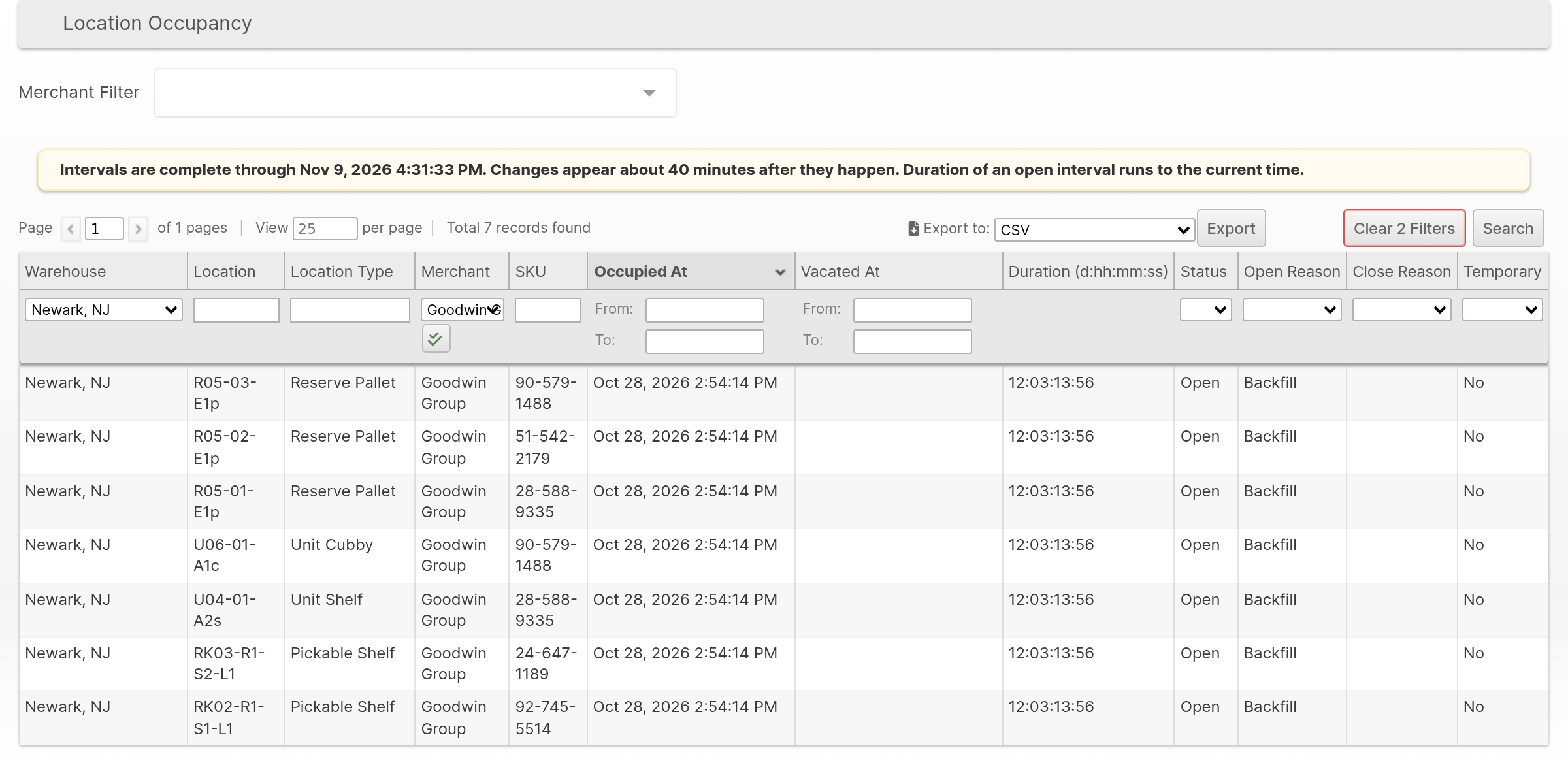
ShipStream now records how long each Location holds stock, and for which Merchant and SKU. Until now no occupancy history was kept, so storage per pallet position per day and cross-dock dwell time could not be measured. Each stay is one interval with its Location, Slot Type, Merchant, SKU, and the times it was occupied and vacated.
Review and filter the intervals at Operations -> Warehouse -> Location Occupancy, export them as CSV, or read them through the Global API. Intervals appear about 40 minutes after a movement, and the grid shows the time through which its data is complete. See Location Occupancy.
De-Kit Work Orders and Lot Holds
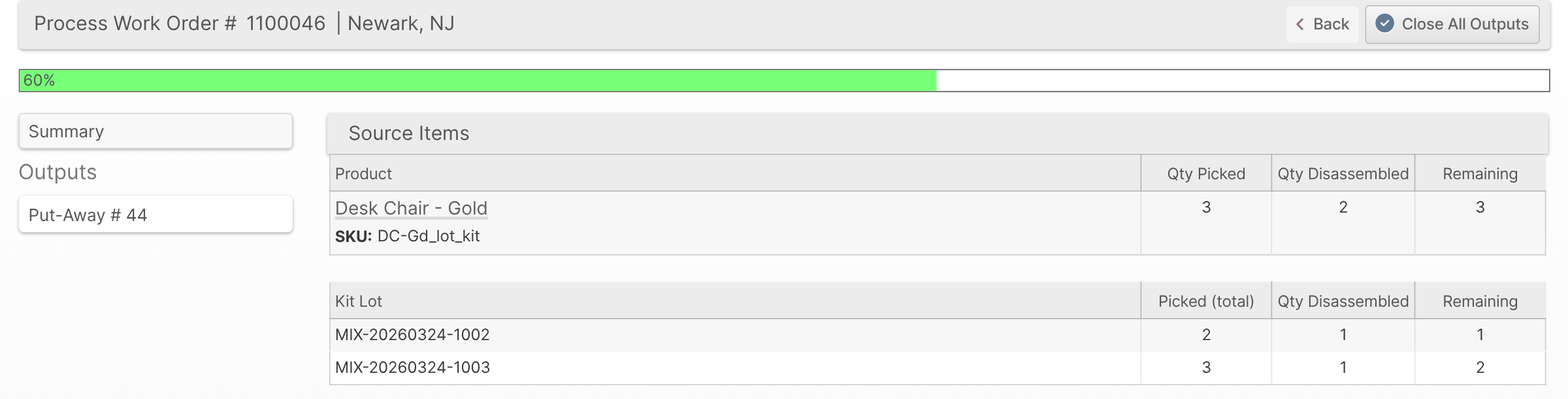
A recall of one kit Lot no longer holds everything a de-kit Work Order produced, and a Lot hold no longer leaves a de-kit Work Order stuck. Each de-kit count now records the Kit Lot its pieces came from, in the Admin count popup and in the Scanner. Quarantine Lot on a kit Lot then holds only the component Lots counted from that kit Lot, and while it is held, only counts from that Kit Lot are refused; kits from the Work Order's other Lots can still be de-kitted. Counts recorded before this release keep the earlier rule and are held with every kit Lot their Work Order picked. The Process Work Order page lists the picked, disassembled, and remaining kits for each Kit Lot, and the Work Order's Lots tab and its export show the Kit Lot of every component Lot.
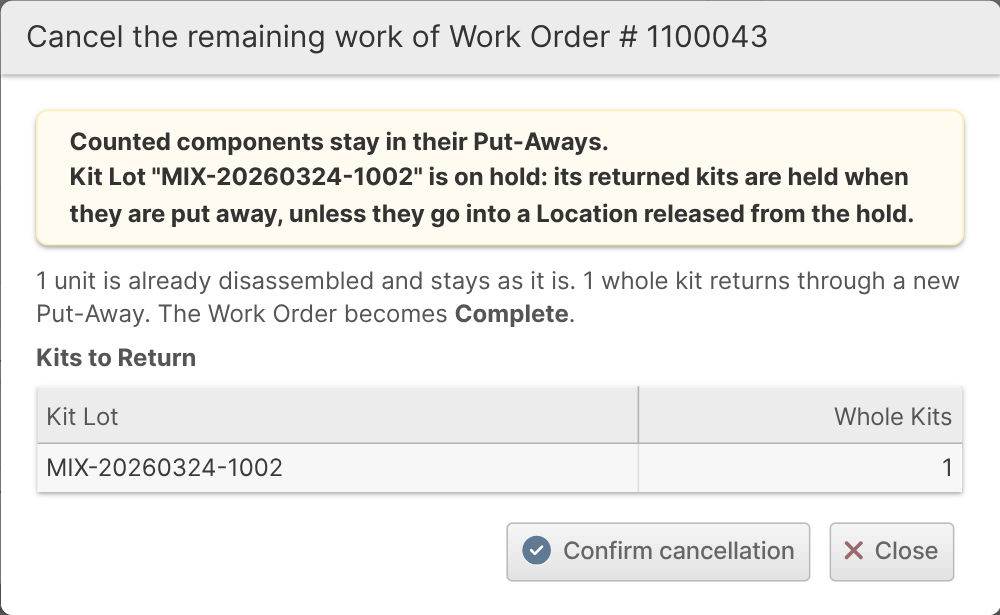
Cancel now works on a partly de-kitted Work Order. A popup shows what will happen and returns the remaining whole kits to stock under their own Lots; when ShipStream cannot tell how many kits are left in each Lot, you enter the counts. A Work Order with finished kits becomes Complete instead of Canceled. While a Kit Lot is on hold, the Admin count can still finish boxes that are already half-open, and the recovered component Lots are placed on the same hold. Canceling a kitting Work Order that produced several Lots also works, and Assemble All is refused while a component Lot it would consume is on hold.
Picking Batch Priority and Velocity Tier Filters
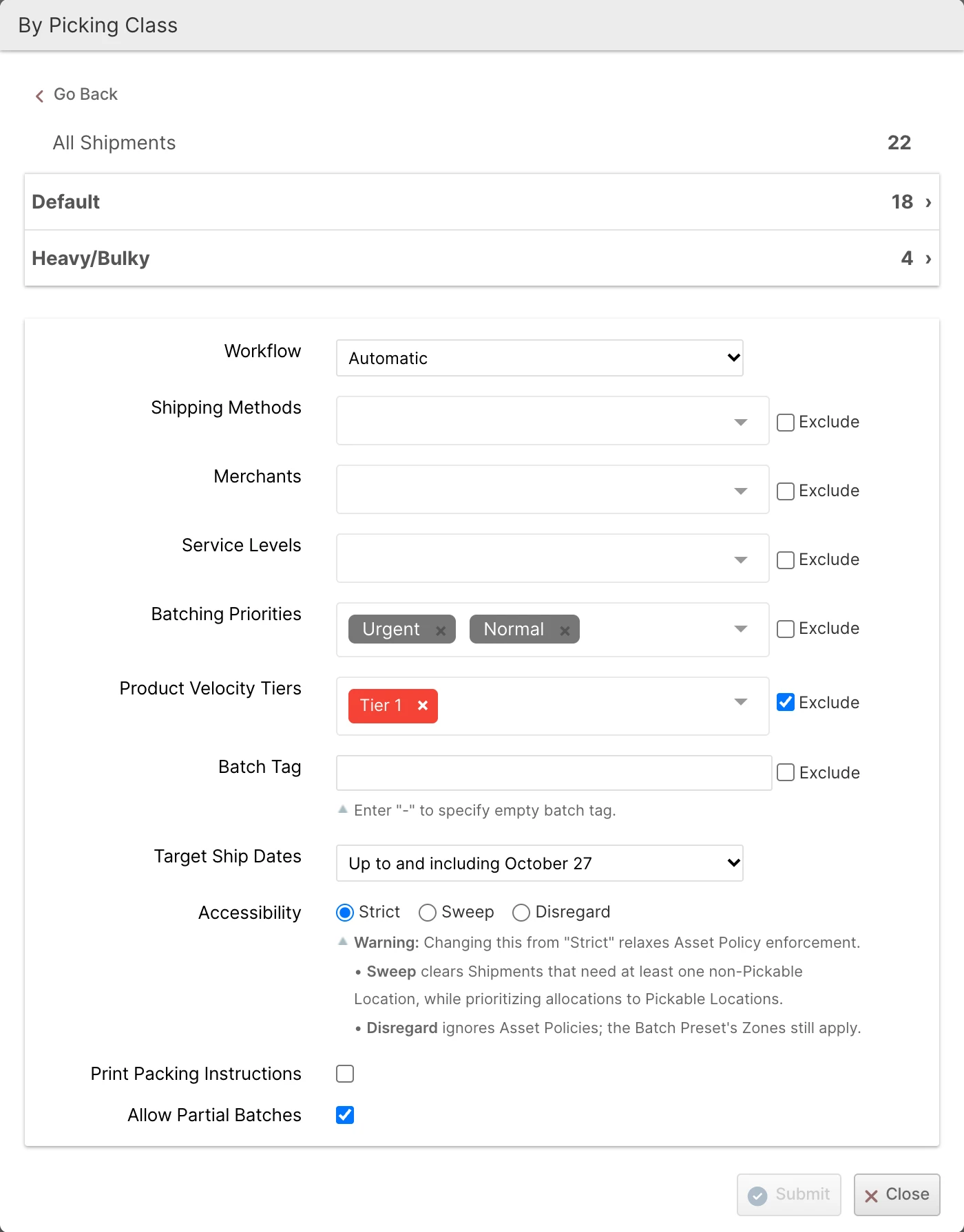
The Start New Picking Batch dialog has two new filters, Batching Priorities and Product Velocity Tiers, each with its own Exclude checkbox. Batch only the Urgent Shipments first, or leave out Shipments holding slow movers. The Shipment counts update as you filter, and a Shipment is always batched whole. See Picking Batches.
Zone-Aware Picking Batches
Picking Batches now favor fewer Zones and widen one ring of neighboring Zones at a time. Among the Shipments with the most urgent Batching Priority and the earliest Target Ship Date (Shipments without one count as earliest), a batch prefers to start from one that can be picked from a single Zone. Otherwise it prefers one that could be filled from the same Zones as the most waiting Shipments, so more of them can join. Zones never start a batch from a Shipment ahead of one with a more urgent Batching Priority or an earlier Target Ship Date. The first Shipment's items then favor fewer Zones, then fewer Racks.
When a batch runs out of Shipments in its own Zones, it now searches their Neighbors, then the Neighbors of those Zones, before the whole Warehouse. Before, it skipped the Neighbors step. From the Neighbors step on, the batch prefers Shipments that add the fewest new Zones, then those whose Zones are closest in Zone Picking Order, and picks a Product stocked in several Zones from the closest one. With Sort Shipments by Picking Order, still off by default, Shipments are also sorted by Rack distance along the batch's Pick Route from the Zones step on. Empty or fully reserved Locations no longer make a Shipment count as nearby. See How Batches Use Zones.
Allowed Overhang for Slot Types
A pallet position entered as its 48 × 40 in footprint can now count a long carton lying flat instead of on end, so Directed Put-Away no longer splits a load that fits in one Location. Fixed-capacity Slot Types have a new Allowed Overhang with a Sides value and a Front and Back value, each applying equally at both edges. Computed capacities count loads that hang past the slot's footprint by up to that much, but never by more than 15% of a unit's own length, and the form shows the largest usable footprint as you type.
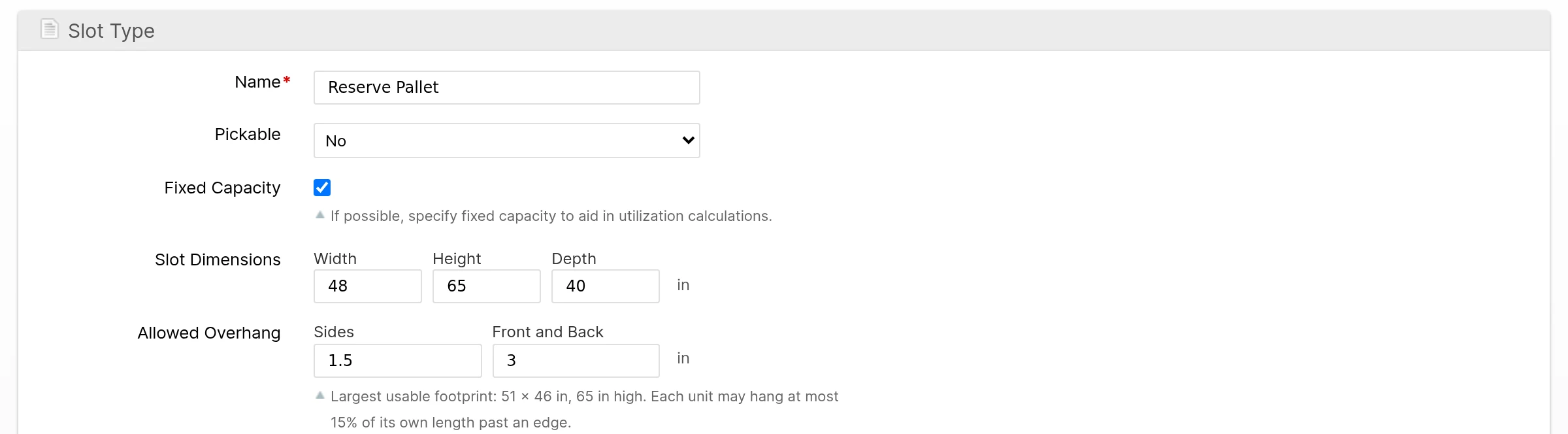
The Slot Types grid and export show both values, and the Product's Slot Capacities tab lists them for each Slot Type that has overhang. See Allowed Overhang for safe values and when to use interior dimensions instead.
Script Version History
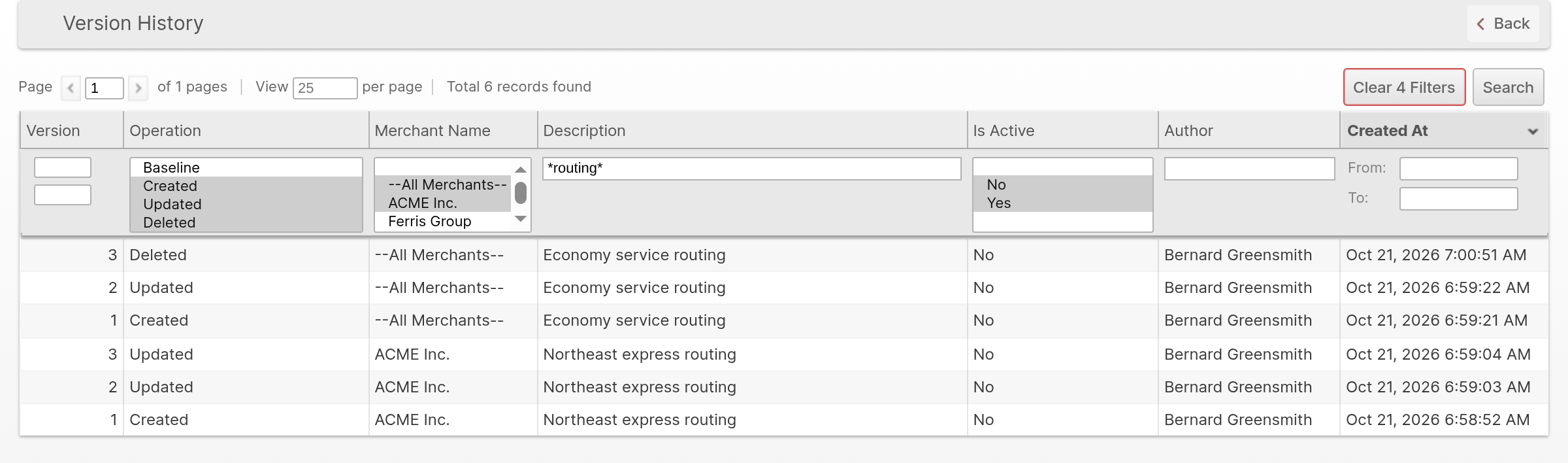
Every change to a script is now kept as a read-only version: creation, edits, activation changes, and the script's final state before it is deleted. Open a script and click Version History to see who changed what and to read any earlier version in full. Admin users can browse the history of every Merchant they have access to, including deleted scripts; Client users see the history of their own scripts. Existing scripts start with a Baseline version. See Version History.
Pickable Locations by Location Profile
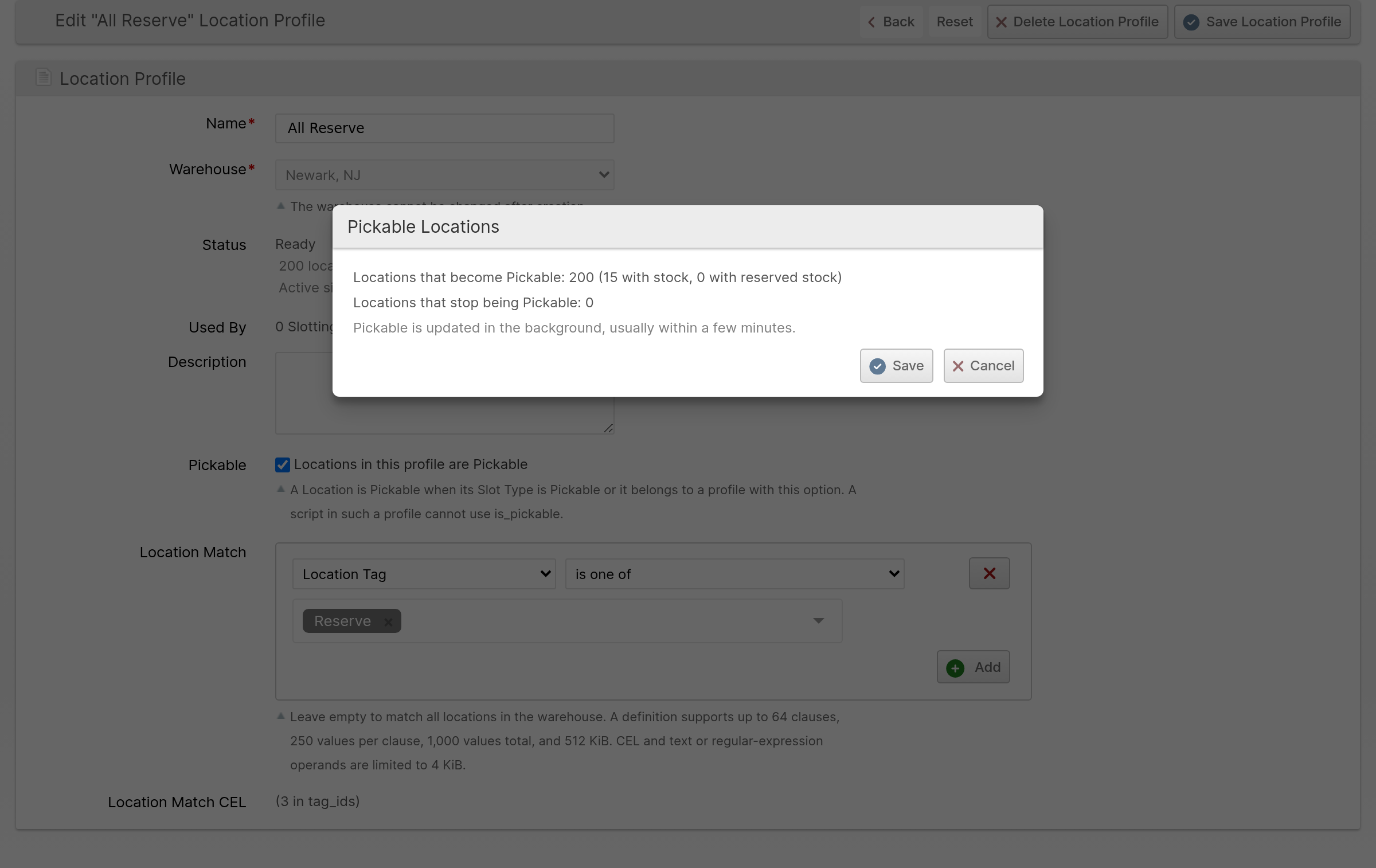
One Slot Type can now serve both pick and reserve positions. Until now a Location was Pickable only when its Slot Type was, so warehouses kept look-alike Slot Types, such as a pickable and a non-pickable pallet type, that differed in nothing else. A Location Profile can now make its Locations Pickable: tick Locations in this profile are Pickable and every Location the profile matches is Pickable, whatever its Slot Type. One "Pallet" Slot Type that is not Pickable and a "Pick pallets" profile matching the floor positions replace the pair, and a new pallet Location becomes Pickable when its label matches.
A Location is Pickable when its Slot Type is Pickable or it belongs to at least one such profile. A profile only adds pickability, so the Slot Type's Pickable setting keeps its meaning, and setting it to No leaves the Locations in such a profile Pickable. Before a save that changes which Locations are Pickable, the Pickable Locations popup shows how many Locations become Pickable and how many stop being Pickable, with how many of them hold stock or reserved stock. Pickable is then updated in the background, usually within a few minutes. On a profile that has already been Ready, turn the option on in a save of its own, once the profile is Ready with the Location Match you want.
The Edit Location page now shows why a Location is Pickable, Yes, from the Slot Type or the profiles that make it so, and the Slot Type page counts its Locations that are Pickable through a profile. See Making Locations Pickable.
Location Tags by Label Pattern
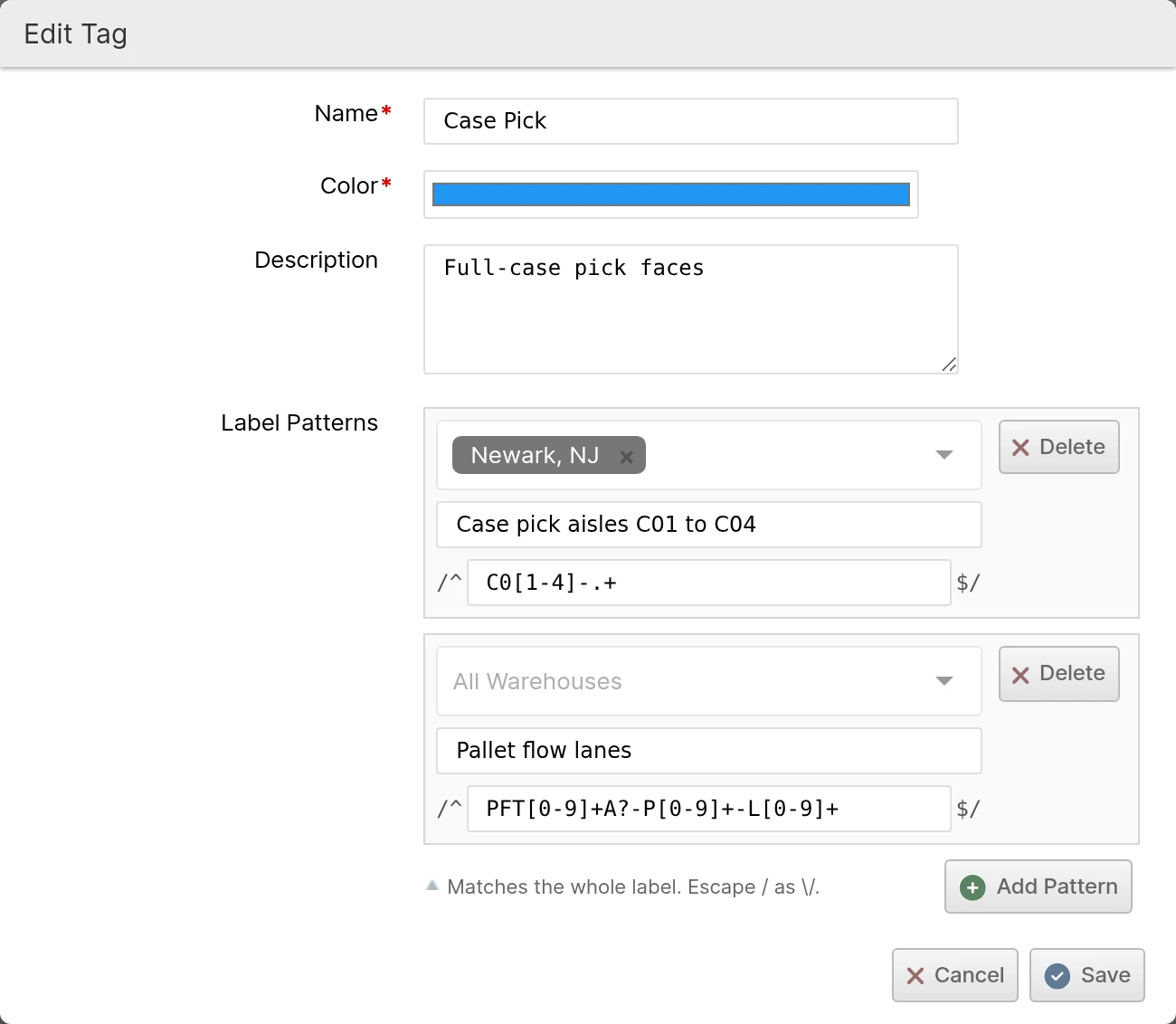
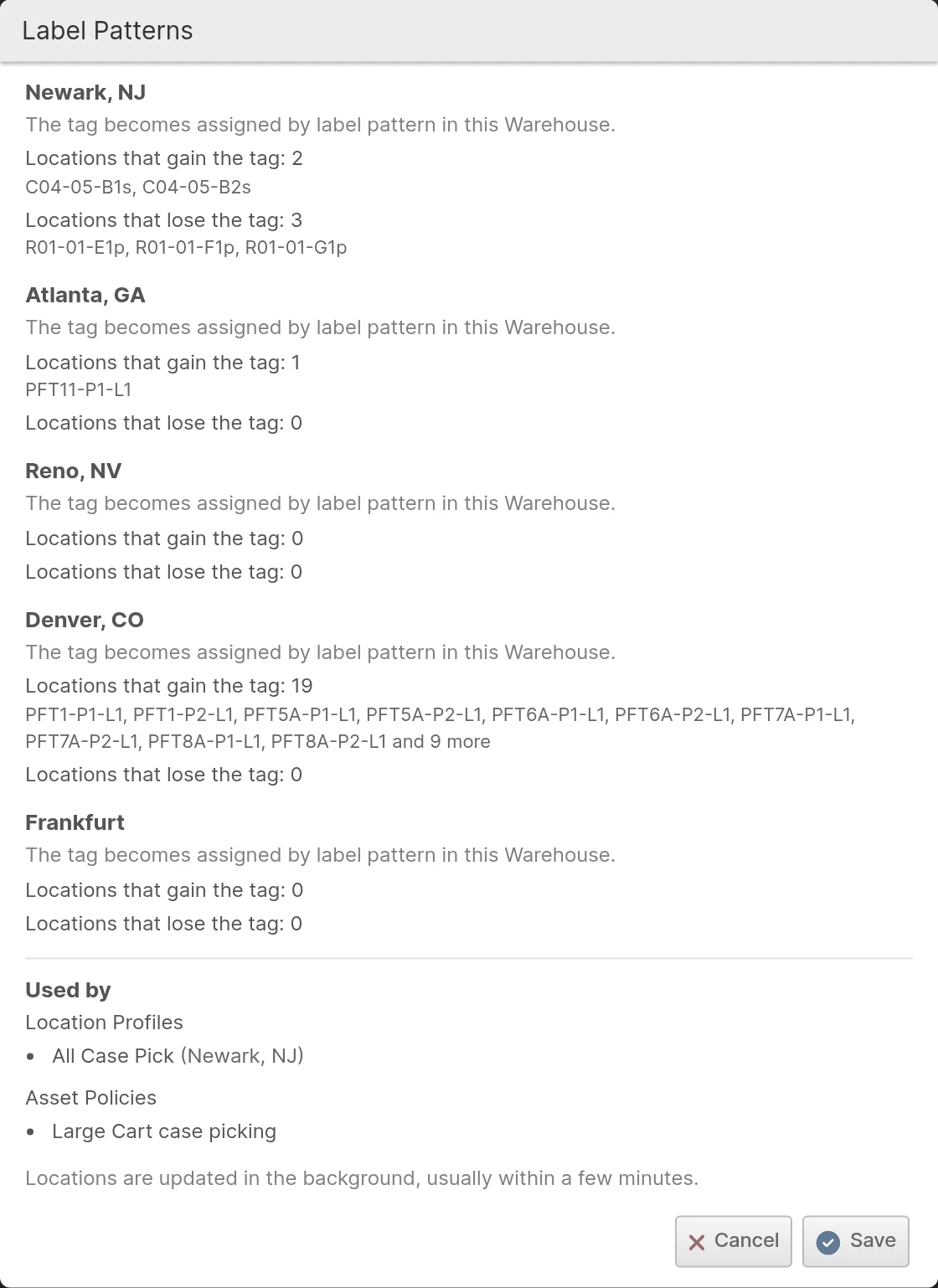
Location Tags can now follow your label scheme automatically, keeping Asset Policies, Location Profiles, and Pickable in step without tagging each new Location by hand. Add Label Patterns at System -> Tags, with a Description, a whole-label case-sensitive pattern, and optional Warehouses. A tag is automatic only in the Warehouses its patterns cover and stays manual elsewhere.
Before saving changed patterns, a preview shows Locations gaining or losing the tag, sample labels, and the Location Profiles and Asset Policies that use it. Existing Locations update in the background, usually within a few minutes. Automatic tags show as locked chips on Edit Location, and Replace Tags keeps them when replacing manual tags. See Label Patterns.
Pickup Schedules
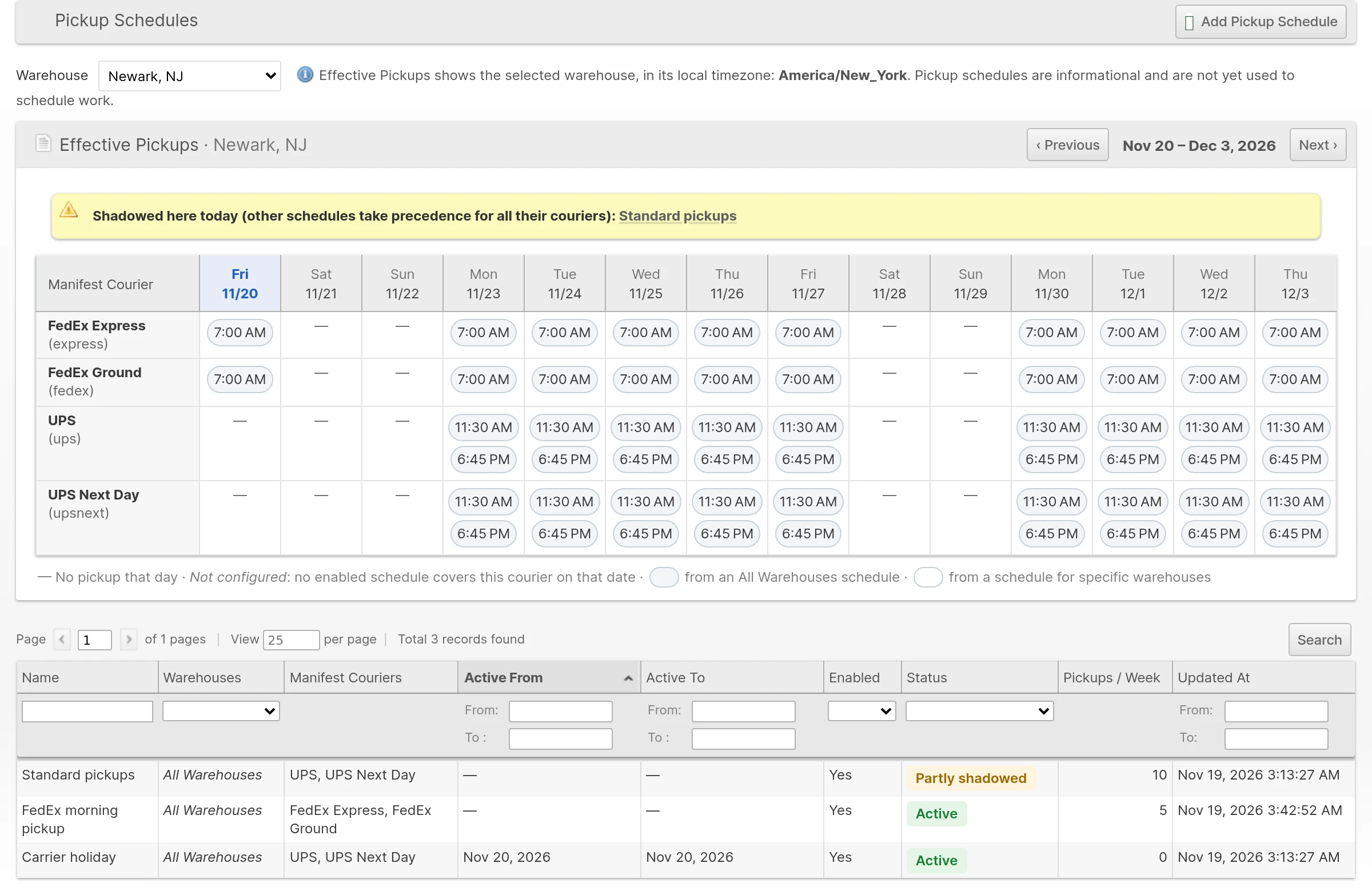
ShipStream now knows when each courier picks up. At the new System > Shipping > Pickup Schedules, record each Manifest Courier's pickup times by weekday, for All Warehouses or specific Warehouses, in each Warehouse's own time zone. Enter a holiday season or a carrier holiday ahead of time as a schedule with Active Dates: the schedule with the latest Active From sets the day, and one without times that day means no pickup. Effective Pickups at the top of the page shows the resulting times at a Warehouse for the next 14 days, the form's Overlaps box explains which schedule takes precedence, and each Warehouse page has a Pickup Schedules button. The new Dashboard marks scheduled pickups and compares each courier's work with its next pickup, and integrations can read the times through the Global API. See Pickup Schedules.
Redesigned Dashboards
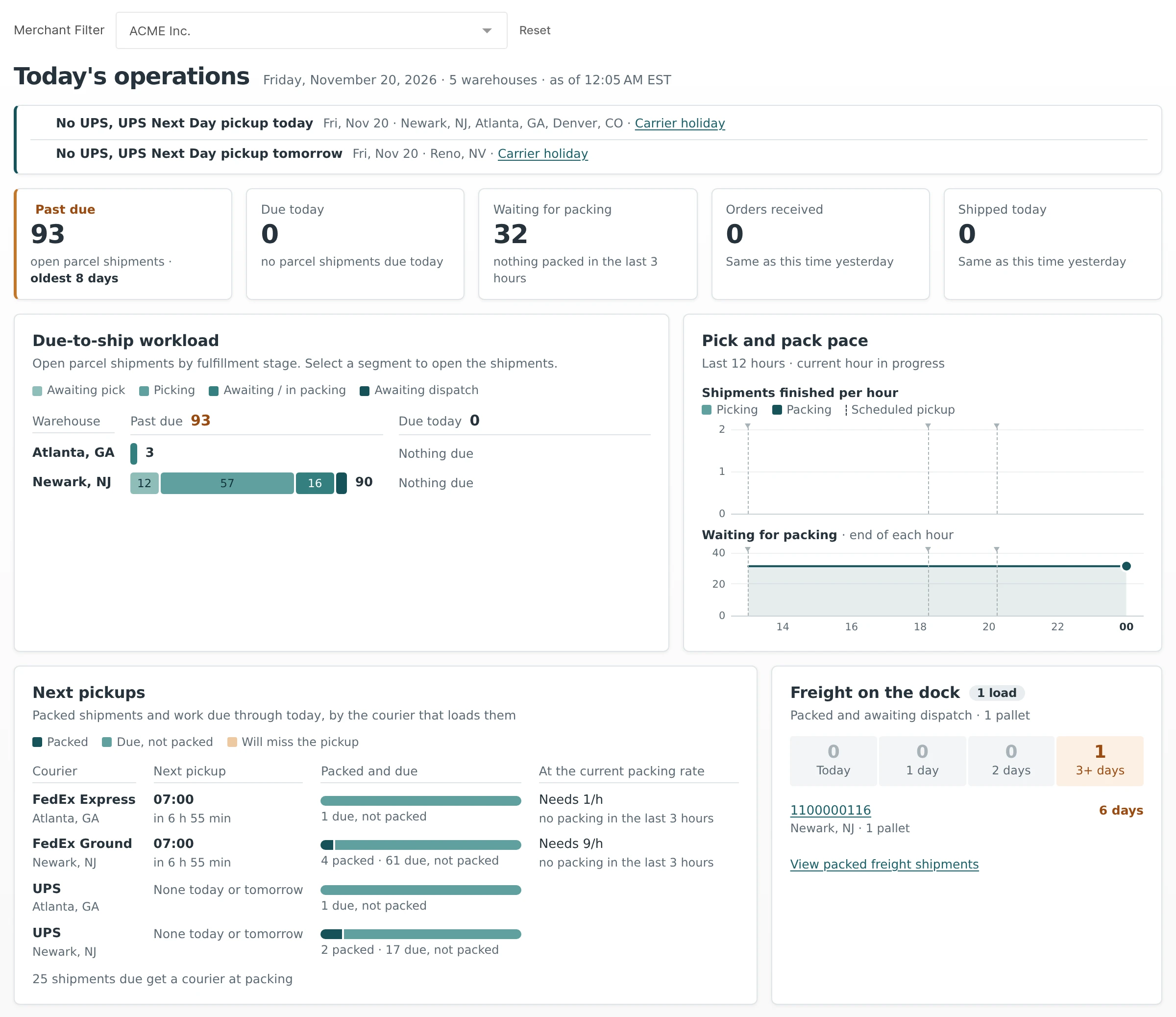
The Dashboard is rebuilt for warehouse staff and merchants. In the Admin UI it shows whether today's fulfillment is on track, and in the Client UI it shows what needs the merchant's attention. Both start with status tiles, then work in progress, then lists of exceptions, then the last 7 days. The figures follow the Merchant Filter and the Warehouse selected in the page header, and reloading the page updates them. See The Dashboard.
In the Admin UI, the tiles show past-due Shipments with the age of the oldest, Shipments due today with a progress bar, the packing queue with how long it takes to clear at the current rate, and Orders received and Shipments shipped compared with the same time yesterday. Due-to-ship workload splits each Warehouse's past-due and due-today Shipments by fulfillment stage; select a segment to open those Shipments. Pick and pack pace charts the last 12 hours and marks each pickup from Pickup Schedules. Next pickups compares each courier's packed and due work with its next pickup and says whether the current packing rate will make it. A notice appears when a temporary Pickup Schedule calls off a courier's usual pickup today or tomorrow. Pick faces at risk, Receiving priority, and Freight on the dock list the SKUs to replenish, the arrived ASNs holding stock for backorders, and the freight waiting longest for dispatch.
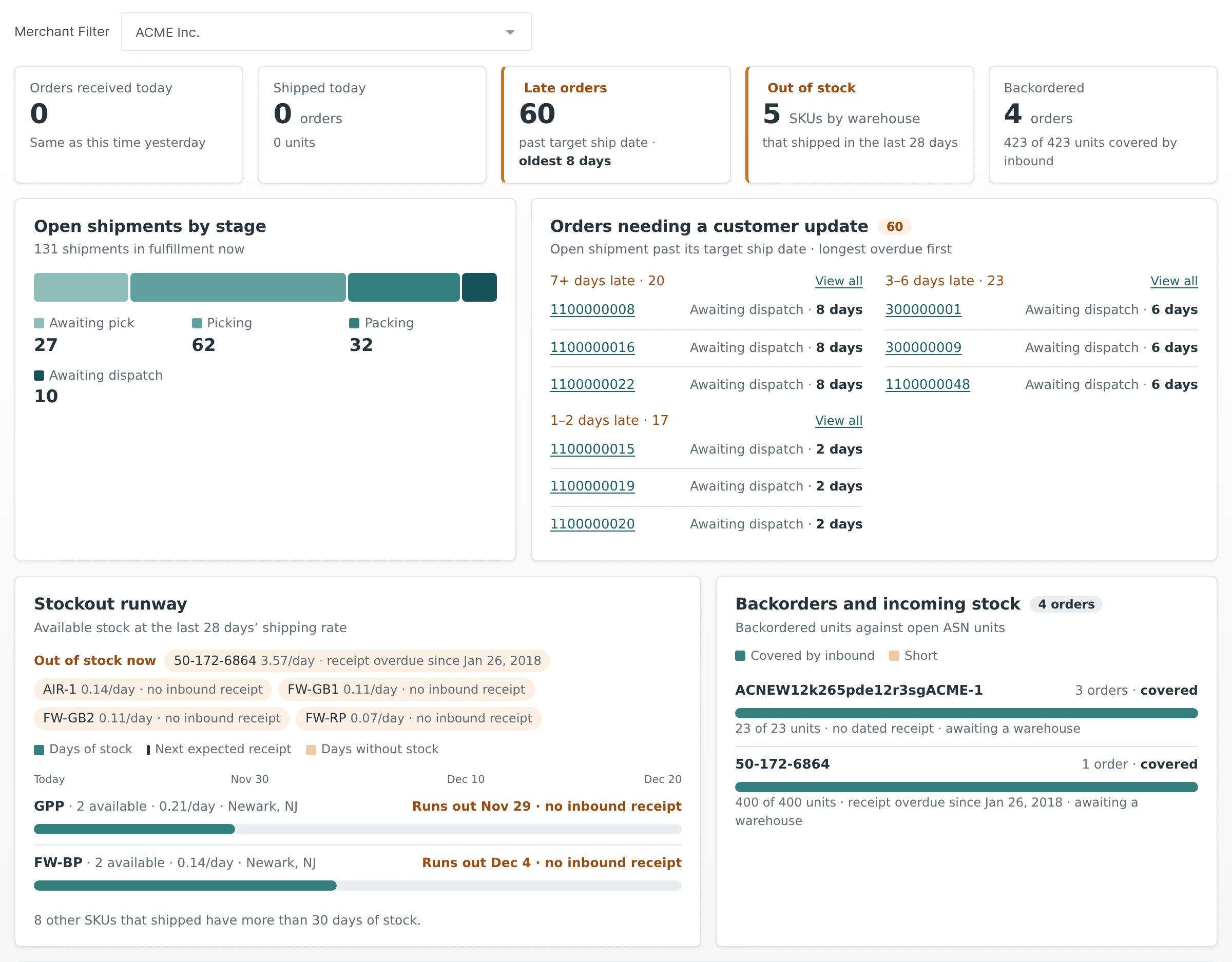
The merchant view counts Orders received and shipped today, late Orders, out-of-stock SKUs, and backordered Orders. Orders needing a customer update groups late Orders by how many days late they are, and View all opens the Orders grid filtered by its new Days Late column. Stockout runway shows when SKUs with 30 days of stock or less run out and when their next ASN is expected. Backorders and incoming stock, Delivery exceptions after shipment, and Slow movers by space occupied cover purchasing and customer follow-up. Admins see the same view for any Merchant at Dashboard -> Client Dashboard, unless that Merchant uses an embedded dashboard.
Custom Embedded Dashboards
You can now replace the built-in merchant dashboard with one you build and host, without contacting support. Admin UI users with the new System -> Configuration -> Client Dashboard role permission can enter your dashboard's address and a shared secret under System -> Configuration -> Clients -> Dashboard, and turn it on for every Merchant or one at a time. ShipStream shows your page in the Client Portal Dashboard and on Dashboard -> Client Dashboard, with a short-lived signed token (JWT) that names the Merchant, and in the Admin UI the Warehouses selected in the page header. Your dashboard verifies the token and loads its figures from the ShipStream API. With Use for Admin Dashboard, it can also replace the Admin UI Dashboard with a warehouse view of your own. See Custom Embedded Dashboard for the token, the frame messages, and example code.
Other Improvements
- Added a Days Late column to the Orders grid in the Admin UI and Client UI. It shows the days since the earliest Target Ship Date among an Order's Shipments that have not shipped, and it is empty for Orders that are on time, shipped, or canceled. Filter it by a range of days to list late Orders. See Service Levels and Target Ship Dates.
- Updated the Orders, Shipping, and Bestsellers reports in the Admin UI and Client UI to read current Orders and Shipments, so they no longer wait for a statistics refresh, and removed Refresh Statistics. Filters and CSV and Excel exports work as before. A split Order counts once in the Orders report, and with a Warehouse selected, the Orders and Bestsellers reports count each Order item in proportion to the stock assigned to that Warehouse, so totals for past periods can differ from before.
- Added the Location's Location Profiles to the Location View and Edit Location pages, and its Tags to the Location View page. The Locations grid column Location Profile is renamed Location Profiles. See Locations.
- Added Shopify order metafields to the Order Transform Script as
shopifyOrder.metafields, so a script can copy a gift message or other custom field onto the ShipStream Order. The Custom Greeting on the Order page now shows line breaks. See Shopify Order Transform Scripts.
- Improved Admin UI and Scanner pages on unreliable Wi-Fi. A page that fails to load completely now reloads itself once, and shows a notice if it still cannot load.
- Improved the loading time of the Stock Movements grid in the Admin UI and Client UI.
- Updated the HTTP client available to scripts to accept only the standard request options (headers, query, body, JSON, form fields, authentication, timeouts, and redirects). Any other option is ignored.
- Added two ways to correct bins while setting up a Picking Batch in the Scanner. On Batch Setup, scan a packing slip or License Plate again, then a new Cart Location, to move that bin. If another Shipment had the Cart Location, its row is cleared and Begin Picking waits until it gets another one. Reset Setup, on Batch Setup and on the batch's page, clears the Cart Location and License Plate of every Shipment in the batch so its bins can be set up again, for example on a different cart. In the Paperless workflow, a Shipment with picked items keeps its License Plate, which packing uses to identify the bin. See Changing a Bin During Setup and Resetting the Setup.
- Added a note to the Start New Picking Batch dialog saying how many matching Shipments are left out because their item combination is locked for Bulk Fulfill, with a Manage locks link to Bulk Fulfill Orders. It explains why the dialog's count can be lower than the Shipments grid's.
- Improved carrier requests, such as buying a UPS label, to retry once when the connection fails before the request is sent, so a brief network problem no longer fails the label.
- Improved the loading time of the Shipments grid when filtered by Warehouse and packed or shipped date.
Bug Fixes
- Fixed Picking Batches not always taking Shipments in Batching Priority and Target Ship Date order. A batch could take the oldest Order first, so a Shipment due sooner waited behind an older one with the same Batching Priority. Within each search step, Shipments are now tried by Batching Priority, then Target Ship Date (Shipments without one first). From the Neighbors step on, and from the Zones step with Sort Shipments by Picking Order, Shipments closer to the batch come first and ties keep this order.
- Fixed a Picking Batch being filled from across the whole Warehouse when none of the first Shipments it tried could be reserved. It now keeps trying Shipments until one starts the batch, and grows the batch around that Shipment.
- Fixed Strict by Location Priorities, set on a Shipment's Picking Class or as the Default Pick Source, not being strictly followed in batches created without choosing a Picking Class, such as from a Batching Preset with Group By Picking Class. Such a batch could reserve a Location further down the Product's Location order because it was near the batch. Each item is now reserved in the top-to-bottom sort order of its Locations, passing over a Location that holds only part of a unit that can't be scanned. With a Lot Type whose Allow Mixing Fulfillment is No, the item comes from the earliest Lot in burn order that can fill it and, among Lots that burn together, the one whose Location comes first. In a batch that mixes Picking Classes, each Shipment follows its own Picking Class's Pick Source. See How Batches Use Zones.
- Fixed batch creation leaving out a Shipment when a Location held part of a case that cannot be picked as scannable units, such as half a case whose singles have no barcode while Allow Barcodeless Shipments is disabled. The batch now reserves only what each Location can supply in whole scannable units and takes the rest from other Locations.
- Fixed the Product Override form presenting a move size inferred from the Product's quantity Bill of Materials that replenishment never used. The form now shows the move unit a Replenishment Task would actually use. A case or pack inferred from the quantity Bill of Materials never sizes a Task: it only gives Slotting Density a unit cube for a Product without its own dimensions, which is ranked using that case or pack's size instead of being excluded. Only a case the Product is split from counts (a Bill of Materials yielding several of the Product from one case); a kit or multipack built from the Product, a disabled Product, or a tie between two cases of the same size infers nothing. See Replenishment Move Size.
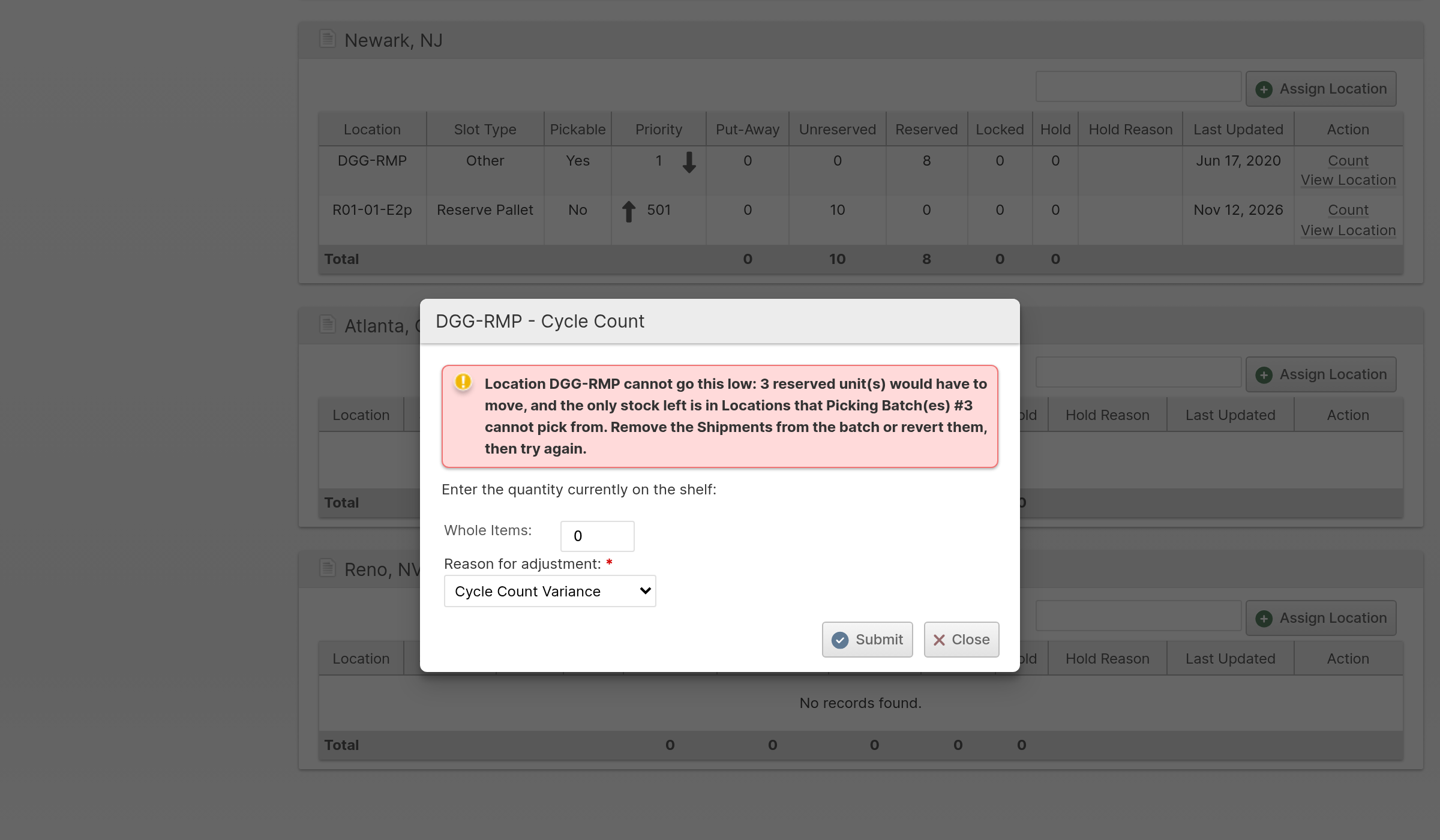
- Fixed several problems when replenishing from the Scanner. Cancel Task could be refused when confirmed a while after it was opened. When the source quantity drops before you confirm a pick, you must now tap OK on the message before scanning or continuing, so the smaller quantity is not missed. A Cycle Count refused because of reservations now shows the units reserved at the Location and the exact number of open reservations, with up to three Packing Slip or Work Order numbers.
- Fixed a Product's replenishment need staying out of date after an inventory change when earlier attempts to plan its Replenishment Tasks had failed.
- Fixed pick scans occasionally failing, and put-aways pausing for up to two minutes, while replenishment needs were being recalculated for the same Warehouse.
- Fixed Parcel and Freight Shipment Comments emails never being sent since Version 2025.7. Merchants with Shipment Comments emails enabled and a recipient set receive them again; their content, triggers and settings are unchanged.
- Fixed Client UI users being refused with "You do not have permission to change the Measurement image." when duplicating a Product that has a Measurement image.
- Fixed the Scanner Overrides list failing when a pending override belonged to a Shipment that no longer exists. Such overrides are now left out of the list.
- Fixed Bulk Fulfill Orders showing an unexpected error for a multi-item combo whose quantities are not whole multiples of each other. It now says "For multi-item combos the multiples should match."
- Fixed a report failing when a filter date had a five-digit year or was not a real date; the date is now refused with a message naming the field. Sorting the Client UI Locations grid by Empty no longer fails.
- Fixed an unexpected error when downloading or printing a Packing Instruction whose file is no longer available. A message now says so, bulk printing leaves the instruction out, and the packer is shown its note.
- Fixed GLS label errors through EasyPost hiding why GLS offered no rate. The error now starts with GLS's own reasons, such as a package over the size limit for the destination zip code.
- Fixed deleting a Location Profile used by a Replenishment Lane showing "An unexpected error occurred." The message now counts the Lanes, Rules, and Policies using it, and the Location Profiles grid has a Replenishment Lanes column.
- Fixed
shopifyOrder.duties_incotermalways being empty in Shopify Order Transform Scripts.
- Fixed Bulk Fulfill Orders showing a Product Velocity tier for a Shipment item that is filled from another Product's inventory, such as singles broken out of a case through a quantity-type Bill of Materials. Such an item now shows no tier and no longer matches the Product Velocity Tiers filter; the tier appears on the picked Product's row on Choose Locations.
- Fixed Work Order Progress showing 0% until every kit was finished. It now shows the finished share, such as 50% for 1 of 2 kits.
- Fixed inventory changes moving the pick locations of a Shipment in an open Picking Batch to Locations the batch may not pick from. The Pick Source no longer moves these reservations while the batch is open. A hold or an inventory adjustment moves them only to a Location the batch may pick from; when there is none, the reservation stays at the held Location until such a Location has unreserved stock, the hold is released or the Shipment leaves the batch, and the adjustment is refused with a message naming the batch. See Pick Locations of an Open Batch.
- Fixed the Scanner reporting a pick or a drop as successful after a lock conflict had interrupted it. The Scanner now says the pick or drop was interrupted and asks you to scan the item again or retry the drop. See Picking Batches.
- Fixed the Zones import failing on a Neighbors value with stray spaces or text, and reading a single Zone Number in an Excel cell, such as
5, as the wrong Zones.
- Fixed product imports rejecting newline-delimited JSON files (
.jsonlor.ndjson) and JSON files compressed with gzip or bzip2, and skipping records when a value contained a brace.
- Fixed a Fee Adjustment with the Percent of Surcharge or Percent of Initial Surcharge formula calculating as $0.00 when the same surcharge type was charged with Percent of Subtotal, the usual way fuel is charged. A fuel discount is now taken from the fuel surcharge.
- Fixed values that were too long or out of range being saved shortened or changed without warning. The Admin UI, Client UI, and Scanner now show a validation error instead, for example on Delivery fields and order addresses.
- Fixed users who ticked Keep me logged in being signed out before that period ended.
- Fixed an unexpected error when a user who was signed out of a device, because the same user signed in on another, took another action there. The user is now sent to the login page.
- Fixed the weight-from-scale button doing nothing when no scale is paired. The Admin UI now tells you to pair a scale, and the Client UI no longer shows the button.
- Fixed the Scanner failing when a scale was unpaired, and opening a second serial number counter when an item was scanned twice.
- Fixed the Print Shipments dialog handling each scan twice, and packing station errors not appearing on Admin UI pages.
- Fixed several grid problems: exports failing for grids filtered on a count column (such as Racks by Location Count), the Target Ship Date filter not applying to the Shipment Item Lots export, and a grid failing to load when its saved sort column was hidden.
- Fixed period reports failing for users whose language uses a date format such as Chinese.
- Fixed CSV imports with invalid characters creating records that could not be processed; those rows are now rejected with a row error. The Client UI also names an unsupported import file type instead of showing an unexpected error.
- Fixed a Client UI mass order cancel stopping when one of the Orders could not be canceled.
- Fixed unexpected errors when deleting a Zone that still has Racks and when saving a new Delivery without a Warehouse. Both now explain what is wrong.
- Fixed a manifest failing to open after its driver documents passed their retention period, and merged documents failing to print when one PDF was slightly damaged.
- Fixed UPS tracking updates failing when UPS omitted the service level or status code, and FedEx outages being reported as a syntax error instead of a FedEx gateway error.
- Fixed ampersands being dropped from integration subscription settings.
- Fixed a Paperless License Plate staying assigned to a Shipment that was packed, shipped, or deleted after it left its Picking Batch, or that went straight from picking to shipped, so the License Plate could not be used again. The update releases License Plates held this way, and Batch Setup no longer asks for a bin for a Shipment that is already packed or shipped.
- Fixed Scanner packing for Bulk Fulfill Orders showing an unexpected error, instead of moving on to the next Shipment, when the scanned Shipment could not be packed.
- Fixed the Shipment, Shipment Item, and Shipment Item Lot grids in the Admin UI and Client UI labeling the Shipment's creation time Batch Created On. The column is now Created At.
- Fixed some UPS label errors showing the raw UPS response instead of the UPS error code and message, and the UPS integration's connection test failing its Locator check for a working account.
Global API Updates
- Added optional
effective_move_multiple_qtyandeffective_move_multiple_sourcefields toGET /v1/inventory/warehouses/{id}/replenishment-report(API version2026-08, requested throughfields), reporting the move multiple a Replenishment Task planned now would use and where it comes from:override(the move size stored on the Product Override),unit_level(the Product declared at the Policy'smove_in_level),whole_unit(quantity1), orblocked(quantitynull) while planning waits for an operator, for example to review a Stale or Unusable override. A case or pack inferred from the quantity Bill of Materials is never reported. They are advisory:desired_level_qtyandtarget_gap_qtyare not rounded to this multiple.
- Added a
slot_overhangfield,{sides, front_back, unit}, to Slot Types in/v1/inventory/slot-types(requested throughfields). It always reads as an object, with both values 0 by default. It is optional on create and update: omitting it leaves the values unchanged,nullresets both to 0, and an object must include bothsidesandfront_back. When the Slot Type has Fixed Capacity enabled, asidesvalue over half its width, or afront_backvalue over half its depth, is rejected with a 422 error naming the field.
- Added a nullable
unit_level(each,inner_pack,case, orpallet) to the Inventory Product resource for read and create/update requests. A value that contradicts another declared level in the Product's quantity Bill of Materials family is rejected. - Added
move_in_level(whole_unit,inner_pack,case, orpallet; defaultcase) to Replenishment Policies. - Added the
unit_levelvalue to a Replenishment Task'suom_source_snapshot, for a Task that moves in the Product declared at its Policy's Move In level;uom_product_id_snapshotidentifies that Product.
- Added
GET /v1/inventory/warehouses/{warehouse_id}/location-occupanciesand a single-record route. Each record includesrack,rack_name, andzone_idas they were when the interval started.
- Added optional
keep_capacity_on_slot_type_changeto Location updates andkeep_capacity_on_dimension_changeto Slot Type updates. When omitted, the affected capacities are reset.
- Added a
replenishment_lanescount to the Location Profileused_byobject. A refused delete now returns422with aused_by.replenishment_lanesdetail. Clients that validate responses strictly against the previous schema must accept the new field.
- Fixed packaging products: creation always returned
400, lists omitted packaging field values, andassociated_productscould be neither read nor written.
- Added a
makes_pickableboolean to Location Profiles (/v1/inventory/warehouses/{id}/location-profiles). It is returned by default, can be requested throughfieldsand used as a filter, defaults tofalseon create, and is left unchanged by an update that omits it. A change is applied without a preview, and theis_pickableof the affected Locations follows in the background. For a profile that has beenready, and so has published Locations, an update that turnsmakes_pickableon is refused with422unless the publishedmatchis the one being saved, so changematchfirst and turn the option on once the profile isreadyagain. A create may set both, and so may an update of a profile that has not beenreadyyet. A profile withmakes_pickable: truecannot useis_pickablein a script (a create, update, or rebuild that would is refused with422) and cannot be deleted untilmakes_pickableisfalse(422). A Location'sis_pickablestays read-only and is now true when its Slot Type is Pickable or it belongs to such a profile.
- Added optional
LocationTag.patternson/v1/inventory/location-tags, requested throughfields. Each pattern hasdescription,regex, andwarehousesreferences; an empty Warehouse list applies everywhere. Omitted patterns are unchanged on update, and[]clears them. Pattern changes apply without an interactive preview and update existing Locations in the background. - Updated
POST /v1/inventory/warehouses/{id}/locations/tagsto refuse a tag assigned by label pattern in that Warehouse with422, naming the tag and Warehouse and including atagserror detail.replacekeeps existing automatic tags while replacing manual tags. - Updated Location create, update, and batch writes to ignore submitted automatic tags and derive them from the Location label. Automatic tags are returned alongside manual tags, so reading and writing back the same tag set remains supported.
- Added
GET /v1/inventory/warehouses/{id}/pickup-times, returning the effective Pickup Schedules of a Warehouse: for each local date fromfromtoto(today to six days later by default, at most 35 dates) and each Manifest Courier, the winning schedule and its pickup times as a localtimeand a UTC instantat, with the Warehousetimezoneand aschedule_versionthat changes whenever the schedules change. The token's user needs the System > Pickup Schedules permission (403otherwise), and a Warehouse outside their User Group returns404. - Fixed
manifest_courier_codeon Shipment packages always being empty. It now returns the Shipment's Manifest Courier, and the new optionalrouting_manifest_courier_codereturns the courier that loads the package at the dock, which differs when a routing rule sends it with another courier, such as FedEx Ground Economy loaded on the FedEx Ground truck. Both are requested throughfieldsand arenullwhen the Shipment has no Manifest Courier;routing_manifest_courier_codeis alsonullon labels created before this release.
Merchant API Updates
- Added
unit_level(each,inner_pack,case, orpallet) toproduct.createandproduct.update, where an empty value clears it, and toproduct.infoandproduct.search, which returnnullwhen it is not set. Import Products accepts a matchingunit_levelcolumn. A value that contradicts another declared level in the Product's quantity Bill of Materials family is refused with a message naming both Products.
- Updated the
order.cancelwarning messages to describe the Order cancellation permissions and the items affected. Integrations that match on the old warning text must be updated.
- Fixed
stock_movement.listfailing when filtered bywarehouse_id,order.searchandshipment.searchrejecting a list of brand codes instore_code, andorder.searchfailing on atarget_ship_datefilter, which is now reported as an invalid filter.
- Improved responses to malformed requests: a bad JSON-RPC request, a wrong argument name, or a wrong argument type now returns an Invalid Request, Invalid params, or invalid-data error instead of an internal error.
- Changed
delivery.createto requireexpected_deliveryon ASNs from February 1, 2027, 00:00 UTC. From then on, a missing or blank value, or one that is not a validYYYY-MM-DDdate, is refused with adata_invaliderror, anddelivery.updaterefuses clearing it on an ASN. A time after the date, as in an ISO 8601 timestamp, is accepted and dropped. Delivery imports follow the same rule. An empty expected delivery date cell on an ASN row is now left empty instead of being set to today's date, so from February 1, 2027 that row fails with the same error. An impossible ASN date such as 02/30/2027 is reported as a record error instead of rolling over into the next month. RMAs and Other Deliveries are unchanged, and SPS Commerce Shipment Advices without a date still use the date they are received.