Table of Contents
Version 2026.0
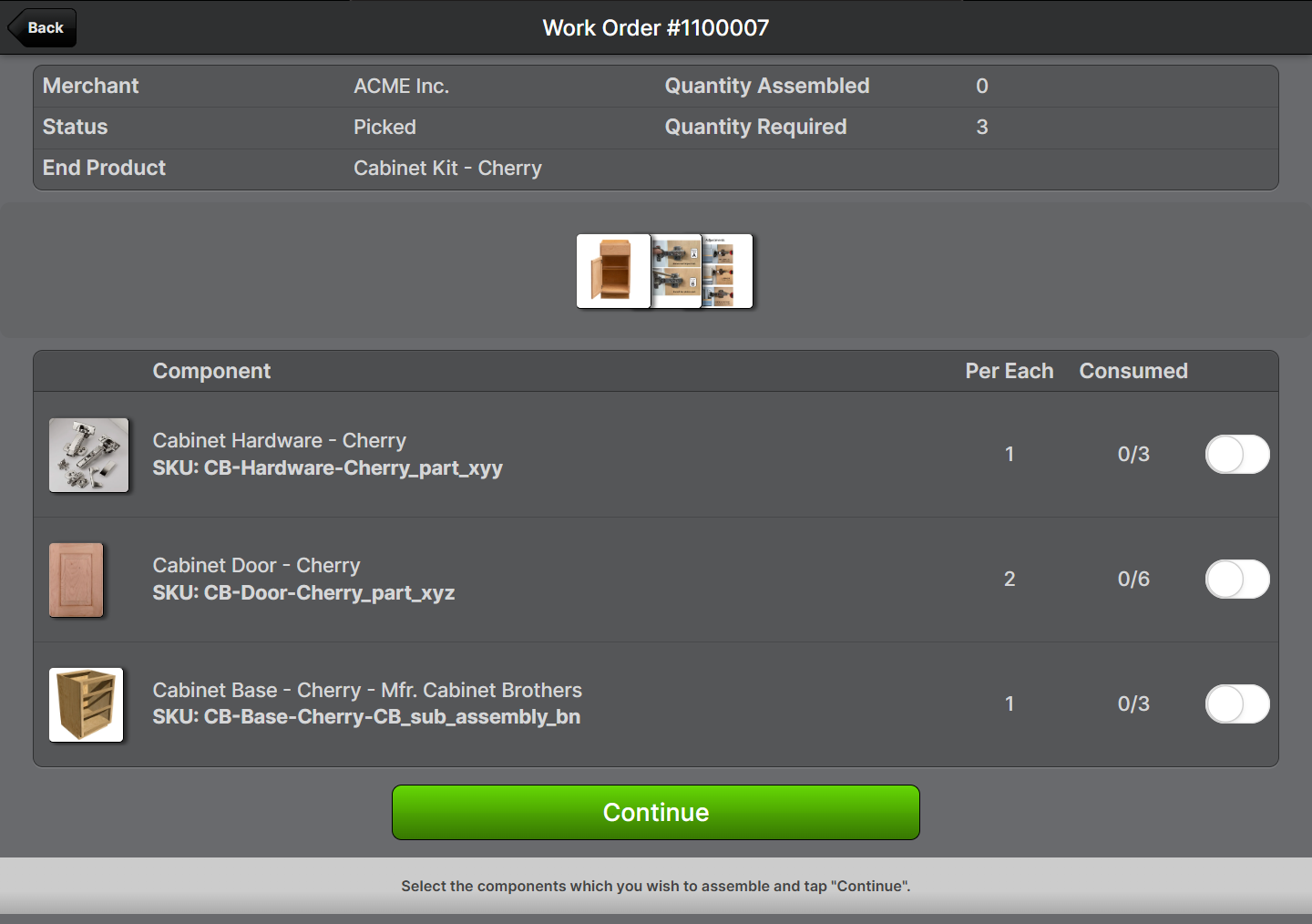
March 7, 2026. Kitting Assembly Photo Galleries. You can now add photos to Bill of Materials (BOM) to support kit assembly operations. Add photos at the BOM level, Kit to Stock, and individual compon…

Kitting Assembly Photo Galleries
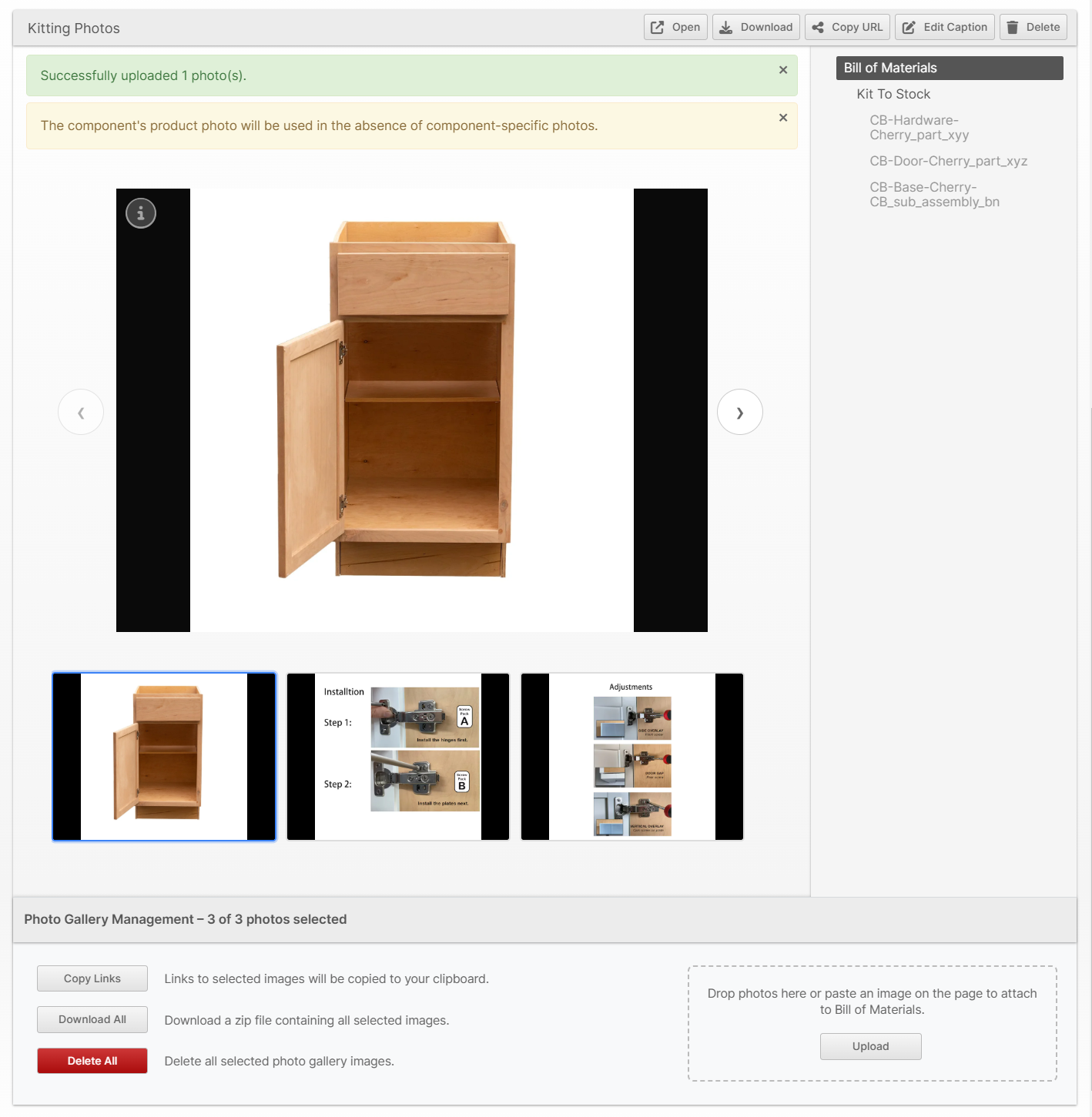
You can now add photos to Bill of Materials (BOM) to support kit assembly operations. Add photos at the BOM level, Kit to Stock, and individual component level to provide greater detail for both the finished product and the assembly process. Include captions to provide helpful information or reminders.
To upload photos, go to the Bill Of Materials page and scroll to the bottom where you will see the Kitting Photo section.
De-Kit Work Orders
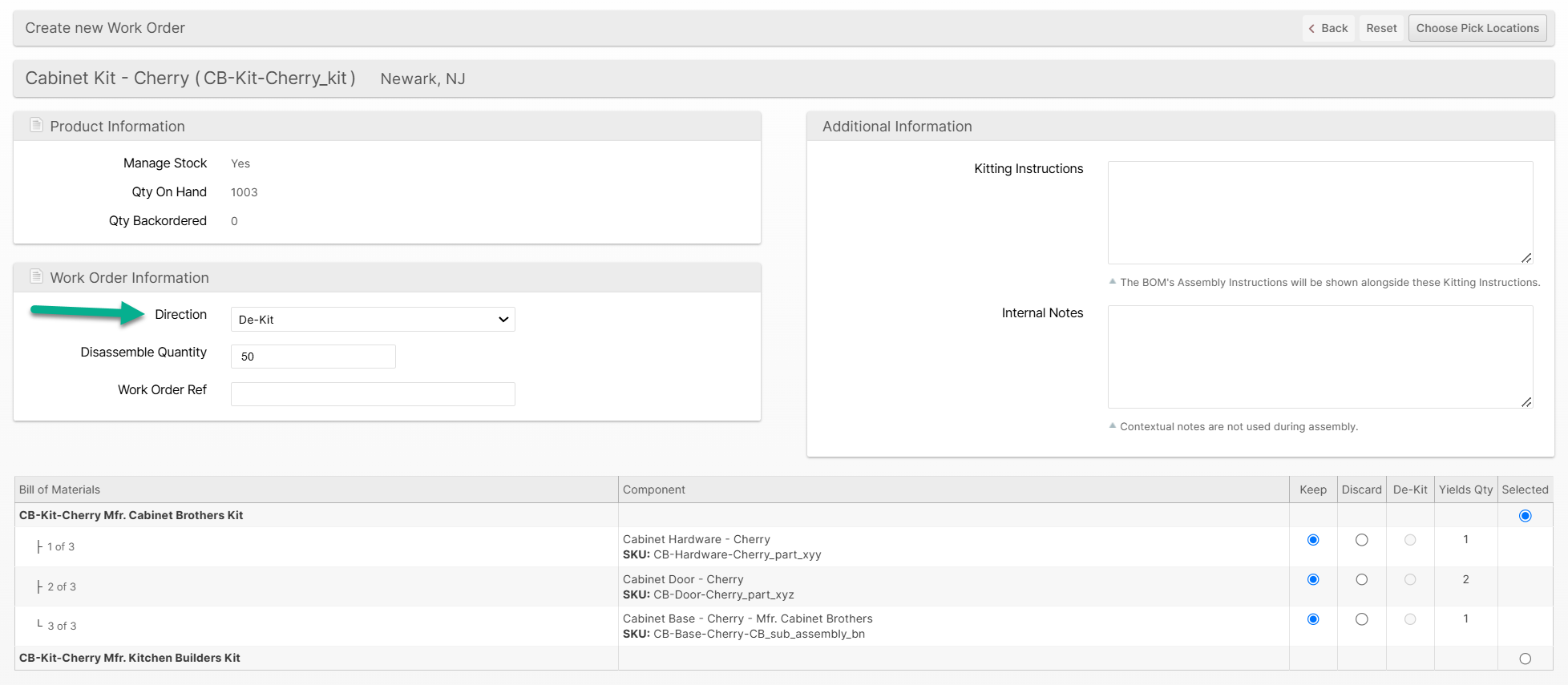
You can now create reverse Work Orders to disassemble your BOM items into the components. The disassembly is similar to the assembly with necessary changes to accommodate Lot/Expiration and Serial Number capture of the components as you are performing disassembly.
- Create a Work Order, choosing Direction: De-Kit:
- Pick it using the Scanner UI or Admin UI
- Process it (disassembly)
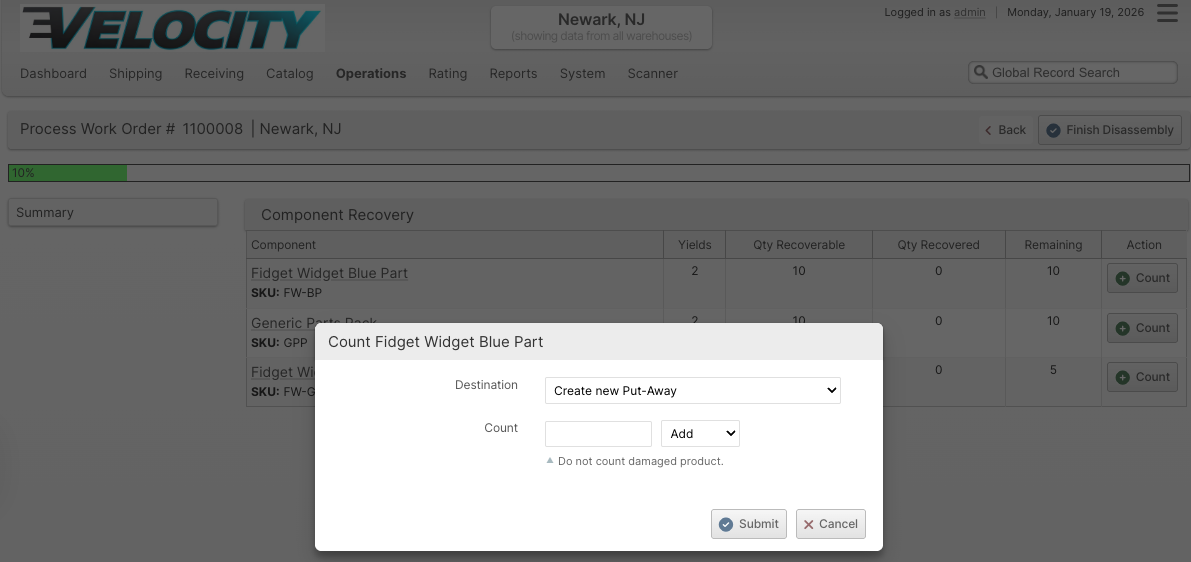
- Put it away!
Consume and Produce Lot and Serial Numbers
When processing a De-Kit Work Order for products with Lot/Expirations Tracking and/or Serial Number Tracking, you can now properly "consume" the source items and capture new lots and serial numbers for the produced items. This will
Resolve Burn Order Conflicts
We've replaced the binary "Allow Non-Pickable Locations" field in batch creation options with a new option called "Accessibility". While the old field either enforced a strict adherence to the Asset Policies or disregarded them entirely, this adds a third choice, which is a more useful compromise. The new "Resolve Burn Order Conflicts" option will still prefer to follow the Asset Policies but allow an exception for shipments which would normally be excluded due to burn order conflicts.
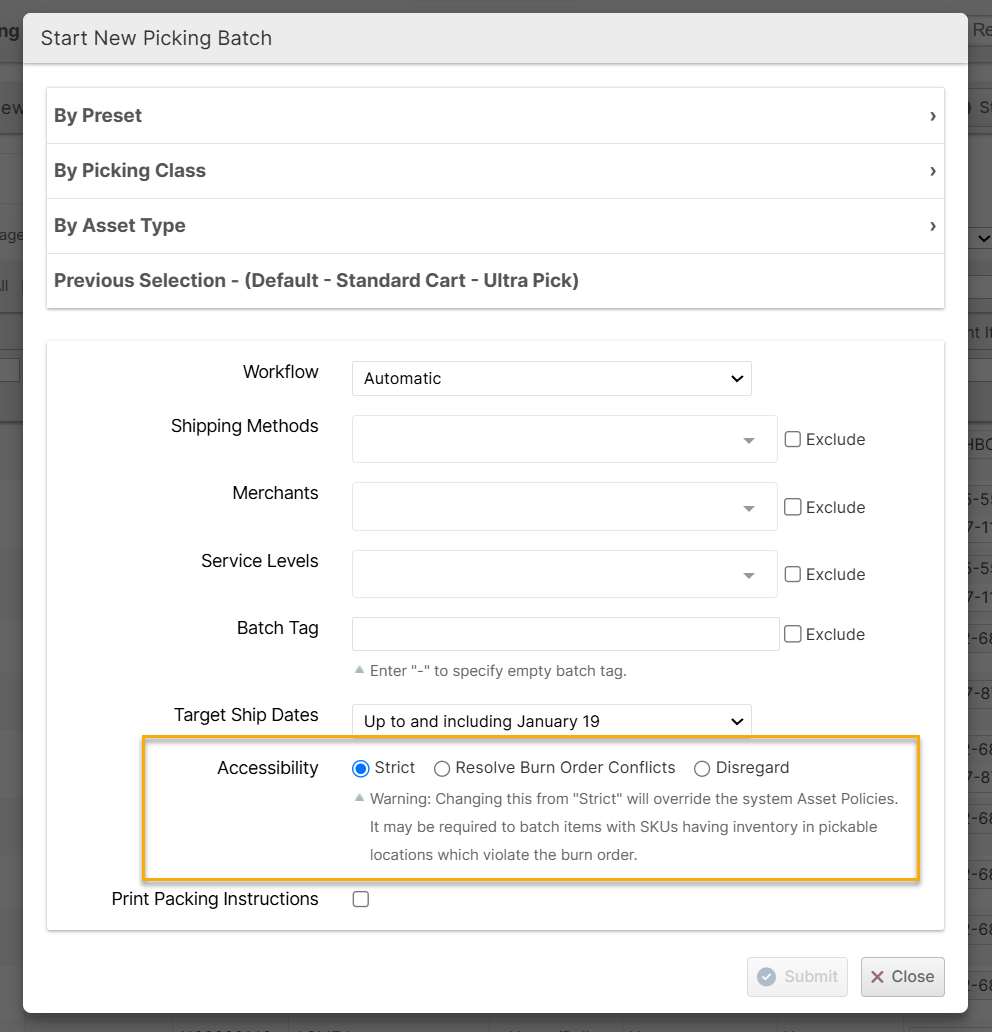
This option provides another alternative to relocating inventory to resolve the burn order conflicts. That is, you can use the "Strict" option (the default) until you can no longer create full batches, then use "Resolve Burn Order Conflicts" to sweep up the remaining shipments.
Shopify Client Credentials
We've added Client Credentials Grant support to the Shopify plugin to allow connecting stores using the "dev dashboard". The Access Token field now accepts these credentials in the format {client_id}:{client_secret} and uses Shopify's client credentials OAuth flow, which generates 24-hour tokens as-needed.
Cycle Count Grid
Planning your cycle count operations just got easier. A new Cycle Count grid is now available under Operations → Warehouse → Cycle Count, providing a focused view of your locations purpose-built for ABC-style cycle count frequency planning.
The grid is derived from the Locations grid and includes all the columns you'd expect — Label, Zone, Priority, Pickable, Location Type, Product Name, SKU, quantities (Put-Away, Unreserved, Reserved), and Last Cycle Count Date — plus a new Tier column that displays each location's product velocity tier (A, B, C, etc.) as a color-coded badge. This makes it easy to see at a glance which locations contain high-velocity products that should be counted more frequently.
By default, the grid shows only non-empty locations sorted by Last Cycle Count Date (oldest first), so you can immediately identify what's overdue for a count. You can filter by Merchant and switch between Pickable and Overall tier assignments to focus on the locations most relevant to your counting strategy. Clicking any row navigates directly to that location's detail page. CSV and Excel export are available.
Other Improvements
- Applied 2026 FedEx and UPS updates to Additional Handling / Large Package / Oversize package criteria taking effect in January 2026.
- Fixed merchant filtering in the batching tool so Batch Preset and Picking Class options remain available and correctly exclude shipments from merchants covered by both preset- and user-level exclusions, regardless of the order in which those filters are applied.
- Fixed an issue where a laser printer was required for the Paperless Workflow when selecting the Previous Selection.
- Fixed an issue preventing the same LPN from being used to pack two different batches in the same session.
- Fixed broken placeholder images for products with no image set.
- Fixed order history records could be attributed to the wrong entity when processed in the background.
- Fixed errors and performance issues when work orders involved more than 65,535 components. Work orders should now support a virtually unlimited number of components.
- Fixed the "Add Country" button for the HTS Code field on the Product Export tab was not working in the Client UI.
- Fixed improper validation which can allow a shipment status to transition from Void to Packing Exception.
- Add translations for improved USA shipping carrier error messages.
- Fixed a failure to recover from a specific intermittent FedEx API error when fetching tracking info.
- Fixed a failure to report error messages back to Shopify due to the message being too long.
- Fixed an intermittent error when merging a group of PDF files.
- Improved handling of invalid FedEx tracking responses (non-XML response).
- Fixed Minimum Billable Weight not applying to USPS shipments for eHub and Easypost.
- Changed EDI file retention period from 90 to 150 days.
- Fixed the Javascript editor on the plugin pages.
- Updated USPS Nonstandard Fee prices for 2026.
- Implemented USPS dimensional weight cap rule: when dimensional weight exceeds 70 pounds for qualifying USPS services (zones 1-9, domestic, volume > 1 cubic foot), the billable weight is capped at 70 pounds.
Global API
- Added support for "Other" delivery type (in addition to existing ASN and RMA types).
- Return
tracking_numbersinline for deliveries as array of strings, removedtracking_number(not backwards-compatible). - Renamed
DeliveryItempropertyqtytoquantity(not backwards-compatible). - Removed the ability to expand
merchant.brandsandmerchant.default_brandfor deliveries endpoints (not backwards-compatible). - New field parameters for delivery endpoints allow selecting specific nested relationship fields:
fields:items- DeliveryItem fieldsfields:items.exceptions- DeliveryException fieldsfields:items.lots- DeliveryItemLot fieldsfields:items.locations- DeliveryItemLocation fieldsfields:containers- DeliveryContainer fields
- Added
Requesterto response forOrderStatusHistoryandDeliveryStatusHistory - Fixed an error when requesting orders with status history.
Merchant API
- Fix ACL path mismatch preventing use of Stock Movement log without full API access.
How did we do?
Version 2026.1
Version 2025.7